
The My Plan section in Apploye will provide you with the details of your current subscription, including your plan information and billing details.
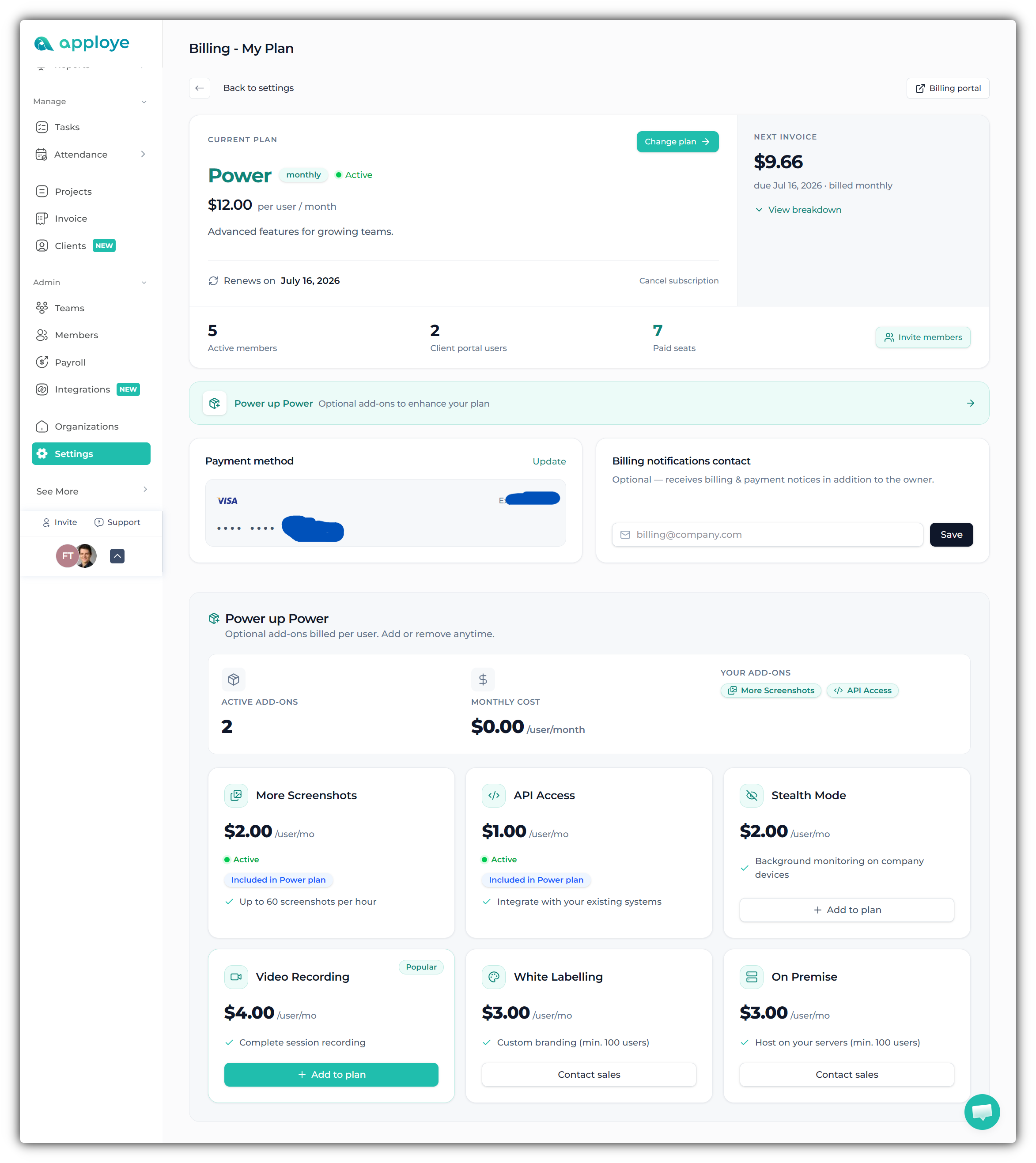
Only the organization's owner will have the option to access the "My Plan " section in Apploye. Let’s go through what you can view and what actions you can take from the My Plan section in Apploye.
What you can view:
• Your current subscription plan (e.g., ELITE / Power)
• Subscription status (Active/Inactive)
• Plan pricing and billing cycle (monthly/quarterly/yearly)
• Renewal date of your subscription
• Upcoming invoice amount and next billing date
• Invoice breakdown details
• Number of active members
• Number of client portal users
• Number of paid seats
• Current payment method details
• Billing notification email/contact
• Active add-ons on your subscription
• Add-on pricing and yearly cost summary
Actions you can take:
• Upgrade or downgrade your current subscription plan
• Open the Billing Portal
• View invoice breakdown details
• Invite additional members to your organization
• Cancel your subscription
• Update your payment method
• Add or update billing notification contact email
• Add or remove available add-ons from your plan
• Manage optional features such as:
– Video Recording
– More Screenshots
– API Access
– Stealth Mode
This section gives you complete control over managing your subscription, billing, seats, and add-ons in one place.