Time Management Techniques for Work: 10 Methods to Plan, Track, and Improve Your Day
Quick List: Best Time Management Techniques
I tested and reviewed the most popular time management methods to see which ones are actually useful for work, not just productivity theory.
Some methods are great for deep focus. Some help when your task list feels out of control. Others work better for students, managers, remote workers, or people who lose time switching between meetings, emails, and unfinished tasks.
In this guide, you’ll find the best time management techniques for 2026, how each one works, when to use it, and where it may fail. You’ll also get a quick comparison so you can choose the right method based on your biggest problem, whether that is procrastination, poor planning, missed deadlines, or too many distractions.
What are Time Management Techniques?
Time management techniques are simple methods that help you plan, prioritize, and control how you spend your time.
They are not just to-do lists. A good time management technique helps you decide what to work on first, how long to spend on it, when to take breaks, and what tasks you should delay, delegate, or remove.
For example, the Pomodoro Technique helps you work in short focus sessions. Time blocking helps you reserve specific hours for specific tasks. The Eisenhower Matrix helps you separate urgent work from important work. Each method solves a different time management problem.
The goal is not to stay busy all day. The goal is to spend your best hours on the work that matters most.
For most people, poor time management does not happen because they are lazy. It happens because their day has no clear structure. Tasks pile up, meetings interrupt focus, small requests take over, and important work gets pushed to the end of the day.
Time management techniques fix that by giving your day a clear system. They help you:
- Plan your work before the day controls you
- Focus on one task instead of jumping between many
- Prioritize important tasks before urgent distractions
- Reduce procrastination and last-minute stress
- Track where your time actually goes
- Build a more realistic schedule
The best technique depends on your main problem. If you struggle with focus, Pomodoro may help. If your calendar feels messy, time blocking may work better. If you always feel busy but not productive, a time audit can show where your hours are going.
How We Chose These Time Management Techniques
We did not choose these techniques because they sound popular. We chose them based on how useful they are in real work situations.
Each method had to meet three simple rules:
- It solves a clear time management problem
The technique must help with a real issue, such as procrastination, poor focus, missed deadlines, task overload, context switching, or weak prioritization. - It is easy to apply without a complex setup
A good time management technique should not take hours to understand. You should be able to try it with a calendar, task list, notebook, time tracker, or project management tool. - It works for different types of people and teams
We looked for methods that can help students, remote workers, managers, freelancers, and busy professionals. Some techniques are better for deep work, while others are better for planning, delegation, or daily task control.
We also compared how each technique performs in practical situations. For example, we checked whether it helps you plan your day, protect focus time, reduce distractions, track where your hours go, or decide which tasks deserve attention first.
The goal was simple: include techniques that are practical, repeatable, and useful beyond theory. So instead of listing every productivity method, we focused on the ones that can actually help you manage time better in your daily work.
10 Best Time Management Techniques
There is no single best time management technique for everyone. The right method depends on your work style, workload, and biggest time problem.
Some techniques help you plan your day. Some help you focus. Others help you prioritize, reduce distractions, or stop wasting time on low-value tasks.
Here are 10 practical time management techniques that can help you plan better, work with more focus, and get more done without feeling overloaded.
1. Time Blocking

Time blocking is one of the most practical time management techniques for people with busy schedules. Instead of keeping a long to-do list, you divide your day into fixed blocks of time. Each block is assigned to one task, project, meeting, or break.
For example, you may block 9:00 AM to 10:30 AM for deep work, 10:30 AM to 11:00 AM for emails, and 2:00 PM to 3:00 PM for team meetings.
How it works
Start by listing your most important tasks for the day. Then open your calendar and assign each task to a specific time slot. Try to keep your most difficult work during the time of day when your energy is highest.
Also, leave some buffer time between tasks. This helps you handle delays, quick calls, or unexpected work without ruining the whole schedule.
Example
If you are a content marketer, your day may look like this:
- 9:00 AM to 11:00 AM: Write blog draft
- 11:00 AM to 11:30 AM: Check email
- 12:00 PM to 1:00 PM: SEO research
- 2:00 PM to 3:00 PM: Content review
- 4:00 PM to 4:30 PM: Plan tomorrow’s tasks
Best for
Time blocking works best for professionals, managers, freelancers, students, and remote workers who want more control over their day.
Not best for
It may not work well if your workday changes too often or if your role requires constant urgent responses.
Practical tip
Do not block every minute of your day. Keep at least 20% of your schedule open for unexpected work.
Our testing note
Time blocking worked best on days with planned deep work, but it became harder to follow when meetings or urgent tasks took over the schedule.
2. Pomodoro Technique
The Pomodoro Technique is a simple focus method. You work for a short period, usually 25 minutes, and then take a short break.
One full cycle usually looks like this:
- Work for 25 minutes
- Take a 5-minute break
- Repeat 4 times
- Take a longer break for 15 to 30 minutes
This method works because it makes large tasks feel smaller. Instead of forcing yourself to work for three hours, you only need to focus for the next 25 minutes.
How it works
Pick one task. Set a timer for 25 minutes. Work only on that task until the timer ends. Do not check your phone, email, or messages during the session.
When the timer rings, take a short break. After four sessions, take a longer break to reset your focus.
Example
If you need to write a report, you can divide it like this:
- Pomodoro 1: Create the outline
- Pomodoro 2: Write the introduction
- Pomodoro 3: Write the main section
- Pomodoro 4: Edit and polish
Best for
The Pomodoro Technique is great for students, writers, developers, designers, and anyone who struggles to start a task.
Not best for
It may not be ideal for work that needs long, uninterrupted focus. Some people may find the 25-minute timer too short.
Practical tip
Use Pomodoro when you are avoiding a task. Tell yourself, “I only need to work on this for 25 minutes.” That makes it easier to begin.
Our testing note
Pomodoro was most useful for starting tasks we were avoiding. But for deep creative work, the 25-minute timer sometimes interrupted the flow.
3. Eisenhower Matrix
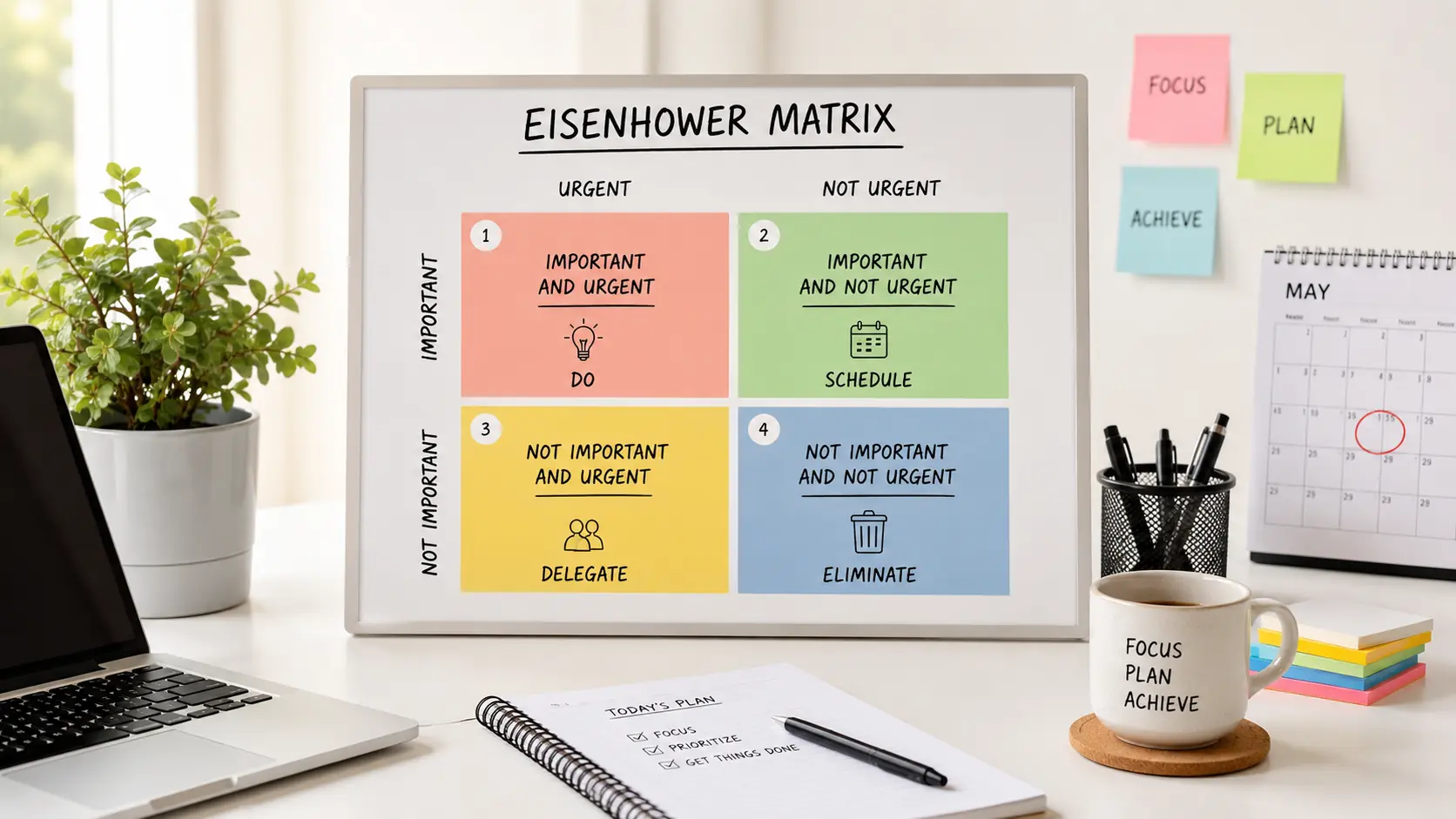
The Eisenhower Matrix helps you decide what to do first, what to schedule, what to delegate, and what to remove.
It divides your tasks into four groups:
- Urgent and important: Do now
- Important but not urgent: Schedule
- Urgent but not important: Delegate
- Not urgent and not important: Delete
This technique is useful because many people confuse urgency with importance. A task can feel urgent but still have little real value.
How it works
Write down all your tasks. Then place each task into one of the four boxes.
Focus first on urgent and important tasks. Then protect time for important but not urgent tasks. These are usually the tasks that create long-term progress, such as planning, learning, strategy, or process improvement.
Example
For a manager, the matrix may look like this:
- Do now: Fix a client issue before the deadline
- Schedule: Prepare next month’s team plan
- Delegate: Ask a team member to collect weekly updates
- Delete: Attend a meeting with no clear purpose
Best for
This method is best for managers, business owners, team leads, and anyone with too many competing priorities.
Not best for
It may not work well if you are unclear about your goals. You need to know what “important” means for your role.
Practical tip
Use this method at the start of the week. It helps you avoid spending the whole week reacting to urgent tasks.
Our testing note
The Eisenhower Matrix helped most during weekly planning because it made priorities clearer before the week became busy and reactive.
4. Getting Things Done, or GTD
Getting Things Done, often called GTD, is a task management system created to help you clear your mind and organize your work.
The main idea is simple: your brain is for thinking, not for storing tasks. Instead of trying to remember everything, you capture every task, idea, and reminder in a trusted system.
How it works
GTD has five basic steps:
- Capture: Write down every task, idea, or reminder
- Clarify: Decide what each item means
- Organize: Put tasks into the right list or project
- Review: Check your lists regularly
- Engage: Choose what to work on next
Example
Let’s say you suddenly remember that you need to send a proposal, renew a subscription, review a report, and book a meeting.
Instead of keeping these in your head, you add them to your task system. Then you sort them into categories like “Today,” “This Week,” “Waiting For,” or “Someday.”
Best for
GTD works well for people who handle many projects, emails, ideas, and small tasks every day.
Not best for
It can feel too complex if you only have a few tasks to manage. It also requires regular reviews, or the system becomes messy.
Practical tip
Do a weekly review every Friday or Sunday. Clean up your task list, remove outdated items, and choose what matters for the next week.
Our testing note
GTD worked well for clearing mental clutter, but it needed a regular weekly review. Without that review, the task lists became messy quickly.
5. Time Auditing
Time auditing means tracking how you actually spend your time. It helps you find where your hours are going.
Many people think they know how they spend their day, but the real data often tells a different story. You may find that meetings, admin work, social media, or task switching take more time than expected.
How it works
Track your activities for a few days. Write down what you do and how long each task takes. You can use a spreadsheet, notebook, time tracking app, or calendar.
After that, review the data and ask:
- Which tasks took more time than expected?
- Which tasks created real progress?
- Which tasks could be reduced, automated, or delegated?
- Where did I lose focus?
Example
You may discover that you spend 90 minutes a day checking emails in small chunks. After seeing that data, you can batch email into two fixed time slots instead.
Best for
Time auditing is best for professionals, remote workers, freelancers, agencies, and managers who want to improve productivity with real data.
Not best for
It may feel boring at first. But even a 3-day time audit can show useful patterns.
Practical tip
Do not judge yourself during the audit. Just track honestly. The goal is to understand your time, not feel guilty about it.
Our testing note
Time auditing gave the clearest insights because it showed where the day was actually going instead of relying on memory or guesswork.
6. Task Batching
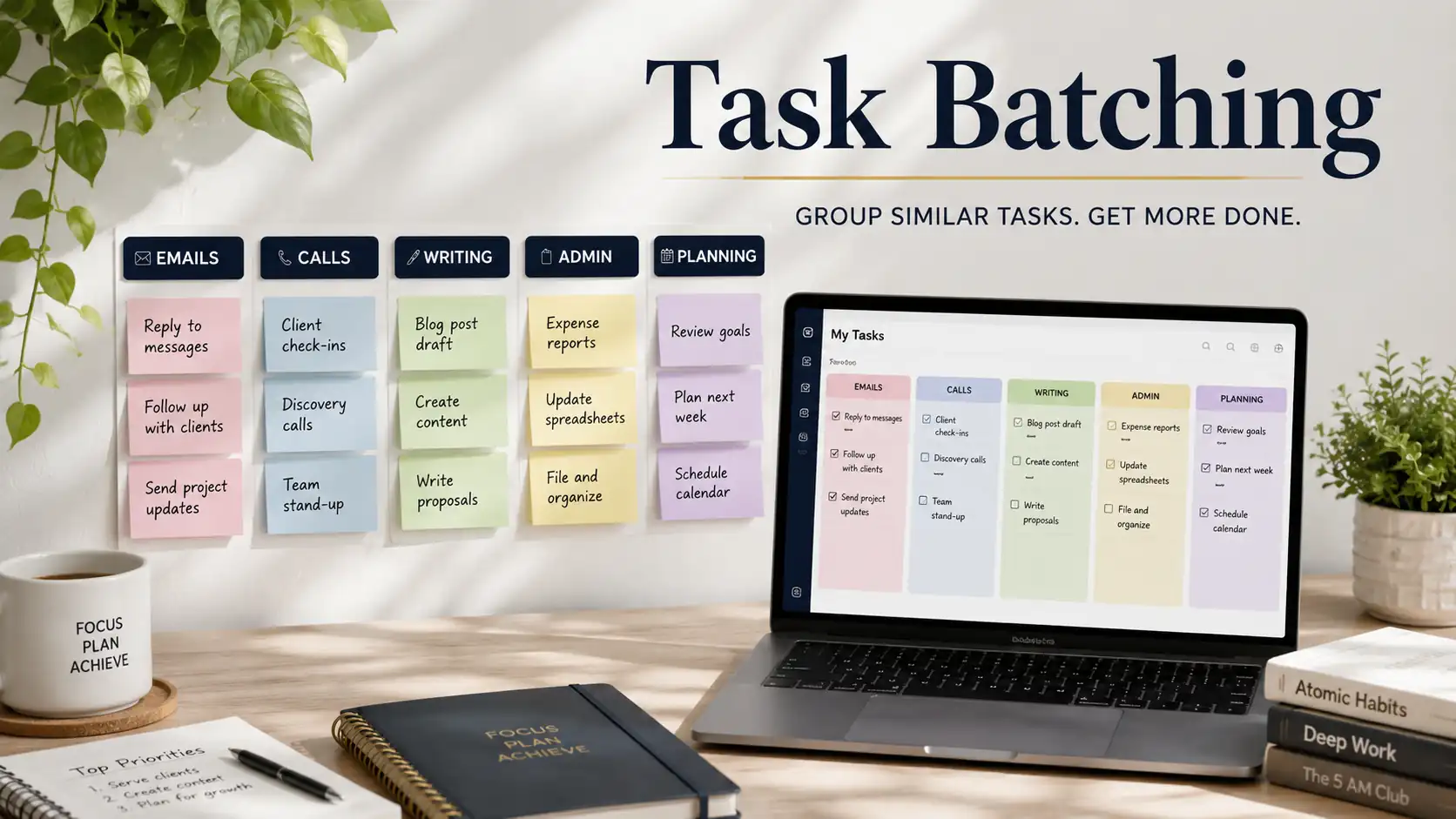
Task batching means grouping similar tasks together and doing them in one focused session.
Instead of answering emails all day, you check your email twice. And instead of switching between writing, calls, reports, and messages, you group similar work into separate blocks.
This reduces context switching. Every time you jump from one type of task to another, your brain needs time to adjust. Task batching helps you stay in one mode longer.
How it works
List your recurring tasks. Then group similar tasks into batches.
For example:
- Email batch
- Meeting batch
- Writing batch
- Admin batch
- Research batch
- Review batch
Then schedule each batch into your calendar.
Example
A marketer may batch tasks like this:
- Monday morning: Keyword research
- Tuesday morning: Content writing
- Wednesday afternoon: Image and brief review
- Friday: Reporting and planning
Best for
Task batching works well for people who handle emails, content, reports, admin work, customer support, or repeated operational tasks.
Not best for
It may not work for urgent support roles where tasks must be handled immediately.
Practical tip
Start with email batching. It is one of the easiest ways to reduce distraction and save time.
Our testing note
Task batching reduced small distractions the fastest, especially for email, reporting, research, and review work that usually gets scattered across the day.
7. SMART Goals
SMART goals help you set clear and realistic goals. A SMART goal is:
- Specific
- Measurable
- Achievable
- Relevant
- Time-bound
This technique helps because vague goals are hard to act on. A goal like “be more productive” does not tell you what to do. A SMART goal gives you a clear target.
How it works
Take a broad goal and make it specific.
Instead of saying:
“I want to manage my time better.”
Say:
“I will plan my top 3 tasks every morning before 9:30 AM for the next 30 days.”
Now the goal is clear, measurable, and time-bound.
Example
Weak goal:
“I want to finish my project faster.”
SMART goal:
“I will complete the first draft of the project report by Thursday at 4 PM by writing for 90 minutes each morning.”
Best for
SMART goals are useful for students, employees, managers, project teams, and anyone who needs clear targets.
Not best for
SMART goals are not enough by themselves. You still need a system to plan and track the work.
Practical tip
Use SMART goals with time blocking. First, set the goal. Then block time to work on it.
Our testing note
SMART goals worked best when paired with time blocking. Setting a clear goal helped, but blocking time made the goal easier to complete.
8. Kanban Method
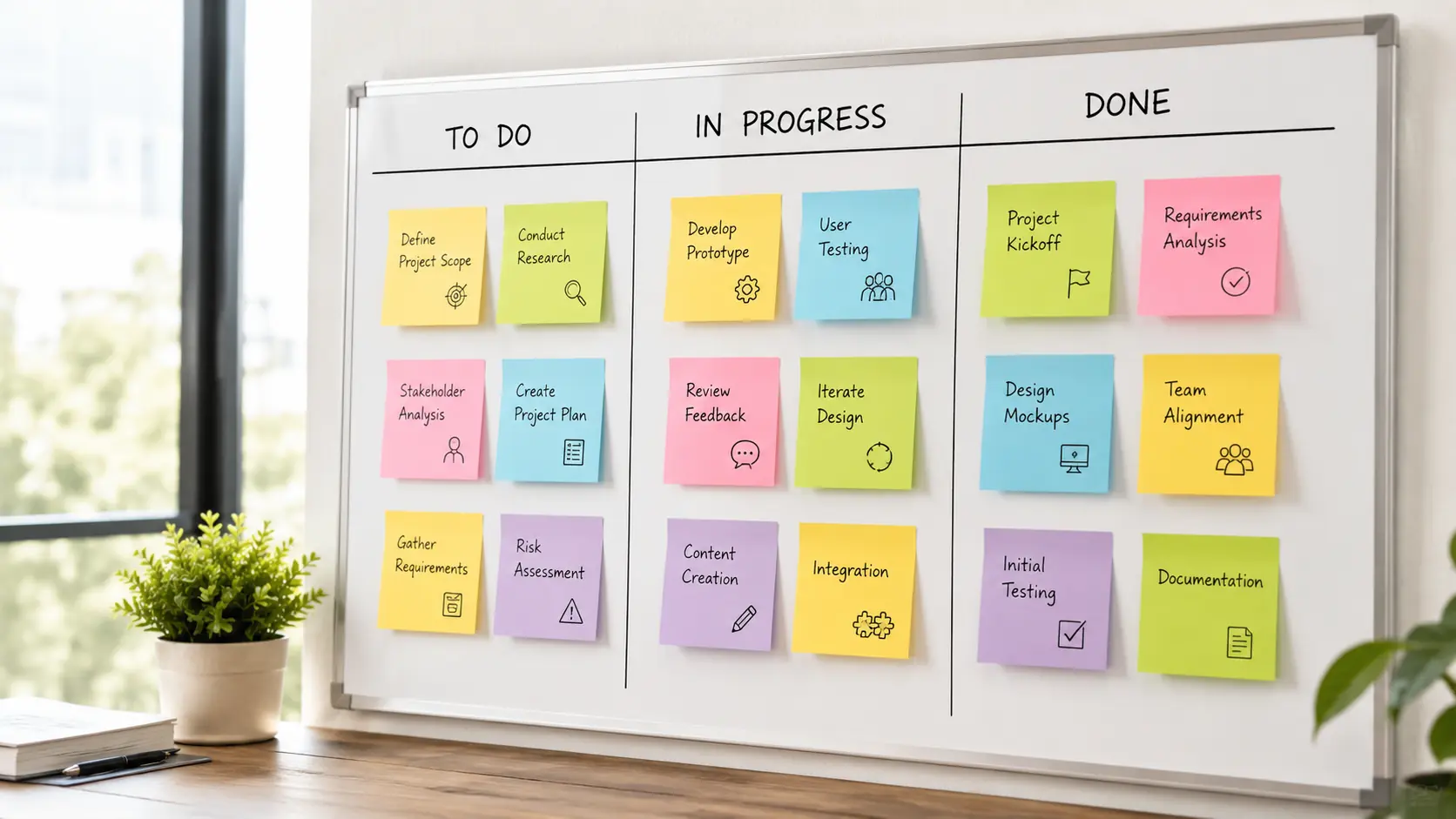
Kanban is a visual time management and workflow method. It helps you see what needs to be done, what is in progress, and what is already finished.
A simple Kanban board has three columns:
- To Do
- In Progress
- Done
You move each task across the board as work progresses.
How it works
Create a board using a tool like Trello, Asana, ClickUp, Notion, or a whiteboard. Add your tasks as cards.
Move each card from one stage to the next. This gives you a clear view of your workload and helps you avoid taking on too many tasks at once.
Example
A simple content workflow may look like this:
- To Do: Research topic, write outline, create image brief
- In Progress: Draft blog post
- Review: SEO check, editor review
- Done: Published article
Best for
Kanban works well for teams, project managers, content teams, developers, and visual thinkers.
Not best for
It may not be enough if your work needs strict deadlines or detailed scheduling.
Practical tip
Limit the number of tasks in the “In Progress” column. This prevents you from starting too many things and finishing too few.
Our testing note
Kanban made progress easier to see, especially for team-based work. But it worked better when the “In Progress” column was kept short.
9. The 80/20 Rule
The 80/20 Rule, also called the Pareto Principle, says that a small number of actions often create most of the results.
In time management, this means not all tasks have equal value. Some tasks move your work forward. Others only make you feel busy.
How it works
Look at your tasks and ask:
- Which 20% of tasks create the biggest results?
- Which tasks directly support my goals?
- Which tasks can I stop, reduce, automate, or delegate?
- Which tasks only look productive?
Then spend more time on high-impact work.
Example
A salesperson may find that follow-up calls with qualified leads create most of their revenue, while formatting reports takes a lot of time but adds little value.
A content marketer may find that updating high-traffic pages creates better results than publishing too many new posts.
Best for
The 80/20 Rule is best for business owners, managers, marketers, freelancers, and anyone who wants to focus on high-value work.
Not best for
It may not work well for tasks that must be done even if they do not create visible results, such as compliance, payroll, or admin work.
Practical tip
At the end of each week, review your completed tasks. Mark the ones that created real progress. Do more of those next week.
Our testing note
The 80/20 Rule was most useful during weekly reviews because it helped separate high-impact work from tasks that only felt productive.
10. Delegation
Delegation is the process of giving the right tasks to the right people. It is one of the most important time management techniques for managers and growing teams.
Many people waste time doing tasks that someone else could do faster or better. Delegation helps you focus on work that needs your skill, decision-making, or leadership.
How it works
Start by listing your tasks. Then divide them into three groups:
- Tasks only you should do
- Tasks someone else can do with guidance
- Tasks that should be fully handed off
When delegating, explain the expected result, deadline, priority, and any important details. Do not just assign the task. Make sure the person understands what success looks like.
Example
A team lead should not spend hours formatting a weekly report if a team member can prepare the first draft. The lead can review the final version and use the saved time for planning, coaching, or solving bigger problems.
Best for
Delegation is best for managers, business owners, team leads, agency owners, and anyone responsible for other people’s work.
Not best for
It does not work well when tasks are handed off without clear instructions. Poor delegation creates confusion and rework.
Practical tip
Do not delegate only the task. Delegate the outcome. Make it clear what needs to be done, when it is due, and what a good result should look like.
Our testing note
Delegation saved the most time when the expected result was clearly explained. When instructions were vague, it created more follow-up work.
Which Technique Should You Choose?
The best time management technique depends on the problem you are trying to fix. Some methods help you focus. Some help you prioritize. Others help you understand where your time is actually going.
Use this quick guide to choose the right technique for your situation.
Best Technique for Focus
If your biggest issue is distraction, start with the Pomodoro Technique or Time Blocking.
Pomodoro works well when you have trouble starting a task. A 25-minute work session feels small, so it is easier to begin. Time blocking works better when you need longer focus time for writing, coding, planning, or deep project work.
Best Technique for Prioritization
If everything feels urgent, use the Eisenhower Matrix.
This method helps you decide what to do now, schedule for later, delegate, or remove. It is especially useful for managers, team leads, founders, and anyone who handles a large number of daily decisions.
Best Technique for Remote Workers
Remote workers should start with Time Blocking, Task Batching, and Time Auditing.
Time blocking creates structure when there is no physical office routine. Task batching reduces constant switching between Slack, email, meetings, and project work. Time auditing helps you see where your workday is actually going.
Best Technique for Students
Students can start with the Pomodoro Technique, SMART Goals, and Daily Planning.
Pomodoro makes study sessions easier to manage. SMART goals help turn broad targets like “study more” into clear goals like “complete two chapters by 6 PM.” Daily planning helps students balance classes, assignments, exams, and personal time.
Best Technique for Managers
Managers should use the Eisenhower Matrix, Delegation, and Kanban Method.
The Eisenhower Matrix helps managers protect time for important work instead of only reacting to urgent issues. Delegation prevents bottlenecks. Kanban gives a clear view of team progress without needing constant check-ins.
Best Technique for Teams
For teams, the best options are Kanban, Time Auditing, and Task Batching.
Kanban helps everyone see task status. Time auditing shows where time is being spent across projects. Task batching helps teams reduce scattered work and create better routines for meetings, communication, and focused execution.
Simple Rule to Pick the Right Method
Choose based on your main problem:
- Too distracted? Use Pomodoro.
- Too busy? Use the Eisenhower Matrix.
- Too unstructured? Use Time Blocking.
- Too much task switching? Use Task Batching.
- Too many unfinished tasks? Use GTD.
- Not sure where time goes? Use Time Auditing.
You do not need to use every technique at once. Start with one method for a week. Track how it affects your focus, deadlines, and workload. Then keep the method that makes your day easier to plan and your work easier to finish.
How to Use Time Tracking to Choose the Right Time Management Technique
Most techniques sound useful in theory. But without time data, you are only guessing whether they work. Apploye helps you turn each technique into something measurable. You can track work hours, review activity levels, check app and URL usage, analyze timesheets, and see where productive time is going.
For example, if your team uses time blocking, Apploye can show whether employees are actually getting enough focused work time or if meetings and distractions are breaking the day apart.
If your team uses task batching, Apploye helps you see whether grouping similar tasks reduces context switching. You can compare time spent on client work, admin tasks, communication, research, and reporting.
If your team uses time audits, Apploye gives managers a clear view of work patterns without micromanaging. Instead of asking employees for constant updates, managers can review time reports, activity trends, idle time, and app usage to find workflow problems.
This is especially useful for remote employee monitoring. A team can combine time blocking, task batching, and weekly reviews inside one workflow. Apploye helps managers see what was planned, what was actually done, and where time was lost.
Here’s how it works in real teams:
- A marketing agency can use Apploye to see how much time goes into writing, outreach, client meetings, and reporting. If too much time goes into admin work, the team can batch tasks or improve handoff processes.
- A software team can use Apploye to protect deep work time. If developers are spending too much time in meetings or switching between tools, managers can adjust schedules and reduce interruptions.
- A call center can use Apploye to review active time, idle time, attendance, and workload balance. This helps managers improve staffing and productivity without pressuring agents every minute.
- A freelancer or remote contractor can use Apploye to track billable hours, create accurate timesheets, and understand which clients or tasks take more time than expected.
So, Apploye does not just help you track time. It helps you prove whether your time management technique is actually working.
Improve your schedule and build better work habits with Apploye
Common Mistakes to Avoid When Using Time Management Techniques
Time management techniques can help you plan better, stay focused, and reduce wasted hours. But they only work when you use them the right way. Many people try a method for a few days, make it too complicated, and then quit.
Here are the most common mistakes to avoid.
1. Trying Too Many Techniques at Once
Do not use Pomodoro, time blocking, GTD, Kanban, and the Eisenhower Matrix all at the same time.
That makes your system harder than the work itself.
Start with one technique that solves your biggest problem. For example, use Pomodoro if you struggle to focus. Use the Eisenhower Matrix if you do not know which task to do first. Use time blocking if your day feels scattered.
2. Planning Every Minute of the Day
A packed calendar looks productive, but it often fails in real life.
Meetings run late. Urgent tasks appear. Some work takes longer than expected. If your schedule has no buffer time, one delay can ruin the whole day.
Leave open blocks between deep work, meetings, and admin tasks. A good time management system should guide your day, not make it stressful.
3. Confusing Busyness With Progress
Checking emails, replying to messages, and moving tasks around can feel productive. But these actions do not always move important work forward.
Before starting your day, ask: Which task will create the most progress today?
Then protect time for that task first. Good time management is not about doing more. It is about doing the right things at the right time.
4. Ignoring Time Audits
Many people guess where their time goes. That is why their planning fails.
A time audit shows how much time you actually spend on meetings, admin work, deep work, distractions, and repeated tasks. Without this data, you may choose the wrong technique.
For example, if meetings take up most of your day, Pomodoro may not fix the problem. You may need better time blocking or meeting limits instead.
5. Making the System Too Complicated
A time management method should be easy to follow.
If you need five apps, ten labels, and a long review process just to manage your day, you will probably stop using it.
Keep your system simple. Use clear task names, realistic deadlines, and a short review at the end of the day or week.
6. Not Matching the Technique to Your Work Style
Every technique does not work for every person.
Pomodoro may help writers, students, and people who delay starting tasks. But it may interrupt people who need long, deep focus sessions. Time blocking works well for structured workdays, but it can feel rigid for support teams or managers with many unexpected tasks.
Choose a method based on your actual work, not because it is popular.
7. Forgetting to Review and Adjust
Your first setup will not be perfect.
You may block too much time for small tasks. You may underestimate creative work. You may find that some tasks should be delegated, batched, or removed.
Review your system once a week. Keep what works. Remove what feels heavy. Adjust the technique until it fits your real schedule.
Conclusion
Time management techniques work best when they match your real problem. Use Pomodoro if you struggle to start tasks. Use time blocking if your day feels scattered. Use the Eisenhower Matrix if everything feels urgent. Use time auditing if you do not know where your hours go.
But do not rely on guesswork. Track how your time is actually spent, review what changed, and adjust your system each week.
With the right technique and the right time data, you can plan better, protect focused work, reduce wasted hours, and build a workday that is easier to manage.
Frequently Asked Questions
What is the 7-8-9 rule for time management?
The 7-8-9 rule is a daily planning guide. Wake by 7 AM, start work by 8 AM, and tackle your high-priority tasks by 9 AM. It's about doing your most important work when your energy levels are highest.
What is the 3-3-3 method of time management?
The 3-3-3 method simplifies your daily schedule. Focus on three major tasks. Work for three hours on each, or use three focused blocks. Then, spend three hours on smaller tasks. This brings focus to your daily tasks.
What are the five P's of time management?
The five Ps stand for Proper Planning Prevents Poor Performance. This highlights that effective planning is vital. Good planning avoids wasted time and resources. It prevents poor time management.
What is the 6-12-6 rule for time management?
The 6-12-6 rule divides your day. It suggests 6 hours for focused work (like deep work time). Then, 12 hours for sleep and personal activities. The remaining 6 hours are for everything else, like family or hobbies. It aims for a balanced life.
Which time management technique is the most effective?
There's no single "most effective" time management technique. The best one fits your personality and job. Many combine methods like time blocking for focus, Pomodoro for sprints, and Eisenhower for task prioritisation. Experiment to find your best fit.
What are the top time management strategies for maximum productivity?
Top strategies include setting SMART goals and using time blocks. Prioritise high-priority tasks. Regularly review progress and cut distractions. Tools like a digital calendar boost efficient time management.
What tools or strategies do you use to manage your time effectively?
We recommend Google Calendar for time blocking. Trello is good for task management (like a Kanban board). A simple to-do list app also helps. Strategies like task batching and Pomodoro are great for focus.
What are your best tips and strategies for improving time management skills?
First, track your time to see where it goes (time auditing). Plan your daily schedule the night before. Identify your critical tasks. Practice saying "no" to non-essential tasks. Delegate when you can. Consistency builds strong time management skills.
What are some effective ways to manage free time?
Manage free time with purpose. Schedule personal activities and hobbies. Use this time to relax, learn, or connect with loved ones. This helps achieve a balanced life. Avoid mindless scrolling during these periods.
What are some lesser-known but highly effective time management techniques for students?
Students should try "Eat the Frog" for tough subjects first. Use the Pomodoro Technique for study time. Apply task batching to things like organising notes. This saves time and boosts focus.
What are some time management secrets and strategies for work and life success?
The "secret" is consistency and self-awareness. Schedule high-value tasks when your energy levels are highest. Review your Long-Term Goals often. Simplify your daily routine. This aligns your efforts with success in your work and personal lives.
How do techniques such as time blocking help improve time management skills?
Time blocking improves time management skills by making you deliberate with your time. It sets specific blocks of time for tasks. This cuts distractions and the urge to multitask. Dedicated deep work time boosts focus and efficiency.
What are the most effective time management strategies for being successful in life?
Effective strategies combine structure and flexibility. Set clear SMART goals. Plan daily and weekly (effective planning). Master task prioritisation. Also, know when to delegate or say "no." This leads to a balanced life and focus on what truly matters.
What are some time management techniques to increase productivity and efficiency?
To boost productivity, use the Pomodoro Technique for focused sprints and regular breaks. Use task batching for similar routine tasks. This reduces context-switching. Review your task list with the Eisenhower Matrix. This ensures you work on impactful items.
About Author
