

Software Advice
Capterra
G2
GetApp
4.8
Star Star Star Star Star

Linux Employee Monitoring Software for Ubuntu and Debian-Based Teams

Apploye Linux employee monitoring software to track work hours, app and website usage, screenshots, and activity levels on Linux desktops. Built for engineering teams, DevOps shops, and any business that runs Ubuntu or a Debian-based distro on company machines.

GDPR

GDPR Compliant

HIPAA

HIPAA Compliant

Companies all over the world use Apploye

What Apploye Monitors on Linux

Screenshots

Screenshots

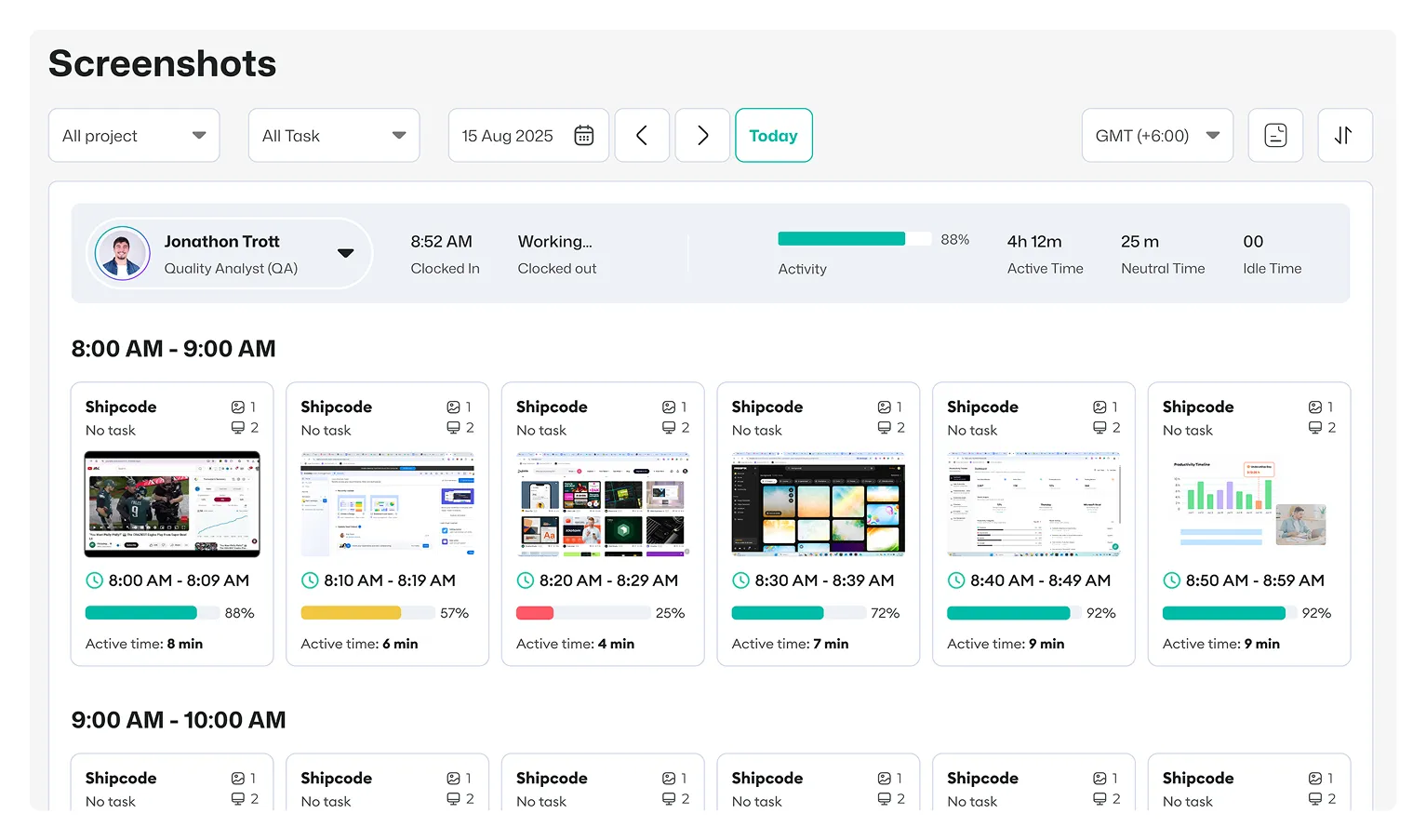
Capture periodic screenshots on Linux at intervals you control. Review what your team worked on without watching a live feed all day.

  • 1 to 10 screenshots every 10 minutes
  • Screenshot blurring for sensitive data
  • Turn screenshots off entirely, per person or team-wide
See Screenshots
Screenshots on Linux with Apploye
Apps & URLs

Apps & URLs

See which apps and websites your team uses while the timer runs. Find out if work time goes to code editors and terminals, or somewhere else.

  • Full app usage time
  • Website history across major browsers
  • Per-user and team reports
Track Apps & Sites
Apps & URLs on Linux with Apploye
Active & Idle Time

Active & Idle Time

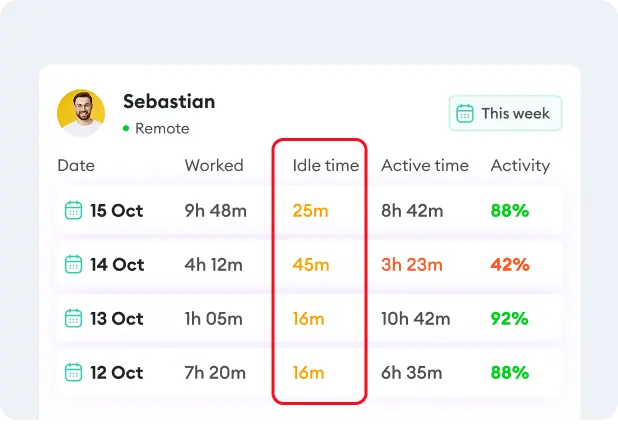
Know the difference between real work and an idle terminal. This keeps timesheets honest and stops idle time from counting as billable hours.

  • Idle time flagged on every timesheet
  • Offline tracking that syncs once you're back online
Try Idle Tracking
Active & Idle Time on Linux with Apploye
Activity Levels

Activity Levels

Check how much your team is actually working during tracked hours. Apploye never stores what someone typed. It only measures activity, not content.

  • Active, neutral, and idle scoring
  • Activity percentage shown per screenshot
See Activity Levels
Activity Levels on Linux with Apploye
Live Feed

Live Feed

See who's working right now and what they're tracking time against. Run a distributed Linux team without pinging everyone for a status update.

  • Live work status across Linux, Windows, and Mac in one dashboard
  • On-demand screenshot requests
Open Live Feed
Live Feed on Linux with Apploye

System Requirements to Install Apploye on Linux

Requirement

Minimum

Recommended

OS

Ubuntu 18.04 LTS or later

Ubuntu 18.04 LTS or later

Officially tested on

Ubuntu, Debian-based (AppImage may run more broadly, unconfirmed)

Same

Processor

Intel Core 2 Duo or equivalent

Intel Core i5, 8th gen or newer

RAM

2 GB

8 GB

Storage

512 MB

1 GB

Want to Monitor Users With Windows and Mac Devices as Well?Want to Monitor Users With Windows and Mac Devices as Well?

Apploye also offers an Interactive Desktop App that employees can download and install, where they pick a project and start/stop tracking manually.
Start for Free

No Credit Card Required

Apploye vs. Other Linux Monitoring Tools

Features

Apploye
Hubstaff
Time Doctor
Kickidler

Install

Single app (.deb/AppImage)

Terminal-based installer

Requires X11 session first

3 parts: Grabber, Server, Viewer

Tested on

Ubuntu, Debian-based

"Any Linux since 2010," unverified

Ubuntu

Not listed

Screenshots

Adjustable interval, blur, can disable

Random interval, blur available

Blur, adjustable frequency, can disable

Continuous video, not screenshots

Live screen view

Yes

No

No

Yes

Screen recording

Yes

No

Standard/Premium tiers only

Yes

Default visibility

Employee sees own dashboard

Background, menu access

Interactive or automatic

Covert by design

Time tracking & payroll

Built in

Included; payroll is add-on

Included

Included; no payroll focus

Free plan

Up to 10 users

1 user only

None

None

Starting price

$4.50/user/mo

$4.99/user/mo

$6.67/user/mo

$5/user/month

Frequently Asked Questions

Does Apploye work on all Linux distributions?

Apploye is officially supported on Ubuntu and other Debian-based distros through its .deb package. The AppImage build is designed to run more broadly, but Apploye's formal testing currently centers on Ubuntu.

Can I install Apploye across my team without setting up each machine by hand?

Yes. You can push the .deb package or AppImage through whatever device management or scripting process your team already uses for Linux rollouts.

Does Apploye log keystrokes on Linux?

No. Apploye measures keyboard and mouse activity to calculate an activity score. It doesn't record or store the actual keys someone types.

Can employees see their own tracked data?

Yes, by default. Apploye's interactive app lets employees review their own time, screenshots, and activity. Stealth monitoring software is available for company-owned devices where that's not the right fit.

What happens if a Linux machine goes offline?

Apploye keeps tracking locally and syncs everything once the machine reconnects.

Is there a free plan for Linux users?

Yes. Apploye has a free employee monitoring plan for up to 10 users, with no credit card and no trial countdown.

Can I run Apploye alongside Windows and Mac teammates on the same account?

Yes. One dashboard covers Linux, Windows, and Mac devices under the same organization.

Is Apploye GDPR and HIPAA compliant on Linux?

Yes. Compliance features apply the same way across every platform Apploye supports, including Linux.