






Free Employee Attendance Sheet Template (Excel & Google Sheets)

Track employee attendance without creating a spreadsheet from scratch.
This free Employee Attendance Sheet helps you record daily, weekly, and monthly attendance, including present days, absences, late arrivals, leave, clock-in and clock-out times, breaks, worked hours, and attendance percentages.
Use it in Microsoft Excel or upload the workbook to Google Sheets and customize it for your team.
Download the Free Employee Attendance Sheet
Your download contains:

Monthly Employee Attendance Sheet
Weekly Employee Attendance Sheet
Daily Employee Attendance Log
Attendance Summary
Attendance status dropdowns
Automatic calculations
Attendance percentage formulas
Worked-hours formulas
Status instructions
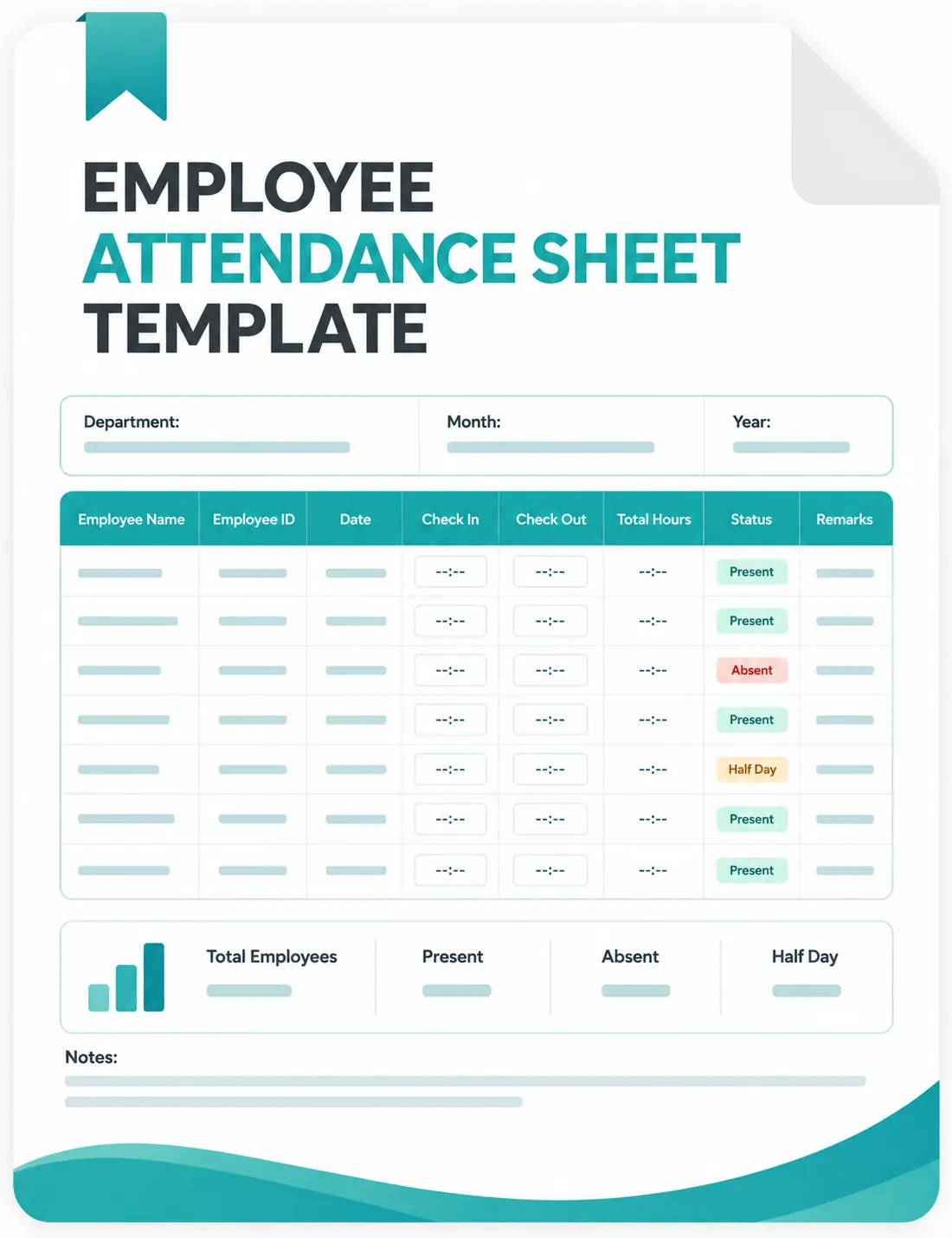
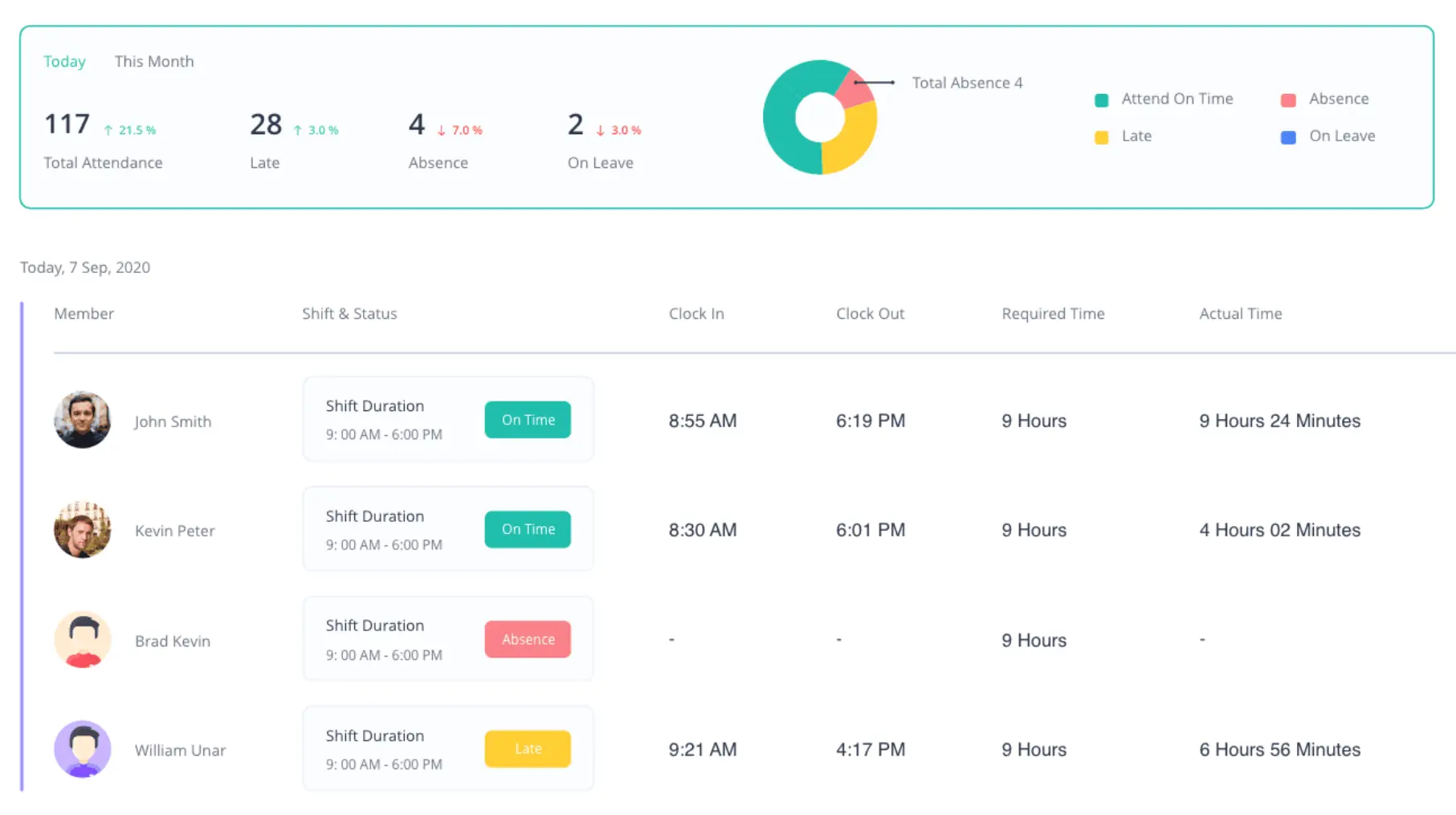
Preview the Employee Attendance Sheet
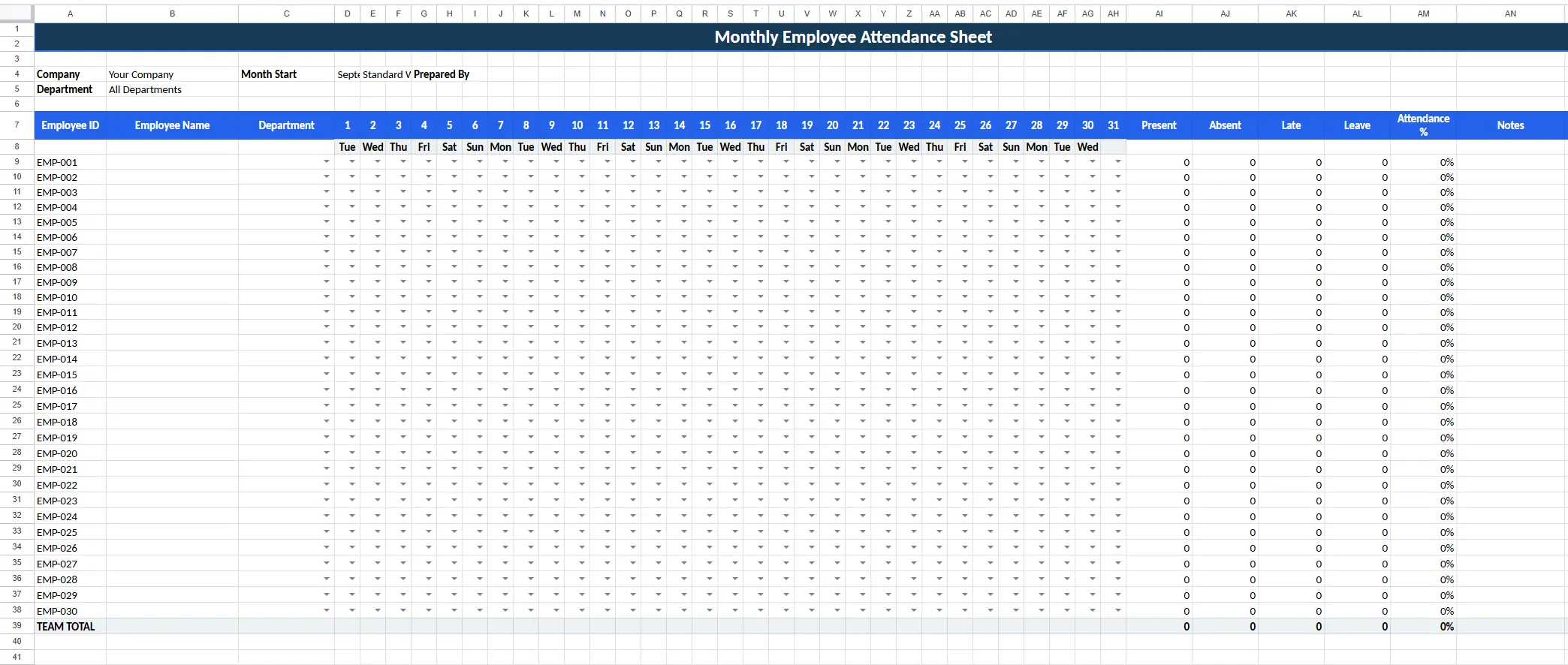
The template is designed to give you both a quick attendance overview and detailed employee records.
You can use the blank version immediately, or follow the completed example below to see how attendance should be recorded.
What's Included in the Employee Attendance Sheet?
Your download includes multiple attendance templates in one workbook, so you can choose the level of detail your business needs.
Monthly Employee Attendance Sheet
Track an entire month of employee attendance in one view.
Record:
- Present
- Absent
- Late
- Sick leave
- Vacation leave
- Personal leave
- Holiday
- Weekly off
The sheet automatically calculates:
- Attended days
- Absent days
- Late occurrences
- Leave days
- Attendance percentage
This is the best starting point if you want a simple monthly employee attendance tracker.
Daily Employee Attendance Sheet
Use the daily attendance log when you need more detailed time records.
Track:
- Employee ID
- Employee name
- Department
- Attendance status
- Clock-in time
- Clock-out time
- Break duration
- Worked hours
- Late minutes
- Notes
The template calculates working hours from the employee's clock-in time, clock-out time, and recorded break.
Weekly Employee Attendance Sheet
Review employee attendance and work hours across a single week.
Track attendance from Monday through Sunday and automatically summarize:
- Days attended
- Absences
- Late arrivals
- Weekly worked hours
- Attendance percentage
This view works well for team leaders and managers who review attendance every week.
Employee Attendance Summary
The workbook also includes a summary view for quickly reviewing monthly attendance.
See:
- Total employees
- Total attended days
- Total absences
- Total late occurrences
- Total leave days
- Overall attendance percentage
- Average attendance per employee
- Average late occurrences
How to Use the Employee Attendance Sheet
You can start tracking employee attendance in a few minutes.
1. Download the Template
Download the Excel workbook and save a working copy.
If your team uses Google Sheets, upload the .xlsx file to Google Drive and open it with Google Sheets. Some spreadsheet formatting can vary slightly after importing.
2. Choose the Right Attendance Sheet
Use:
Monthly Attendance for a month-at-a-glance employee attendance record.
Weekly Attendance for weekly attendance and hours.
Daily Log when you need clock-in, clock-out, break, and worked-hour details.
3. Add Your Employees
Enter each employee's:
- Employee ID
- Name
- Department
Replace the example employee information with your own team's details.
4. Choose the Reporting Period
Set the month, week, or date you want to track.
For monthly attendance, create a separate working copy for each month if you want to maintain historical records.
5. Record attendance
Use the included attendance codes.
Use the same codes consistently so your totals and attendance reports remain easy to understand.
6. Record work times when needed
In the Daily Log, enter:
- Clock-in
- Clock-out
- Break minutes
The spreadsheet calculates total worked hours automatically.
7. Review the attendance summary
Use the summary worksheet to review attendance totals and identify patterns in absence, leave, and late arrivals.
What Is an Employee Attendance Sheet?
An Employee Attendance Sheet is a spreadsheet or document used to record whether employees attend work as scheduled.
At its simplest, an attendance sheet records an employee's name, work date, and attendance status.
A more detailed employee attendance sheet may also track:
- Clock-in time
- Clock-out time
- Total worked hours
- Breaks
- Late arrivals
- Absences
- Sick leave
- Vacation
- Other time off
Businesses use employee attendance sheets to maintain a consistent attendance record instead of relying on messages, emails, memory, or handwritten notes.
Attendance can be recorded daily, weekly, monthly, or annually depending on the organization's needs.
Who Should Use an Employee Attendance Sheet?
An employee attendance spreadsheet is particularly useful for small and growing teams that need a simple way to maintain attendance records.
It can work well for:
- Small businesses
- HR teams
- Office managers
- Team leaders
- Agencies
- Retail teams
- Service businesses
- Startups
- Shift-based teams
- Remote or hybrid teams that manually record attendance
A spreadsheet is usually most useful when attendance rules are straightforward, and one person can maintain the records without creating significant administrative work.
What Should an Employee Attendance Sheet Include?
A good attendance sheet should make it easy to answer two questions:
Was the employee expected to work?
What actually happened that day?
The most useful fields are:
Employee Details
Include enough information to identify each employee.
For example:
- Employee ID
- Employee name
- Department
- Team
Date
Every attendance record should correspond to a specific date or scheduled workday.
Attendance Status
Use consistent statuses such as:
- Present
- Absent
- Late
- Sick leave
- Vacation leave
- Personal leave
- Holiday
- Weekly off
Clock-In and Clock-Out
Record start and finish times when punctuality or hourly work matters.
Worked Hours
Worked hours provide more context than attendance status alone.
An employee may be marked Present but still work less than the expected number of hours.
Late Arrivals
Track lateness separately instead of recording a late employee as simply Present or Absent.
Leave
Separate approved time off from unexplained absence.
Notes
Use notes for schedule changes, exceptions, explanations, or other relevant information.
How Do You Calculate Employee Attendance Percentage?
A simple attendance percentage formula is:
Attendance Percentage = Attended Days ÷ Scheduled Attendance Days × 100
For example, if an employee was expected to attend 20 working days and attended 19:
19 ÷ 20 × 100 = 95% attendance
Your organization's policy determines how approved leave, holidays, partial days, and other exceptions should be treated.
The downloadable employee attendance sheet automatically calculates an attendance percentage from the attendance records entered into the spreadsheet.
Daily vs. Weekly vs. Monthly Employee Attendance Sheets
Daily Attendance Sheet
Choose a daily attendance sheet when you need detailed records such as clock-in, clock-out, breaks, worked hours, or late minutes.
Best for:
- Hourly employees
- Shift workers
- Detailed attendance records
Weekly Attendance Sheet
Choose a weekly employee attendance sheet when managers review attendance and working hours each week.
Best for:
- Weekly team reviews
- Variable schedules
- Supervisors managing smaller teams
Monthly Attendance Sheet
Choose a monthly employee attendance sheet when you need a broader view of attendance patterns.
Best for:
- HR records
- Monthly reporting
- Identifying repeated absences
- Identifying recurring lateness
- Leave overview
For many small businesses, the monthly employee attendance sheet is the simplest place to begin.
When Is an Employee Attendance Spreadsheet Enough?
You may not need attendance software yet.
A spreadsheet can be enough when:
- Your team is small
- Employees have predictable schedules
- Attendance rules are simple
- One person maintains attendance
- You only need periodic reports
- Manual updates take very little time
- You do not need real-time attendance visibility
If that describes your team, download the template and use it for as long as it solves the problem.
Download the Free Employee Attendance Sheet
Your download contains:
Monthly Employee Attendance Sheet
Weekly Employee Attendance Sheet
Daily Employee Attendance Log
Attendance Summary
Attendance status dropdowns
Automatic calculations
Attendance percentage formulas
Worked-hours formulas
Status instructions
When You've Outgrown the Employee Attendance Sheet
The disadvantage of an attendance spreadsheet is not the spreadsheet itself.
It's the manual work required to keep it accurate.
Every day, someone needs to collect attendance information, update statuses, enter work times, record leave, correct mistakes, and prepare reports.
As your team grows, maintaining the employee attendance sheet can become another recurring administrative task.
That's where attendance software becomes useful.
| Manual Employee Attendance Sheet |

|
|---|---|
| Enter attendance manually | Employees clock in and out while tracking work |
| Type clock-in and clock-out times | Clock-in/out records are captured through Apploye |
| Update late or absent statuses manually | Review attendance statuses such as on time, late, absent, and on leave |
| Maintain schedules separately | Create and manage employee shifts |
| Compare hours yourself | Compare required shift time with actual tracked time |
| Update leave in the spreadsheet | Employees submit time-off requests in Apploye |
| Build attendance reports manually | Review and export attendance reports |
| Check separate files every month | Review attendance information from the Apploye workspace |
The spreadsheet is useful when you want a simple manual system.
Apploye is the next step when you want to reduce the amount of manual attendance administration.
Track Employee Attendance Automatically with Apploye
Instead of asking a manager to update an employee attendance sheet every day, Apploye connects attendance with the employee's actual time-tracking workflow.
Employees can clock in and clock out from Apploye's desktop or mobile apps.
Managers can review attendance information, working time, shifts, and time off from the same system.
With Apploye, you can manage:
- Employee clock-in and clock-out
- Attendance records
- On-time, late, absent, and on-leave statuses
- Employee shifts
- Required vs. actual shift time
- Time-off requests
- Worked hours
- Timesheets
- Attendance reports
