Free Project Performance Report Template

Projects can face issues with costs, resources, milestones, or workload even when work is on track. With this free project performance report template, you can track project status, results, milestones, hours, risks, and next steps in one place.
Get the Free Project Performance Report Template
With this template, you can document:

Project and reporting information
Current project status
Key performance indicators
Milestones and task progress
Hours and resource usage
Budget and cost details
Risks and project blockers
Follow-up actions and recommendations.
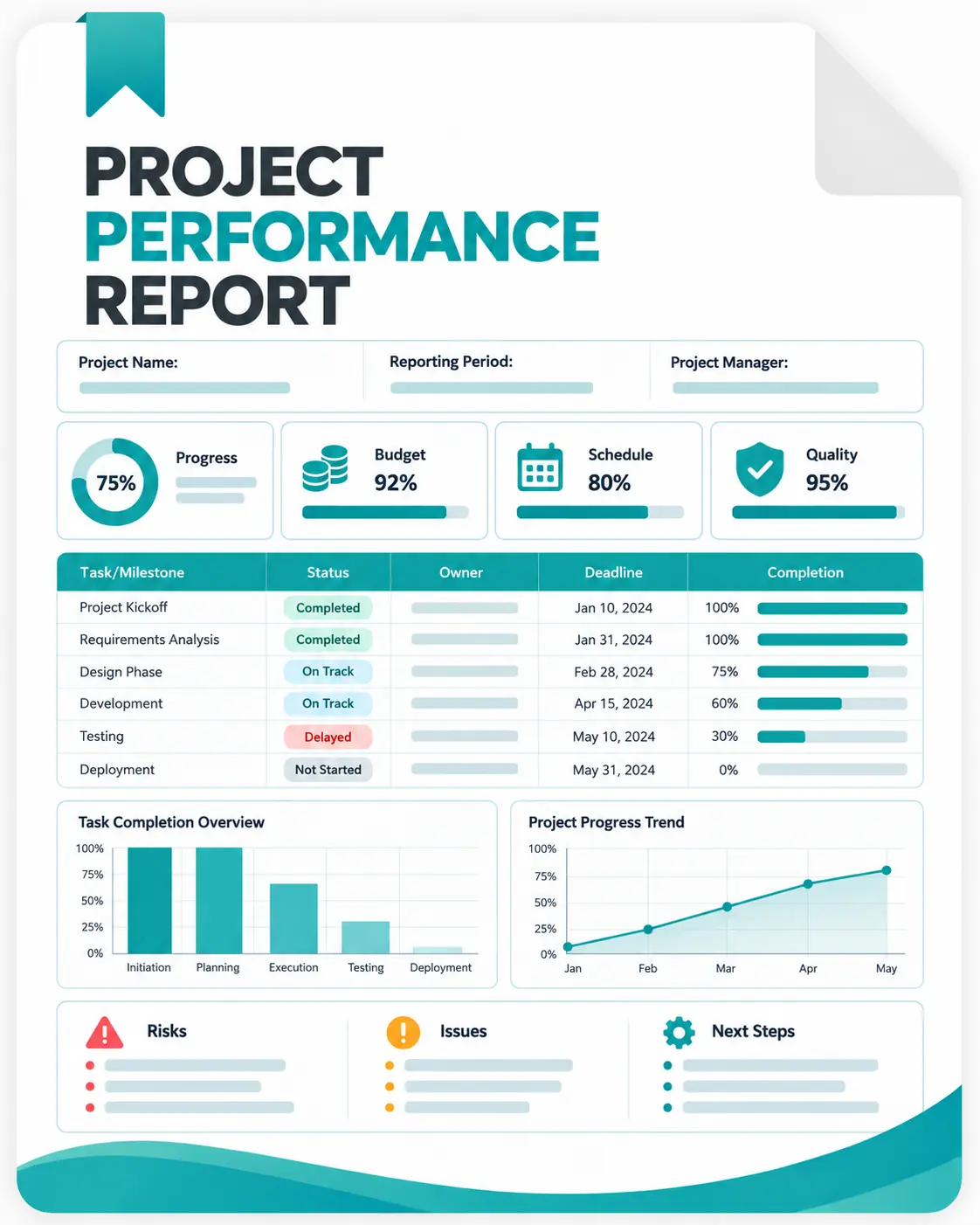
How the Project Performance Report is Organized
The template divides project information into focused sections so you can review overall performance before moving into detailed work and follow-up.
Project Overview
Start with the basic project information and provide a summary of the current situation. Include the overall progress, major achievements, current concerns, stakeholder updates, and the next important milestone.
Performance Metrics
Use this section to compare important project measurements against their targets. You can record actual results, variance, status, trend, and supporting notes.
Milestone and Task Progress
List the important milestones or work items being tracked. Record planned dates, actual or forecast dates, completion percentage, hours used, blockers, and the next step.
Budget and Resources
Review planned and actual project costs or resource usage where applicable. Comparing budgeted resources with actual usage can help identify areas that require attention.
Risks and Blockers
Document problems that may affect the timeline, budget, quality, resources, or expected project outcome. Include enough context to make the issue understandable.
Actions and Recommendations
Turn project findings into specific follow-up actions. Assign an owner, priority, due date, status, and any support required to move the action forward.
How to Prepare a Project Performance Report
1. Add the Project Information
Enter the project name, client or department, project manager, reporting period, and current status.
2. Define the Review Period
Make sure the report covers a specific period, so project performance can be compared consistently across reviews.
3. Update the Key Metrics
Enter the KPIs that matter to the project, along with their targets, actual results, variance, and current status.
4. Review Current Work
Update milestone and task information, including completion levels, planned dates, forecast dates, and hours used.
5. Compare Costs and Resources
Add budget, actual cost, resource, and hours information where applicable to see whether project usage is staying within expectations.
6. Document Current Risks
Record delays, blockers, dependencies, or resource issues that could affect upcoming project work.
7. Create Follow-Up Actions
List the actions needed to address important findings and assign owners and deadlines.
8. Finalize the Report
Review the completed report and make sure the information gives stakeholders a clear understanding of project performance and what needs to happen next.
What Makes a Project Performance Report Effective?
A good project report should answer a few practical questions quickly:
Where are we now? → What has been completed? → Are results on target? → What is causing problems? → What needs attention next?
The goal is not to record every project detail. Instead, focus on information that helps managers and stakeholders understand progress, identify changes, and make follow-up decisions.
From Manual Project Reporting to Tracked Work Data
Excel is useful when you need a flexible format for periodic project reviews. But when teams have to collect hours, tasks, timesheets, and project activity manually, preparing each report can take additional time.
Apploye brings project and task time tracking, timesheets, project progress information, and reporting into one platform. This gives teams a way to work from tracked project data when preparing regular performance reviews.