Mac Employee Monitoring Software for MacBooks and macOS

Track work hours, app and website usage, screenshots, activity levels, and idle time on macOS. Improve productivity, manage remote teams, and understand how work gets done.

Forbes Advisor 2025
USA Today
Business Insider
Forbes Advisor 2026
Entrepreneur
Capterra
G2
GetApp
Software Advice
GDPR
HIPAA
SOC 2
ISO

Join 29,000+ Organizations

What Apploye Monitors on Mac

Screen Activity

Screenshots and Screen Recording

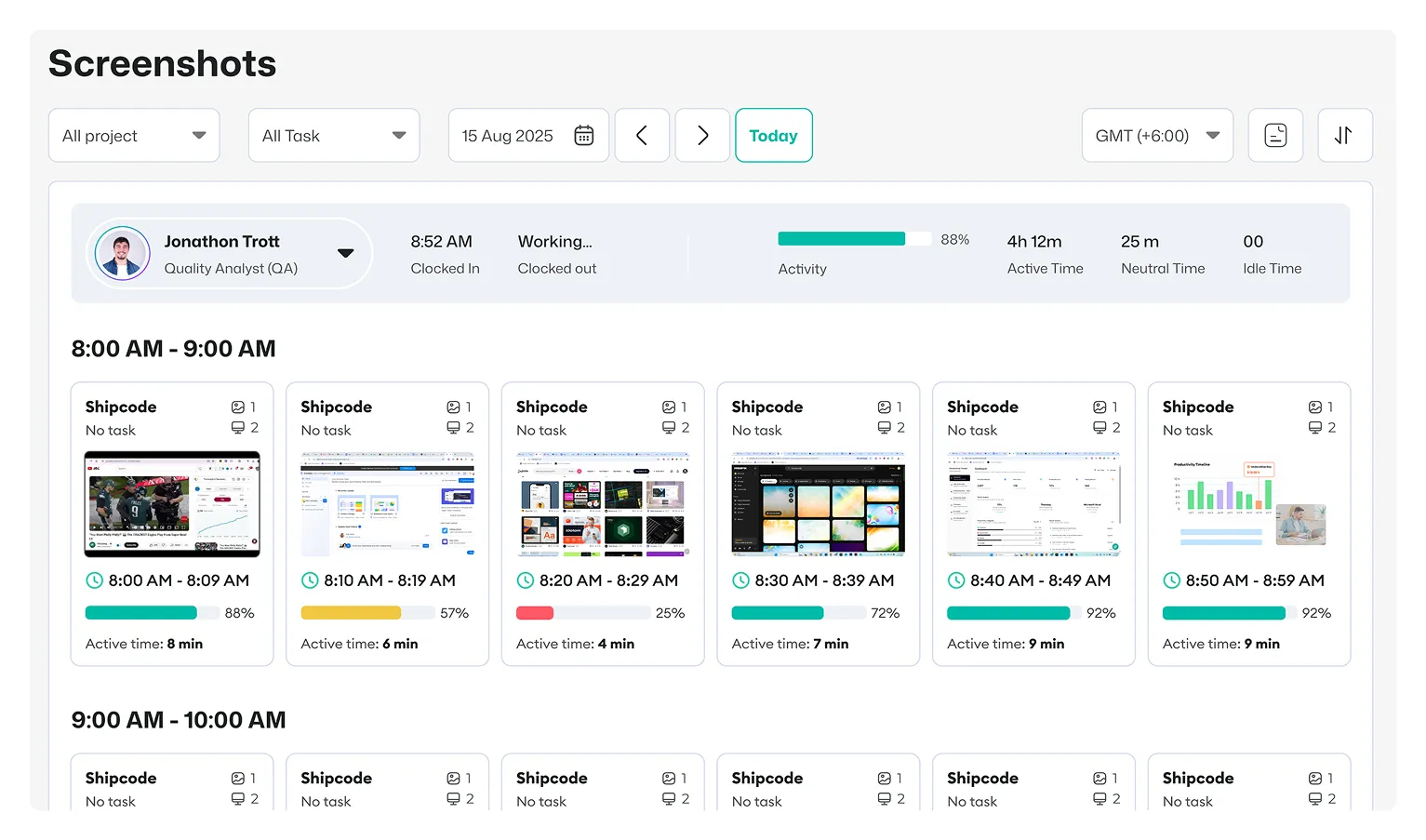
 Monitor employee screens with automatic screenshots at random times, and see how workers spend their hours. You look at all this activity from the admin panel and spot anything odd right away.

How Apploye helps:

  • 1–10 screenshots every 10 minutes
  • Captures every connected monitor
  • Screenshot blurring
  • Screen recording add-on
Monitor employee screens with automatic screenshots in Apploye
Online Activity

Application and Website Usage Tracking

See which apps and websites workers use while the timer runs. Apploye shows you if work time goes to helpful tools, chat apps, or sites that waste time.

How Apploye helps:

  • App usage time
  • Full URL history
  • All major browsers
  • Per-user and team reports
Track application and website usage with Apploye
Active & Idle Time

Automatic Idle Time Detection

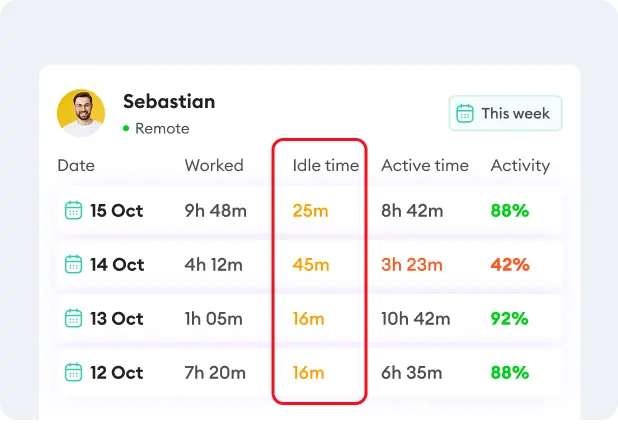
Know the difference between real work and idle time. This idle check keeps timesheets correct and stops inactive time from counting as real work.

How Apploye helps:

  • Keep idle time out of billable hours
  • Idle time visible on every timesheet
  • Offline tracking
Automatic idle time detection with Apploye
Activity Levels

Keyboard and Mouse Activity Tracking

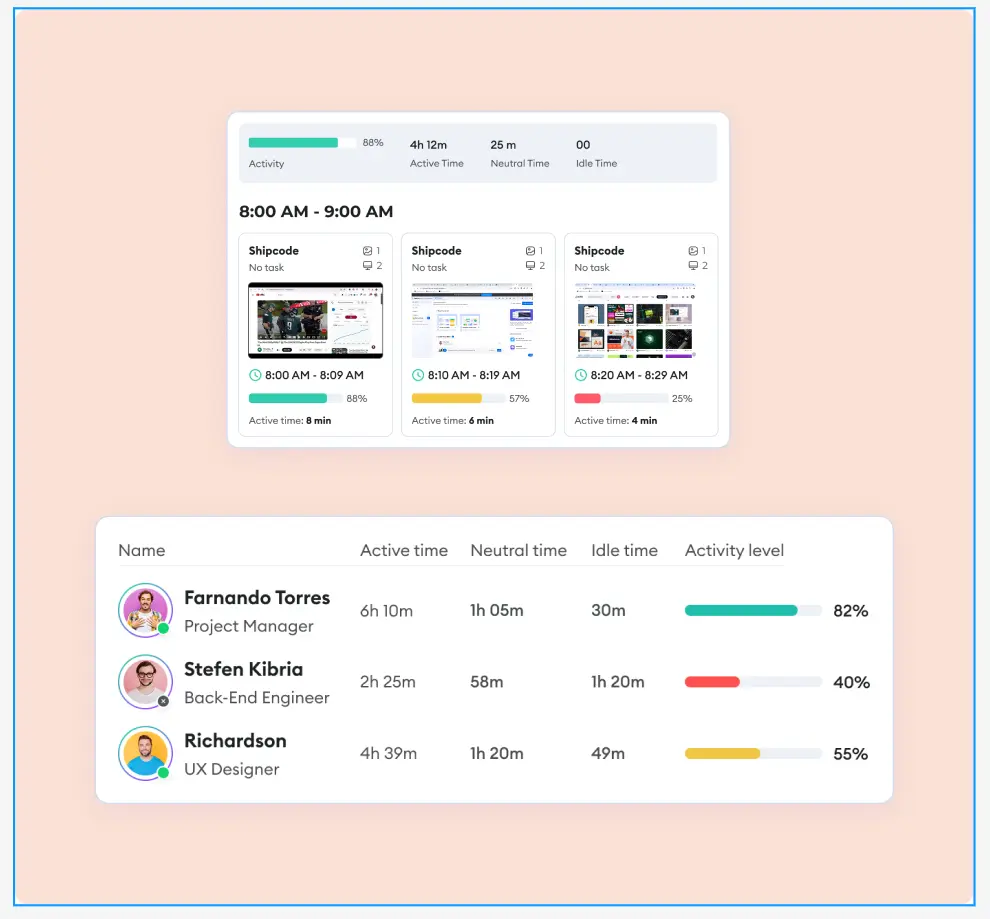
Check how much workers move the mouse and use the keyboard. But Apploye never saves the actual keys they press. So you can review employee activity levels without reading what people type.

How Apploye helps:

  • Active, neutral, and idle scoring
  • Measure Activity percentage
  • Activity shown per screenshot
Keyboard and mouse activity tracking with Apploye
Live Monitoring

Real-Time Employee Status and Live Feed

See who is working, who is idle, and what project each person is tracking. Because of this live view, you can lead your remote team without asking for updates all the time.

How Apploye helps:

  • Real-time work status
  • Current app and project tracking
  • On-demand screenshot
  • Mac, Windows, Linux in one dashboard
Real-time employee status and live feed with Apploye
Productivity Ratings

Productive and Unproductive App Classification

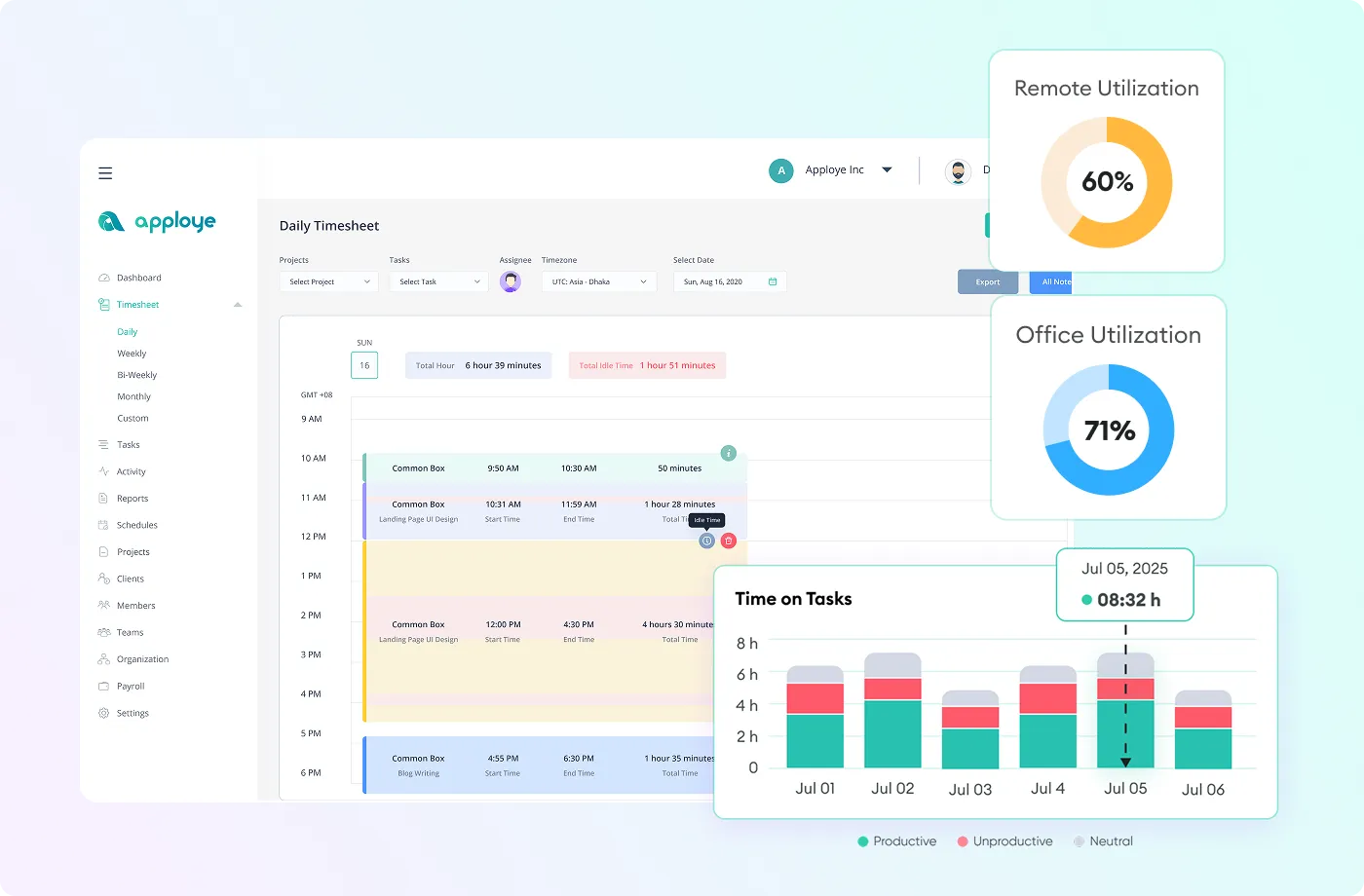
Classify apps and websites as productive, neutral, or unproductive based on your team’s workflows. Then Apploye turns this data into clear reports for each worker, team, and group.

How Apploye helps:

  • Choose productive and unproductive apps
  • Check productivity trends
  • Export reports for employees and teams
Productive and unproductive app classification with Apploye
Suspicious Activity

Suspicious and Unusual Activity Detection

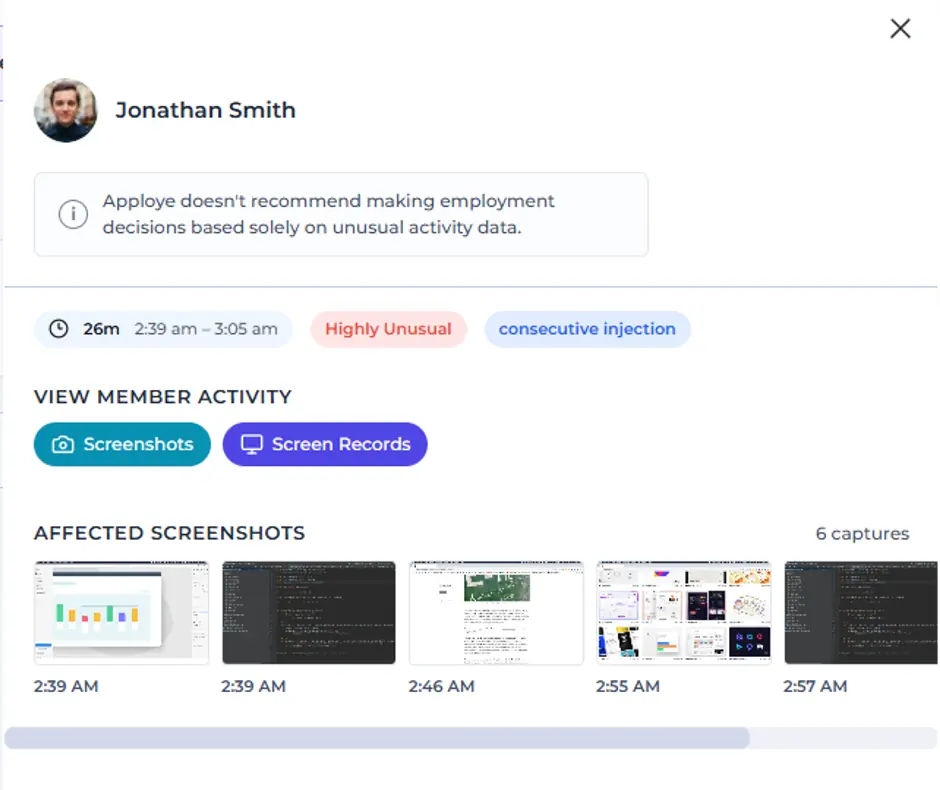
Identify unusual activity patterns, for example, potential mouse-jiggler usage. You can look into just those cases instead of checking every session by hand.

How Apploye helps:

  • Mouse-jiggler detection
  • Highlights unusual activity sessions
  • Review only the flagged cases
Unusual activity investigation with affected employee screenshots in Apploye.
Attendance & Leave

Attendance and Leave Tracking

Automatically turn tracked activity into detailed timesheets. Monitor clock-in times, work hours, breaks, late arrivals, and attendance from the same platform.

How Apploye helps:

  • Daily, weekly, and monthly timesheets
  • Clock-ins, breaks, and late arrivals
  • Team attendance overview
  • Track PTOs and holidays
Attendance and leave tracking with Apploye

How to Install Apploye on macOS

one

Download Apploye for Your MacBook

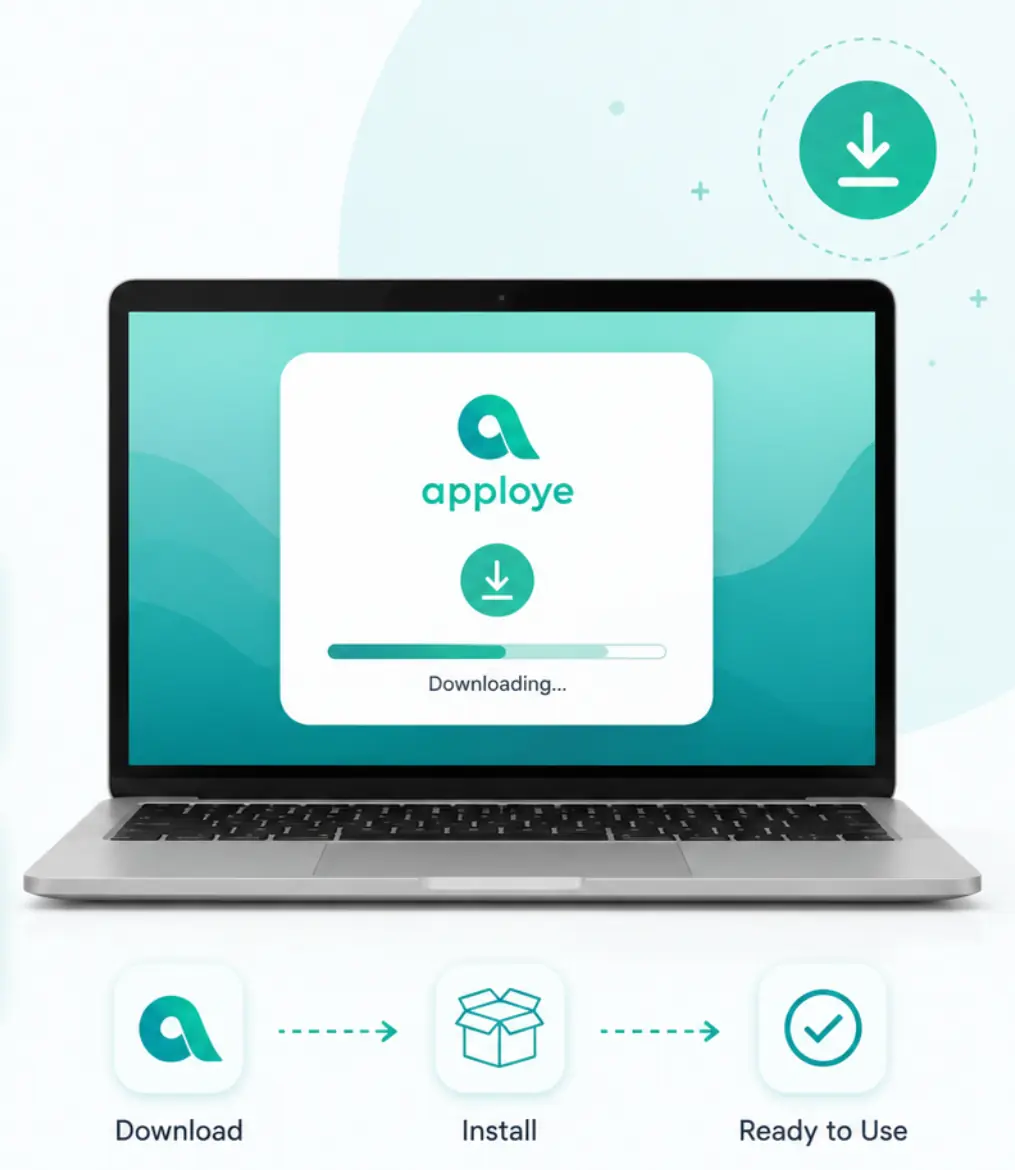
Visit the Apploye download page and select the version that matches your Mac. Then, open the installer and follow the on-screen instructions to complete the installation.

two

Employees Start Tracking Time

When employees start to track time, Apploye takes screenshots, screen recordings, app usage, website activity, active time, and idle time.

three

Review Reports Anytime

You can review activity reports, screenshots, timesheets, and project data from the dashboard.

one

Download Apploye for Your MacBook

Visit the Apploye download page and select the version that matches your Mac. Then, open the installer and follow the on-screen instructions to complete the installation.

Download Apploye for MacBook with quick installer setup instructions.
two

Employees Start Tracking Time

When employees start to track time, Apploye takes screenshots, screen recordings, app usage, website activity, active time, and idle time.

Employees Start Tracking Time
three

Review Reports Anytime

You can review activity reports, screenshots, timesheets, and project data from the dashboard.

Review Reports Anytime
Download Apploye for MacBook with quick installer setup instructions. Employees Start Tracking Time Review Reports Anytime

Want to monitor users with Windows and Linux devices as well?Apploye has an interactive desktop app for whichever operating system your employee uses

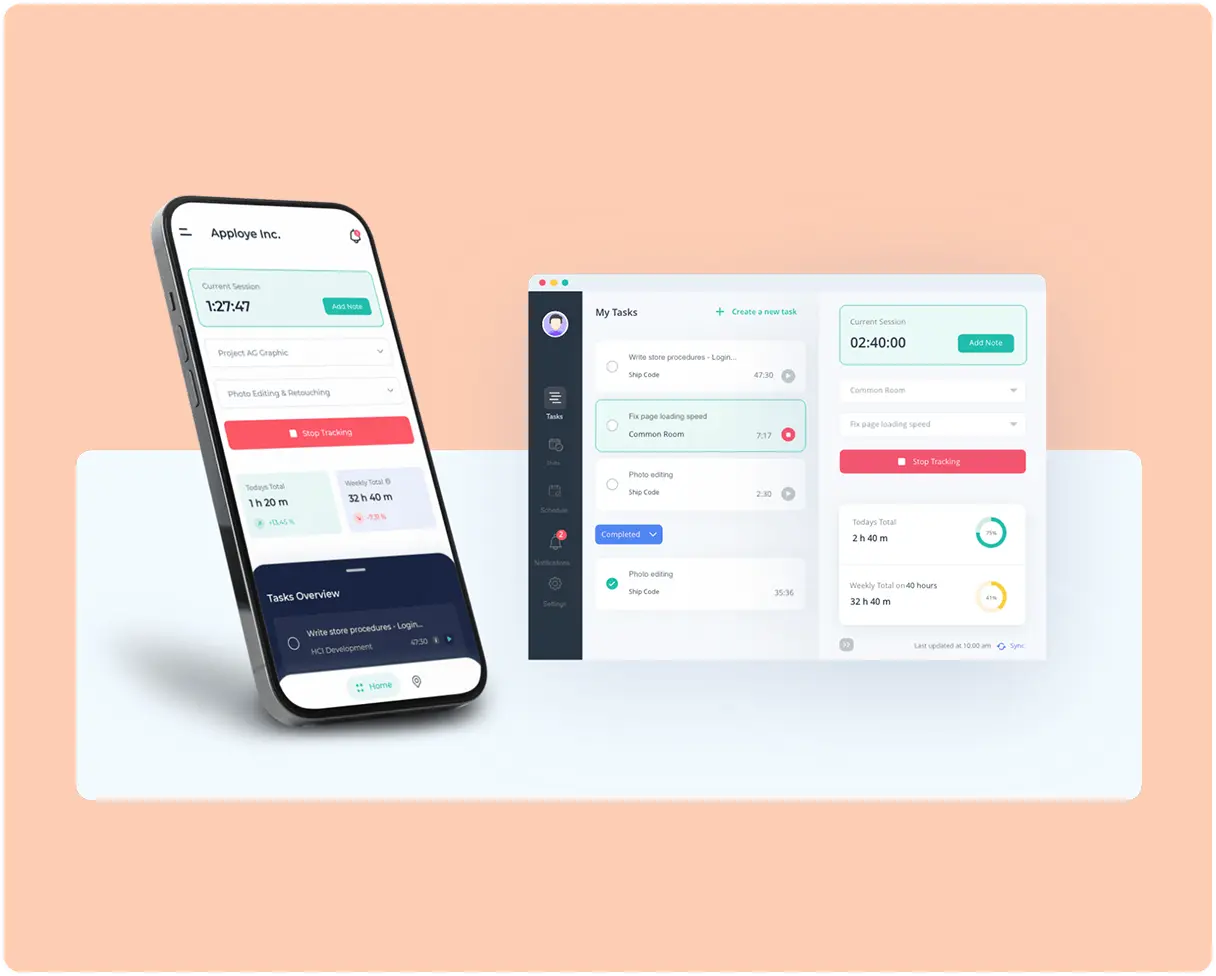
Apploye also offers an Interactive Desktop App that employees can download and install themselves, where they pick a project and start/stop tracking manually.
Start for Free

No Credit Card Required

Mac Compatibility and Requirements

Requirement

Details

Chip

Native Apple Silicon (M1, M2, M3, M4) + separate Intel build

macOS versions

macOS 10.15 or later

Permissions needed

Screen & System Audio Recording (screenshots) and Accessibility (app & website tracking); URL tracking may also need Automation

Deployment

Individual install or MDM

Apploye vs Other Mac Monitoring Tools

Feature

Apploye
Teramind
Hubstaff
Time Doctor
ActivTrak

Starting paid price (billed yearly)

$4.5/user/mo

$14/user/mo

$4.99/user/mo

$6.67/user/mo

$10/user/mo

Free plan

Up to 10 users

No

1 user only

No

Up to 3 users

Native Apple Silicon build

Yes (M1–M4)

Yes

Yes (arm64)

Yes (v3.8.50+)

Yes

Separate Intel build

Yes

Yes

Yes

Yes

Yes

Minimum macOS

10.15 Catalina

11.7.10 Big Sur

10.9 (10.15+ for full permissions)

10.15 Catalina

10.15 Catalina

Full Mac feature parity with Windows

Yes

No (Mac feature set is limited)

Yes

Yes

Yes

Core permissions

3

6

3

2

2

Installs a system extension

No

Yes (NetApp, non-removable via MDM)

No

No

No

Terminal commands during setup

No

Yes (network, file, and geolocation monitoring)

No

No

No

Full Disk Access required

No

Yes

No

No

No

Optional Location Services access

No

Yes

No

No

Yes (optional)

MDM deployment

Yes

Yes

Yes

Yes

Yes

Hidden / stealth agent offered

Yes (Silent app)

Yes (process name can be disguised)

Yes (Silent app)

Automatic app

Silent install

Screenshots included in base plan

Yes

Yes

Yes

Yes

No

Screen recording

Yes (add-on)

Yes

Higher tiers

Premium tier only

No

Minimum seats

None

5-seat minimum

2-seat minimum

None

None

What Users are Saying

“Full monitoring that keeps remote teams honest”

Simon runs remote software teams and leans on Apploye's screenshot tracking, app and URL monitoring, and activity tracking to keep accountability high. He notes that the monitoring can feel intrusive to staff unless managers explain it clearly beforehand.

Star Star Star Star Star
Simon D.
CEO, Computer Software
Check out the full review

“Total visibility into every remote dev's day”

Mark's distributed dev teams gained clear daily visibility through work hours tracking, screenshot monitoring, and app usage reports. He finds that it manages remote employees without adding complexity, giving managers quick insight into performance.

Star Star Star Star
Mark F.
Co-founder
Check out the full review

“The monitoring alone makes Apploye worth it”

Running a fully remote team, Kazi calls the monitoring feature the most valuable part, showing activity levels, which apps are used, and occasional screenshots. Once staff saw that they could protect their privacy, it built trust and accountability across the team.

Star Star Star Star Star
Kazi M.
Content Manager, Computer Software
Check out the full review

“Screenshots make remote work impossible to fake”

Sam manages a remote virtual assistant team and values the automatic time tracking with screenshot monitoring most. It gives operations better visibility into how tasks are handled without constant follow-ups, plus app usage tracking and timesheets.

Star Star Star Star Star
Sam W.
CEO, Professional Training & Coaching
Check out the full review

“Effortless eyes on every remote developer”

Richard monitors remote developers' performance using Apploye's monitoring features. He likes that reviewing them isn't complex, appreciates the sleek web interface, and found migrating over from Hubstaff straightforward for his IT team.

Star Star Star Star Star
Richard Q.
Lead Developer, Information Technology and Services
Check out the full review

“Screenshots and monitoring features catch slackers instantly”

Running a virtual school, this reviewer uses Apploye to monitor teacher productivity and spot the least productive staff. Random screenshots verify remote teachers' work, and attendance tracking shows when teachers arrive and leave schools.

Star Star Star Star Star
Verified User in Education Management
Check out the full review

“One dashboard to watch the whole remote team”

David's finance team relies on the employee monitoring dashboard to review tracked hours and watch work activity across remote staff. It centralizes attendance, productivity tracking, and project-based reporting so managers can gauge accountability.

Star Star Star Star Star
David F.
CEO, Financial Services
Check out the full review

“Spot time-wasters before they cost you money”

Tara adjusts the idle-time tracker to flag idle versus neutral time, helping her spot employees abusing time and praise those using it well. Screenshots and activity tracking let her confirm her team is productive.

Star Star Star Star

“The most reliable staff monitoring I've used”

This managing director calls Apploye the most reliable tool used for monitoring staff productivity and ensuring no slacking. A modern, bug-free alternative to Time Doctor with fast setup.

Star Star Star Star Star
Verified Reviewer
Managing Director, Information Technology and Services
Check out the full review

“Monitoring that ended the daily follow-ups”

Steve's remote marketing team replaced spreadsheets with Apploye, and the employee monitoring features gave better visibility into daily activity without constant follow-ups. Project-based tracking improved accountability across many campaigns.

Star Star Star Star Star
Steve P.
CEO, Marketing and Advertising
Check out the full review

“Live tracking that made accountability easy”

For managing remote and hybrid consultants, Svetlana values the real-time activity tracking and screenshots that improve accountability and make verifying timesheets easier.

Star Star Star Star Star
Svetlana S.
HR, Information Technology and Services
Check out the full review

Frequently Asked Questions

What is employee monitoring software for Mac?

MacBook employee monitoring software helps organizations understand how employees use company Mac computers during working hours. Depending on the settings enabled, it can track work hours , application and website usage, activity levels, idle time, screenshots, projects, and productivity patterns.

Does Apploye run natively on Apple Silicon Macs?

Yes. Apploye has a native app for Apple Silicon (M1, M2, M3, M4) and a separate build for Intel Macs. Each runs on its own hardware without Rosetta 2, so battery and CPU use stay low.

Will Apploye slow down or drain a MacBook?

No. Because the app is native to Apple Silicon, it runs light on CPU and battery. There's no Rosetta 2 translation layer eating extra power.

Which macOS versions does Apploye support?

Apploye supports both Apple Silicon and Intel Mac computers. Our app is compatible with macOS 10.15 or later.

What permissions does Apploye need on macOS?

Apploye needs Screen Recording permission and activity access. macOS asks for these once during setup, and you approve them in System Settings under Privacy & Security.

Can I deploy Apploye to Macs through MDM?

Yes. Organizations can deploy Apploye across company-owned devices using a mobile device management system or a deployment script. This can help IT teams install and configure the application across multiple Macs without setting up every computer individually.

Can employees see that Apploye is running on their Mac?

That depends on how Apploye is configured. The interactive desktop application allows employees to open Apploye, select projects or tasks, start and stop the timer, and review their tracked work. Apploye also offers a silent or background-tracking option for company-owned and managed devices.

Can I monitor a Mac without the employee knowing?

Yes, with the stealth monitoring software , you can monitor a Mac without the employee knowing.

Does Apploye record what employees type?

No. Apploye does not log or store the actual words, passwords, or messages employees type. It can measure general keyboard and mouse activity to calculate activity levels, but it does not function as a keylogger.

Can screenshots be blurred or disabled?

Yes. Organization owners and administrators can disable screenshot tracking for the entire organization or for individual employees. They can also permanently blur captured screenshots to help protect private or sensitive information.

Does Apploye work when a Mac is offline?

Yes. The Apploye desktop application can store tracked information locally when the Mac temporarily loses its internet connection. The data can then sync with the Apploye web dashboard after the internet connection is restored.

Can Mac and Windows employees use the same Apploye dashboard?

Yes. Apploye works across macOS, Windows, and Linux desktop devices, allowing organizations to manage employees using different operating systems from the same central dashboard.

Is there a free version for Mac?

Yes. Apploye is free for up to 10 users. The free employee monitoring plan offers time tracking with screenshots and activity reports. You can test it on your Mac team before paying anything.

Why Monitoring a Mac Is Not Like Monitoring a PC

Apple locks things down harder than Windows. That's good for privacy, but it trips up a lot of monitoring tools that were built for Windows first.

Since 2018, macOS asks users to approve exactly what an app can see. Screen recording, activity tracking, files, each one needs its own permission. This system is called TCC (Transparency, Consent, and Control).

Then there's the chip. New Macs run on Apple Silicon (the M1, M2, M3, and M4). And an app built only for older Intel Macs has to run through a translator called Rosetta 2, which burns extra battery and CPU.

Apploye skips that problem. You get a native app for Apple Silicon and a separate one for Intel.

Is Mac Computer Monitoring Legal?

In most places, yes, as long as you're open about it. Several U.S. states, including California, Connecticut, Delaware, and New York, require you to tell employees before you monitor them.

Apploye is built for that kind of open monitoring. It's also GDPR and HIPAA compliant, so your data handling stays on the right side of the rules. Always give your team clear notice before you start.

Read our guide to employee monitoring laws by state.

Transparent or Background Monitoring: You Stay in Control

Every team has different monitoring needs. Apploye lets you choose how employee activity is tracked on Mac, so you can balance productivity visibility with employee privacy.

Transparent Monitoring for Trust-Based Teams

Employees can use the Apploye macOS version to start and stop their timers, select projects, and review their own work activity. This approach keeps monitoring visible and gives team members greater control over how their working hours are recorded.

Transparent monitoring is ideal for remote teams, agencies, freelancers and organizations that want to improve accountability without creating a culture of surveillance.

Automatic Monitoring for Company-Owned Macs

For organizations that need consistent attendance and activity records, Apploye can automatically track work activity without employees interacting with the app. This reduces missed timesheets, manual reporting, and inaccurate work-hour records.

You can view information such as:

  • Active and idle time
  • App and website usage
  • Screenshots and screen activity
  • Real-time employee status
  • Productivity trends
  • Suspicious activity indicators

Monitoring settings can be configured according to your company policies, team structure, and security requirements.

Monitor What Matters

Apploye gives administrators control over how monitoring is used. Depending on your organization’s settings, you can manage screenshot frequency, access permissions, and which managers can view employee data.

Role-based access helps ensure that sensitive monitoring information is available only to authorized users. Employees can also be given access to their own activity records. This resolves timesheet issues and maintain transparency.

Why Teams Choose Apploye macOS Employee Monitoring software

Apploye is built for businesses that need more visibility than a basic Mac time tracker without the cost and complexity of an enterprise surveillance or data-loss-prevention platform.

With Apploye, you can:

  • Capture periodic screenshots during tracked work.
  • See which applications and websites employees use.
  • Detect idle time and review activity levels.
  • Monitor active employees from a real-time dashboard.
  • Organize tracked hours into projects and tasks.
  • Approve timesheets and calculate employee payroll.
  • Generate invoices from billable working hours.
  • Configure monitoring settings for individual employees.
  • Add screen recording, stealth monitoring, or on-premise hosting when required.

Apploye’s free plan includes limited screenshots, app and website visibility, activity analytics, timesheets, projects, payroll, and invoicing. Paid monitoring plans start at $4.50 per user per month when billed annually, while the account owner is not charged as an additional employee.

Apploye: Lightweight Mac Employee Tracking Software

Employee monitoring software should provide useful workforce insights without placing an unnecessary burden on employees’ computers. And because Apploye works on macOS natively, it consumes very few resources.

Apploye Performance Profile on Mac

Standard benchmark configuration: Apploye Interactive App, one built-in display, app and website tracking enabled, activity and idle-time detection enabled, one screenshot every 10 minutes, and stable Wi-Fi. Benchmarks were run on macOS Tahoe 26.

Reference device Avg CPU Avg memory Added battery over 8 hrs
MacBook Air, M1, 2020 ~1.5% ~150 MB ~2.9 pts
MacBook Pro 13", M2, 2022 ~1.4% ~120 MB ~2.4 pts
MacBook Pro 14", M3, 2023 ~1.3% ~120 MB ~2.0 pts
MacBook Pro 13", Intel Core i7, 2020 ~2.0% ~150 MB ~4.0 pts

Installation and Data-Sync Performance

Metric Result
Installation and setup ~2 min 30 sec
Time until activity data ~2 min
Time until the first scheduled screenshot Within the set interval (up to 10 min)
Average compressed screenshot upload size ~80 KB
Average hourly network usage ~0.9 MB
Average background CPU usage on an M1 Mac ~1.5%
Average background memory usage ~120 MB

Compatible with Intel and Apple Silicon Macs

Apploye offers separate downloadable applications for Apple Silicon and Intel processors. Its minimum requirements are:

Requirement Minimum Recommended
macOS macOS 10.15 or later macOS 10.15 or later
Memory 2 GB RAM 8 GB RAM
Available storage 512 MB 1 GB
Processor Intel Core 2 Duo or equivalent Intel Core i5 (8th gen) or Apple Silicon

Privacy, Compliance, and Security for Mac Workforce Monitoring

Employee monitoring involves sensitive workplace data. Apploye helps businesses monitor productivity on Mac while maintaining clear controls over what is collected, who can access it, and how monitoring is configured.

Monitor Transparently and Responsibly

Apploye gives organizations the flexibility to create a monitoring policy that fits their workplace.

Depending on your settings, you can:

  • Use visible time tracking for transparency
  • Configure automatic tracking on company-managed Macs
  • Control screenshot frequency
  • Blur or disable screenshots when appropriate
  • Decide which apps and websites are classified as productive
  • Allow employees to review their own activity and timesheets
  • Limit monitoring to scheduled work hours

Before monitoring employees, organizations should clearly explain what information will be collected, why it is needed, and how it will be used.

Control What Apploye Captures

Apploye can collect work-related activity such as:

  • Time worked
  • Active and idle time
  • App and website usage
  • Screenshots or screen recordings
  • Keyboard and mouse activity levels
  • Attendance, tasks, and project activity

Monitoring settings can be adjusted according to your organization’s policies and local legal requirements.

Protect Sensitive Employee Data

Apploye is designed to help organizations protect monitoring data from unnecessary access.

Security and administrative controls include:

  • Role-based access permissions
  • Restricted access to screenshots and activity records
  • Secure transmission and storage of monitoring data
  • Separate access levels for owners, administrators, managers, and employees
  • Configurable screenshot and monitoring settings
  • On-premise deployment options for more control over monitoring data

Only authorized users should be given access to employee activity information.

Support Your Compliance Requirements

Apploye can help organizations implement employee monitoring policies that support applicable privacy and security requirements, including GDPR- and HIPAA-related workflows.

However, using remote employee monitoring software does not automatically make an organization compliant. Compliance depends on how the software is configured, the type of data collected, where employees are located, and the policies and procedures followed by the employer.

Flexible Deployment for Security-Conscious Organizations

Businesses can choose the deployment approach that best matches their security requirements.

Apploye can be deployed through:

  • Individual installation on employee Macs
  • Company-managed device deployment
  • Mobile device management tools
  • Automated deployment scripts
  • On-premise environments

For large Mac fleets, administrators should document required macOS permissions and use approved device-management processes to keep installations consistent.

Build Trust With Clear Monitoring Policies

Responsible employee monitoring starts with transparency.

Before deploying Apploye, consider providing employees with a written policy that explains:

  • Which devices and users will be monitored
  • What information will be collected
  • When monitoring will occur
  • How the information will be used
  • Who will have access to it
  • How long records will be retained
  • How employees can raise questions or request corrections

Clear policies help reduce uncertainty, support compliance efforts, and create a more accountable workplace.