
ActivTrak After 14 Days: Worth Paying For After the Trial Ends?

Two weeks is enough time to learn if a workforce analytics tool actually helps your team. Or will it just create more stress, more paperwork, and bigger trust issues?
The frustrating part is that most monitoring tools make you choose between two bad options. You either get useless numbers that don't mean much, or you get invasive surveillance that feels like spying on employees.
However, ActivTrak promises real productivity insights and workload information without treating your team like suspects.
So I put the 14-day trial to the test. I set everything up, classified the actual apps and websites my team uses, and watched how the "live" views worked during regular workdays. This helped me understand if this tool is worth paying for.
Here’s what held up and what didn’t.
ActivTrak’s Core Features
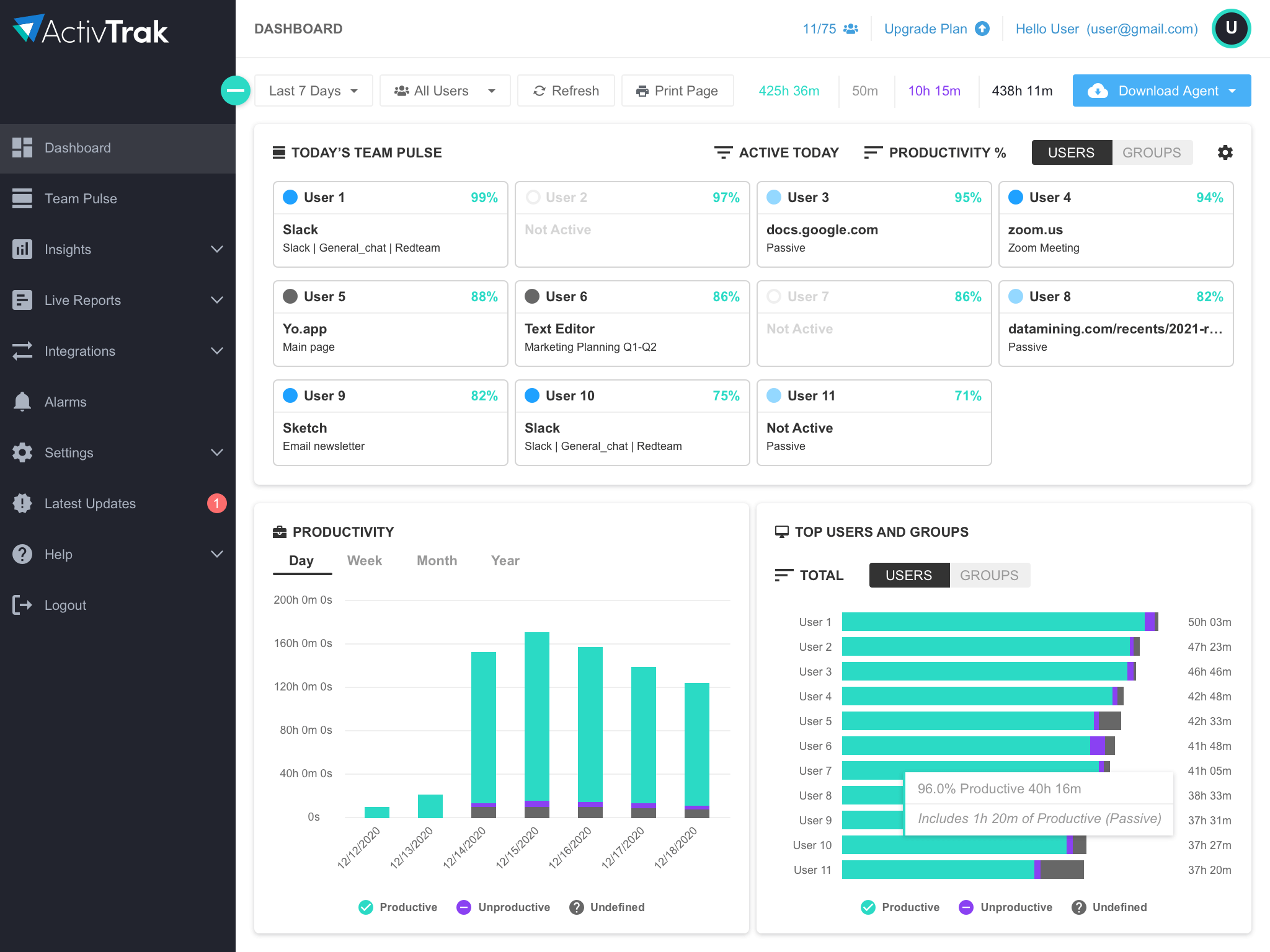
At its core, ActivTrak tracks computer activity and turns that into useful information for managers. First, you install an agent on each device. Then, ActivTrak monitors the apps and websites people use and how long they spend on them.
But the real value isn't just collecting this information. It's what the platform does with the data afterward.
1. Live Visibility

ActivTrak's live views helped me quickly check on my team. Are they working smoothly? Stuck in too many meetings? Or jumping between tasks all day? This works best for monitoring remote teams.
Limit:
Live views only tell part of the story. Some jobs don't show up well in tracking software. For example, designers, strategists, or people on phone calls. They might look "quiet" even when they're working hard.
To fix this issue, set clear expectations upfront and adjust your tracking settings to match different work styles.
Read more:
2. App & URLs Classification

ActivTrak lets me sort apps and websites into groups. You can mark them as productive or unproductive. After setting this up, I got accurate reports. This helped me make better choices about coaching and workplace rules.
Limit:
You have to set this up first, and it takes time. If you skip this step, your data won't look right, and the tool will not be helpful.
Learn more about:
How to Monitor Employees Computer Activity
3. Workload Balance & Coaching Signals
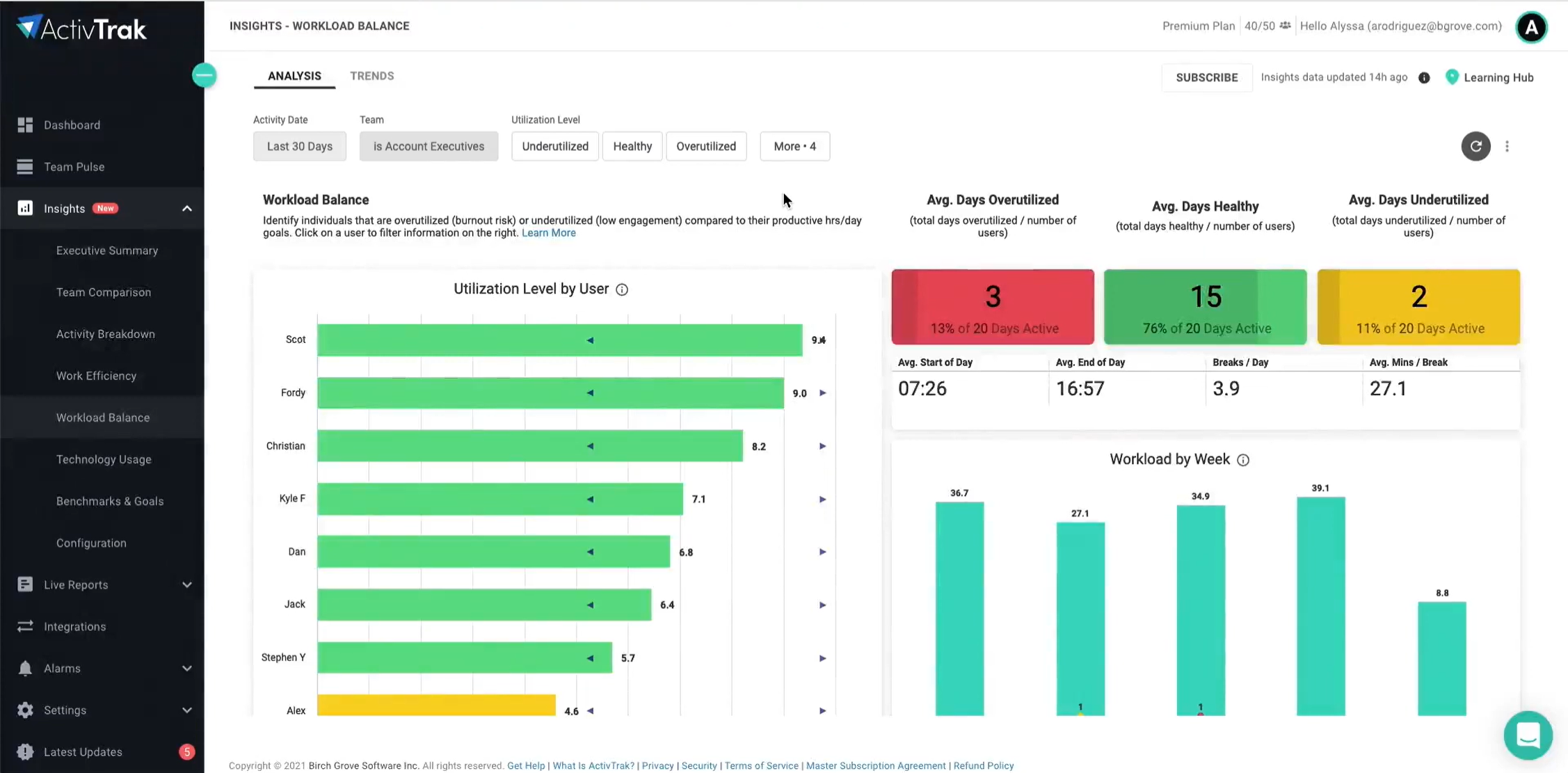
ActivTrak's standout use case is spotting work patterns that show problems early. It helped me track who is overloaded, underused, or has uneven workloads.
Limit:
The tool is not a mind-reader. Think of it as a helpful warning system. You still need to look at actual results, job roles, and use your own judgment as a manager.
4. Productivity Analytics

This is where ActivTrak goes beyond just monitoring and starts analyzing.
The trend dashboards showed me how employees spend their time. The app breaks down focus time versus meeting time and shows how productivity is spread across my team.
Limit:
The platform tracks activity to measure productivity. But how you read the data matters a lot. If leaders use these charts to judge people, it hurts morale. But if they use them to spot problems and find solutions, it becomes useful.
5. Controls, Interventions, and “How invasive is it?”
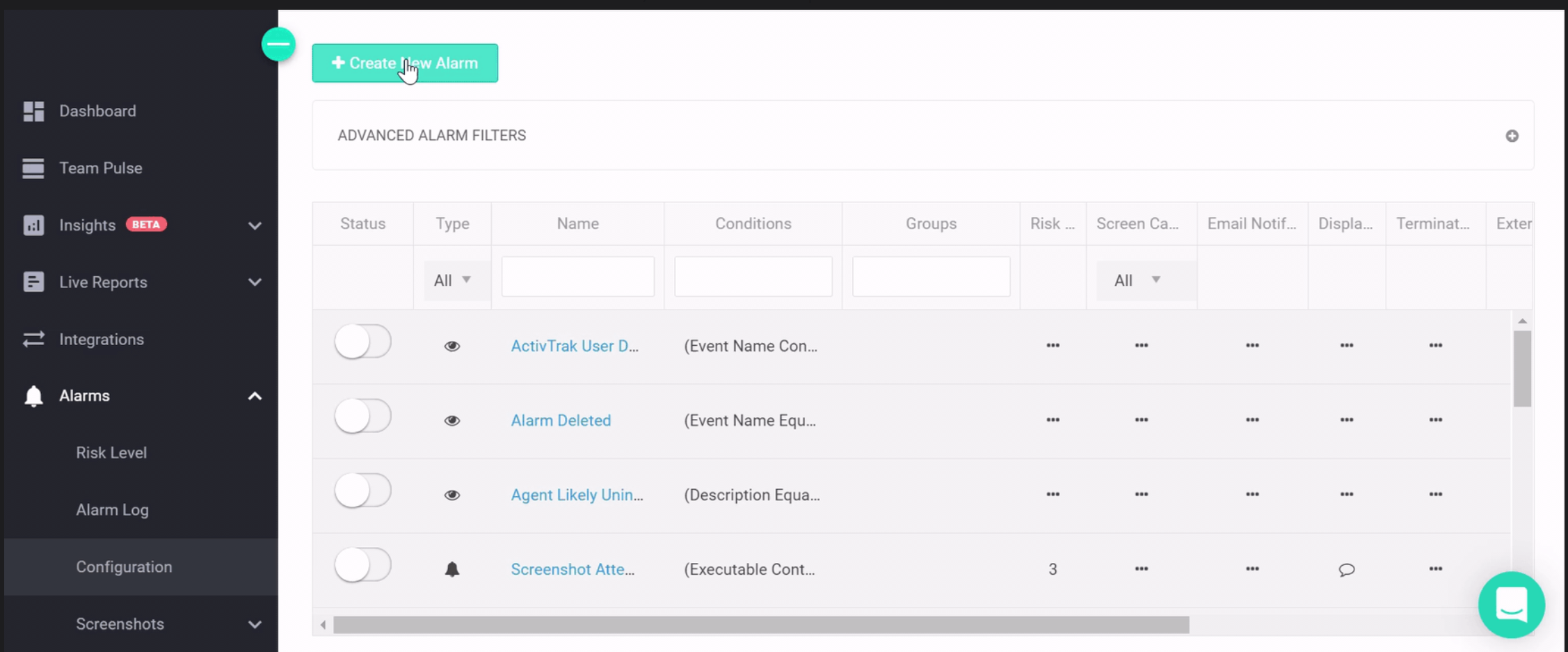
ActivTrak includes alerts and website blocking. I also got a closer look at screens through screenshots. I blocked distracting websites on certain computers and received alerts when someone broke company rules.
Limit:
These features cause privacy concerns. Some people won't feel comfortable being monitored that closely. If your team falls into that group, keep things privacy-friendly instead. Focus on helping people work more effectively and manage their workload.
Explore further:
Monitoring vs Spying in Workplace
Who Should Use ActivTrak
After two weeks, the pattern was clear. ActivTrak works best when you use it to fix problems with workload, meetings, and work habits. It doesn't work well when you use it to monitor people closely.
Different jobs get different benefits from it.
For Owners and Managers: Clearer Coaching without Constant Check-Ins
If you manage a hybrid or remote team, the hardest part isn't checking if people are working. It's figuring out who's stuck, who has too much on their plate, and where everyone's time actually goes.
ActivTrak turns your team's daily work into clear signals you can use in your one-on-one meetings:
- Workload Balance shows you when work isn't spread evenly. You can shift things around before anyone burns out.
- Focus vs collaboration patterns reveal when meetings and messages take over. This helps you protect time for deep work.
- Trends over time give you a better picture than looking at just one busy or quiet day.
- Learn which tools your team needs. You might be paying for software that nobody uses.
For IT and Security: Governance and Guardrails
IT teams want two things: easy setup and control over who sees what. ActivTrak helps IT give leaders the data they need. But it doesn't turn everyone into a spy.
- You can roll it out the same way everywhere. You control who can access what. This stops people from misusing the tool.
- You get tools like alerts and website blocking to enforce your rules. Use these carefully, not on everyone, all the time.
For HR: More Consistent, Less Subjective Performance Conversations
HR teams face a tough choice. They need to see what employees are doing, but they don't want to spy on them.
In this case, ActivTrak can help you find the middle ground. It shows you real data about workload, schedules, and work habits. You can use this info to coach your team and help them grow.
You can also set it up to protect privacy. When people trust the system, they'll actually use it. And that matters.
Read more:
Employee Monitoring Company Policy
ActivTrak Pros and Cons


My Verdict
After 14 days, ActivTrak feels less like a “monitoring app” and more like a workforce analytics tool. You can see who has too much work, who's stuck in too many meetings, or which tools people are using. It helps you spot problems before they get worse.
So, I’d say, ActivTrak is only worth the money if you use it to help your team work better. But if you just want to monitor employees, it's not the right tool.
But for my workflow, I need to track tasks & projects, check billable hours, send invoices, and handle payroll. On top of that, I need screen monitoring with automatic screen capture and screen recordings. Because of all these needs, ActivTrak isn't the right fit for me.
ActivTrak vs Apploye: Which is the Better?
With ActivTrak, you might think, "The insights are good, but do I really need all this instead of checking what my employees are doing?" That's where Apploye comes in.
Both tools monitor your team. But they work toward different goals.
- ActivTrak = workforce analytics & workload decisions
- Apploye = time tracking + employee monitoring + payroll/invoicing
Key Differences in Features
ActivTrak is strongest when you need to manage performance patterns, not timesheets.
- Daily/weekly/monthly productivity analysis, team/org rollups, and “work balance/well-being” style insights.
- Better fit for capacity planning and coaching after you’ve built up data history.
- Not built around “proof-of-work” capture: it doesn’t do keystroke logging.
Apploye is strongest when you need to track active & idle time and monitor employee activity.
- Time tracking is front-and-center, with projects, tasks, timesheet approval, invoicing, and payroll features.
- Takes screenshots randomly and records the screen automatically when employees start the app.
- Logs which apps and websites employees visit during work hours.
Pricing
ActivTrak: $10 / $15 / $19 per user/month for Essentials / Essentials Plus / Professional, with a free plan (3 users).
Apploye: starts much lower, e.g., $4.5 / $8 / $10 per user/month for Elite / Power / Enterprise, with a free plan (up to 10 users).
Frequently Asked Questions
ActivTrak works on Windows and macOS via its desktop agents, and on ChromeOS/Chromebooks via a ChromeOS Agent. It does not provide mobile device tracking for iOS or Android.
No, ActivTrak does not record or log the actual keys you type. Instead, it detects keyboard/mouse activity to determine active and idle time.
No, ActivTrak doesn't turn on "screen views" automatically. An admin has to buy the Screen details add-on first. Then they need to turn the feature on in the settings.
ActivTrak tracks work activity patterns instead of spying on you. It doesn't record what you type, won't turn on your webcam or microphone, and screenshots are completely optional, so you can turn them off if you want. Plus, admins can control who sees what. They use role-based access to limit data exposure. They can also hide sensitive information to protect your details.
ActivTrak tracks what apps and websites you use on your computer. It also tracks how long you use them. Plus, it watches if you're actively working or just idle.Also, depending on your settings, ActivTrak collects URL/window details and screenshots.
First, open the dashboard you want to work with. Next, pick your date range and choose which teams or users you want to see. Then you can export your view to CSV or Google Sheets. You can also subscribe to get it sent to your email on a schedule. For deeper analysis, use the ActivConnect add-on. It lets you build custom reports in tools like Power BI. This gives you more options beyond what's built into ActivTrak.
ActivTrak helps teams get more done by showing where time goes, who has too much work, and which apps or meetings slow people down. Managers can use this to fix problems, spread work better, and get rid of tasks that waste time.
Apploye is the best ActivTrak alternative if you need simple time tracking with employee monitoring. It's not about deep productivity analytics. Instead, it focuses on what matters most: tracking time and managing your team. Apploye is easier to set up. And it works great for agencies and teams with lots of contractors. The flow is simple: track hours → check activity → approve → invoice or pay. That's it.
First, you need to spend time setting it up right. You have to tell the software which apps and websites matter for work. The tool tracks computer activity. But this can miss offline work like meetings or phone calls. Some workers might look less productive than they really are. Some of the best features, like workload balance and screen details, cost extra money. Also, the software doesn't work on phones or tablets. So if your team uses mobile devices, you can't track that work.
Yes, ActivTrak connects directly to Google Calendar and Microsoft Outlook. The platform also handles user management through Entra ID. Plus, it links to HRIS systems like ADP Workforce Now using SFTP. You can even set up alerts that go straight to Microsoft Teams or Slack.