Understanding & Improving Call Center Agent Utilization
Key Takeaways
-

Agent utilization shows how much of an agent’s paid time is spent helping customers. Call center monitoring software helps teams spot waste, plan better, and stay organized at work.
-
Strong utilization is not about keeping people busy every second. The best teams balance calls, breaks, training, and admin work so service stays fast and stress stays low.
-
Simple fixes like clear schedules, smart staffing, fewer task switches, and better workflows can raise utilization, improve focus, and make daily work easier to manage.
Call center agent utilization allows you to see how effectively your employees are using their work hours. Whether they are getting overwhelmed or wasting precious time, utilization measurement will let you find that gap.
As a result, you can plan staffing better, control costs, and deliver faster service. In this blog, we will cover how to improve call center agent utilization. So, let’s begin–
Understand Call Center Agent Utilization First
Definition of Call Center Agent Utilization
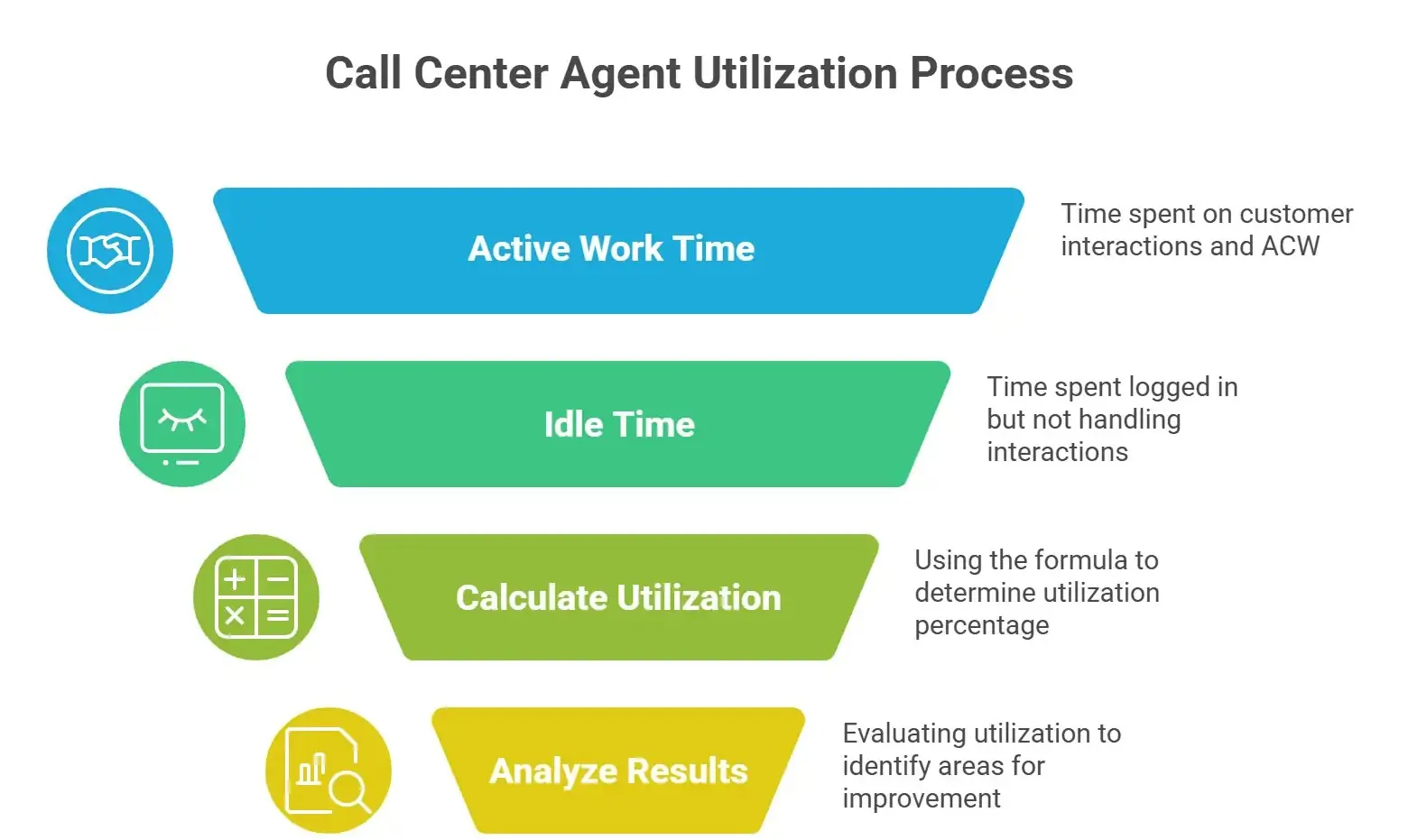
Call center agent utilization measures the percentage of an agent's actively working time spent on customer interactions compared to their total logged-in time.
In a contact center or service center, agents typically perform tasks such as–
- Attending customer query calls
- Placing customers on hold while searching for information
- Completing after-call work (ACW) like notes or ticket updates
All of these activities count as active work time for a help desk agent. Besides, the remaining time when agents are logged in but not handling interactions is considered idle or available time.
Agent utilization helps you understand how effectively your support center uses its workforce throughout the day.
Call Center Agent Utilization Calculation Formula
While agent utilization, managers use a simple formula to calculate effectiveness–
(Total Worked Hours / Total Available Hours) × 100
Here, Total Worked Hours represents the time spent on calls, holds, chats, or after-call work. Besides, Total Available Hours shows the data of Total logged-in time during a shift.
For example:
- An agent logs in for 8 hours
- They spend 6 hours handling calls, chats, and ACW
Utilization = (6 ÷ 8) × 100 = 75%
This means the agent spent 75% of their shift actively working with customers in the customer service center.
See live dashboards for agent utilization
Importance of Call Center Agent Utilization
You might be thinking, ‘Is it necessary for you as well to understand or leverage agent utilization?’ Well, understanding agent utilization is important because it directly impacts the performance of your call center services.
When you monitor utilization effectively, you can:
- Maximize efficiency: You understand whether your contact center has too many agents scheduled or too few. So you can prevent wasted labor hours while ensuring service quality.
- Lower cost per interaction: Better staffing decisions reduce operational costs in your service center because you’re using your workforce more effectively.
- Manage capacity: Utilization helps you plan for peak hours and slow periods in your virtual call center, ensuring agents are available when customers need help.
In short, it gives you a clearer picture of how productive your support center actually is.
Risks of Bad Call Center Agent Utilization
As most business strategies come with their own limitations, utilization is not indifferent as well. It’s useful, but it can also become problematic if it’s too low or too high.
Here’s what each stage means–
1. Low utilization
When utilization is low, it usually means agents are idle too often. This increases operational costs for your call center services because you're paying staff who are not actively handling interactions.
The common causes of low utilization are Overstaffing, Poor scheduling, and Low call volume forecasting accuracy.
2. Very high utilization
On the other hand, extremely high utilization, especially above 80–85%, can create serious problems.
Your customer service center agents may experience Constant back-to-back calls, get limited break time, and go through high stress and fatigue. This ultimately can lead to burnout, reduced service quality, and higher turnover in the customer service center over time.
That’s why finding the right balance in held desk agent utilization is so important.
See idle time and screenshots in one view
What’s a “Good” Customer Service Center Utilization Rate?
Most contact centers aim for a utilization rate between 75% and 85%.
This range is often considered the sweet spot. The reason behind this is that agents can remain productive in this particular stage while having time for breaks, coaching, and unexpected tasks.
However, the ideal utilization rate can vary depending on:
- Channel type (voice, chat, email)
- Complexity of customer issues
- Goals of the help desk or support center
For example:
- Technical service centers may need slightly lower utilization because issues are more complex.
- High-volume call center services handling simple requests may operate closer to the higher end.
It’s also important to remember that higher utilization isn’t always better.
If agents spend nearly all their time on calls:
- Service quality may drop
- Employees may feel overwhelmed
- Attrition rates can increase
Healthy utilization ensures productivity without sacrificing agent well-being.
Keep utilization balanced with smart tracking
How to Improve Help Desk Agent Utilization
You don’t need to force your agents to work harder for utilization at all. Instead, it allows you to improve processes within your contact center so agents can work more efficiently.
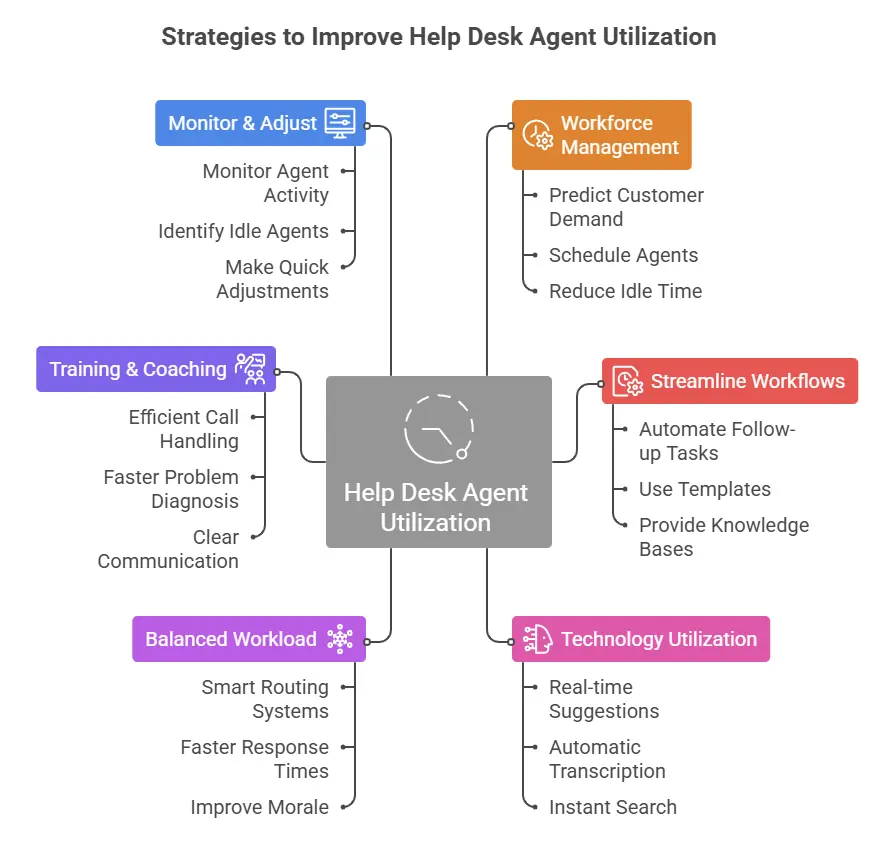
Here are several proven strategies you can follow to ensure you are using agent utilization in the right way—
1. Workforce Management (WFM)
The most effective strategy to improve employee utilization is maintaining proper call center workforce management. Good workforce management can help the support center ensure the right number of agents are scheduled at the right time.
In a busy customer service center, call volumes can fluctuate throughout the day. Accurate forecasting for workflow management allows you to:
- Predict customer demand
- Schedule agents during peak periods
- Reduce idle time during slower hours
Flexible scheduling also helps virtual call center teams adjust staffing levels without overloading agents.
Match staffing to real tracked work hours
2. Streamline Workflows
Inefficient workflows often reduce productivity in help desks and support centers. And here, one of the biggest time drains you will notice is after-call work (ACW).
To reduce after-call work and streamline workflows, you can–
- Automate the follow-up tasks
- Use templates for ticket updates
- Provide searchable knowledge bases to the team
When your agents can find answers quickly, they will spend less time searching for information. This will reduce call time and after-call work by resulting in more time spent helping customers.
Reduce ACW with time and task visibility
3. Technology Utilization
Modern call center services rely heavily on technology to improve efficiency. Here, using AI-powered tools can assist your agents in several ways:
- Provide real-time suggestions during calls
- Offer automatic call transcription
- Give instant knowledge base search
AI chatbots can also handle routine inquiries, which reduces call volume in the contact center and allows agents to focus on complex issues.
Use app and URL data to remove friction
4. Balanced Workload
Uneven workloads can hurt utilization. For example, some agents may receive too many calls while others remain idle.
Try to leverage smart routing systems in your support center. It will help you distribute interactions evenly across the team. So, you can achieve faster response times, better workload balance, and maintain consistent service levels.
Balanced workloads also improve morale in customer service centers.
5. Training & Coaching
When you have well-trained agents, they can handle interactions faster and more confidently. At your service center, you may have newbie agents as well as experienced ones. Try to understand the employees' needs. You can also arrange regular coaching sessions in your service center, which can focus on–
- Efficient call handling techniques
- Faster problem diagnosis
- Clear communication skills
Over time, this training reduces handle time and improves productivity across your call center services.
Coach faster with screen and activity data
6. Monitor & Adjust
In a call center, "once and done" doesn't work because the environment is constantly moving. If you only adjust your troops once, you're managing based on a snapshot of a situation that has already changed.
Utilization should never be measured once and forgotten. Modern contact center dashboards allow managers to monitor agent activity in real time. This helps you quickly identify:
- Agents who are idle too often
- Teams overloaded during peak hours
- Scheduling gaps
With this information, you can make quick adjustments and maintain optimal utilization levels in your virtual call center.
How to Balance Virtual Call Center Agent Utilization and Well-being
Agent well-being is the key to a business’s success. We all know, productivity is important. However, if your employees' well-being is not ensured, their productivity will start to drop, no matter what strategy you follow.
High-pressure environments in support centers can quickly lead to burnout if not managed properly. This is why a proper balance between work pressure and well-being is necessary. Here are a few ways to maintain balance:
- Set realistic utilization goals: Instead of targeting 100% productivity, aim for sustainable levels that allow agents to perform consistently.
- Staggered breaks: In busy call center services, staggered breaks help maintain coverage while still giving agents time to rest.
- Monitor stress levels: Managers in customer service centers should regularly check in with agents, watch for signs of fatigue, and provide support when needed. A healthy team ultimately delivers better customer experiences.
Spot overload early with live team insights
Conclusion
Agent utilization is one of the most important metrics in any contact center or service center.
When managed correctly, it helps you run more efficient call center services, reduce operational costs, and maintain better customer support performance.
However, the goal isn’t to push agents to their limits. Successful customer service centers focus on balancing productivity with employee well-being. So, leverage the tips we shared in this blog, monitor regularly, and update your employee management for better utilization.
Here’s to the success of your customer service center.
Start free for up to 10 team members now
Frequently Asked Questions
What is call center agent utilization?
Call center agent utilization measures the percentage of time agents spend actively for customer interactions compared to their total logged-in time.
What’s the difference between occupancy and utilization?
Occupancy measures how busy agents are when they are available to take interactions. Besides, utilization measures how much of their entire logged-in time is spent working.
What is a good utilization percentage for a call center?
Most call center services aim for 75–85% utilization. It is considered a proper balance of productivity and employee well-being.
Is higher utilization always better?
No. Extremely high utilization can harm more than help you. It can lead to employee burnout, lower service quality, and higher employee turnover in your customer service centers.
How does shrinkage affect utilization and staffing?
Shrinkage directly impacts an agent’s ability to hit utilization targets. It reduces the time agents are available to truly work, so managers must account for it when planning staffing levels in a contact center.
How do you reduce after-call work (ACW)?
We can reduce ACW by using automation, templates, and integrated CRM systems that speed up documentation tasks.
How do you improve schedule adherence without micromanaging?
Use of expectations, providing supportive management, and scheduling tools can help my agents stay on track without constant supervision.
How should utilization be measured in chat and omnichannel environments?
In omnichannel environments, utilization is measured by concurrency. It is an agent’s ability to handle multiple chats or tasks simultaneously. Instead of a simple "on" or "off" status, it is calculated as the agent's total capacity percentage that is currently active. To get an accurate utilization picture, you must track their "active handle time" across all channels.
What’s the relationship between utilization, AHT, and service level?
These three metrics are a balancing act. If AHT (Average Handle Time) increases, your agents stay on calls longer, which automatically drives utilization up. High utilization means fewer agents are free to work. This causes your service level to drop as customers wait longer in the queue. To maintain a strong service level, you must keep utilization at a sustainable point so there is enough breathing room to handle the next call immediately.
How do you prevent burnout when utilization is high?
When utilization is high, try to prevent burnout by scheduling breaks, providing coaching, managing workloads, and maintaining realistic productivity targets.
About Author