How Does Stealth Monitoring Work? Alerts, Logs, Dashboards
Key Takeaways:
-
Stealth monitoring software uses a hidden program on your work computer. This program tracks what you do (time spent, apps you use, websites you visit, and security issues). Then, it sends this information to the main computer. The main computer turns it into charts, alerts, and reports. It should be policy-based, disclosed, and limited to business needs.
Stealth Monitoring Data Pipeline
Try the ultimate productivity tracker today
Most stealth monitoring systems work the same way:
They track activities on your device (like when you're working vs. idle, which apps you're using, and if you visit work sites). They also watch for security issues like unusual file transfers.
Next, they send that information to a main server. Your data stays encrypted and safe.
Then, the system looks for patterns and creates alerts. For example, you might notice you're often idle during work hours. Or it might flag when someone uploads big files to an unapproved cloud service.
Finally, managers, HR, and IT can see reports and dashboards. Each person only sees what they need for their job.
For example, imagine a remote employee using a company laptop:
- The agent notes the device is active and records work-app usage (e.g., Google Docs, Jira) plus idle time.
- It detects a security signal like a large file transfer to a USB drive (if that’s in policy scope).
- The data is encrypted and uploaded in the background to a secure system.
- The system summarizes the week into reports (attendance patterns, top apps) and creates alerts only when something crosses a defined threshold (e.g., repeated after-hours access to sensitive folders).
- A manager sees team-level trends, while IT sees security flags, all logged for auditing.
Here is a simple look at the 5-step process of how stealth monitoring works.
How Stealth Monitoring Works
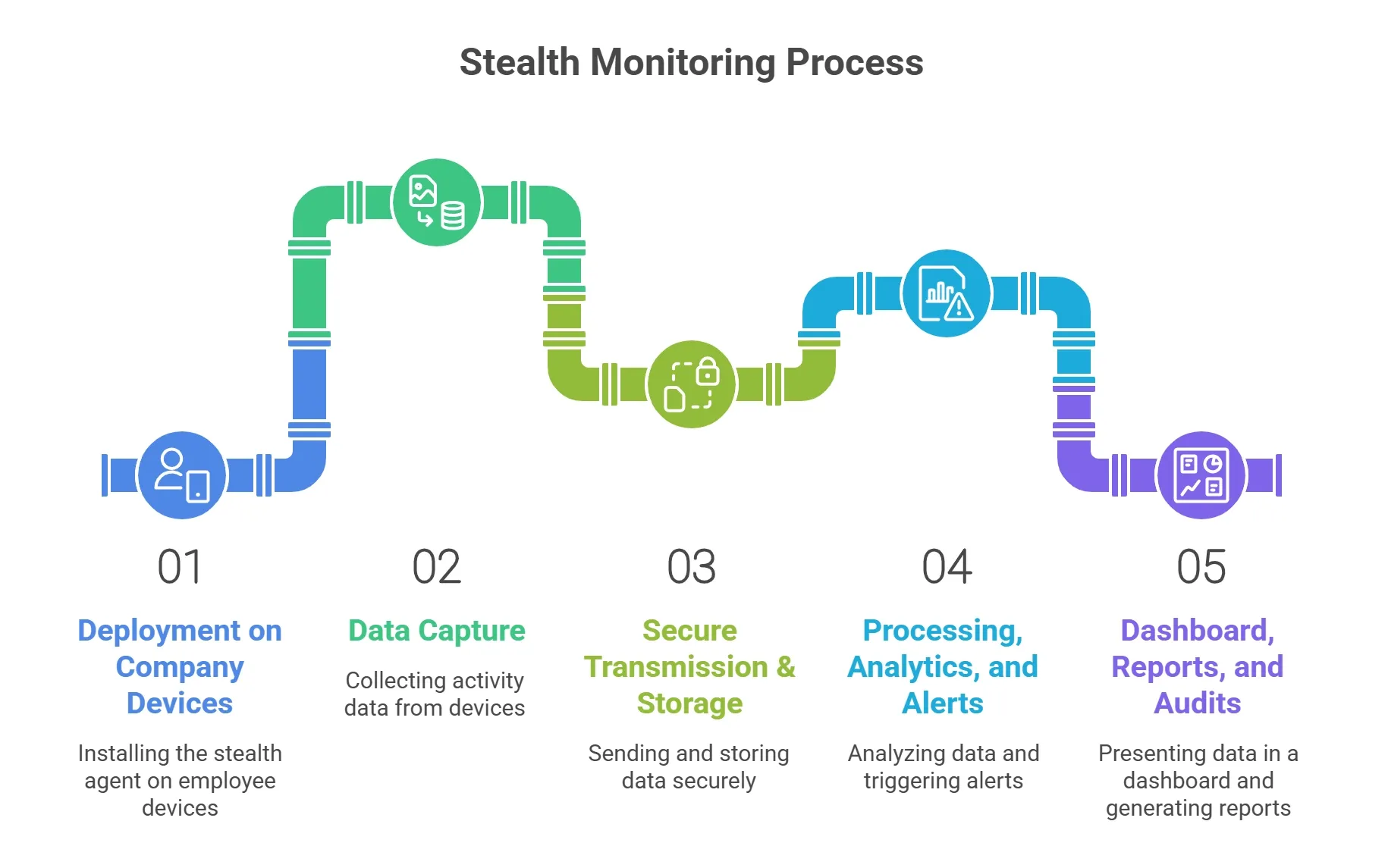
Step 1: Deployment on Company Devices
The first step in stealth employee monitoring is getting the "eyes and ears" onto the device. This is done by installing a Silent Agent using specialized Deployment Methods.
An agent is a kind of software that stays on the employee's computer. Unlike a regular app (like Spotify or Zoom), a stealth agent is designed to be invisible. These agent usually has no UI, and start automatically whenever an employee starts using their device.
As these stealth surveillance setup requires advanced technical knowledge, employers use specialized IT personnel to deploy the agent on their employees’ devices.
Here are the methods through which IT departments deploy an invisible agent on an employee’s device:
- Network Push (GPO): Companies that have a central network, their IT department can "push" the agent to hundreds of laptops at once. So, when an employee logs in, the network automatically installs the agent in the background.
- Silent Command Lines: IT experts use a "quiet" installation code in this deployment method.
- Master Imaging: Many companies install the agent on the laptop's "Master Image" before it's even mailed to the employee. So, employee productivity monitoring becomes a part of the computer’s system from day one.
- Remote Management Tools (RMM): If a company uses management software to update apps or fix bugs, they can use those same tools to "drop" the monitoring agent onto the device at any time.
Enforce operational standards with silent setup
Step 2: Data Capture
Once an employee's secret monitoring system gets successfully deployed, it starts to collect activity data from that particular device. Companies can track, collect, and analyze that data for better productivity management.
Here’s what activity data, an employee secret monitoring solution captures–
I. Time & Attendance
Time and attendance tracking is the baseline of a silent tracker like Apploye monitoring solution on an employee’s device. Usually, these systems start to track a device’s time and attendance even without getting any manual punch clocks. Here’s what an invisible tracking agent automatically logs—
- Active vs. Idle Time: The solution tracks "active" minutes (typing or moving the mouse) versus "idle" minutes (when the computer is on but untouched).
- Shift Patterns: It records exactly when a device is powered on, when the user logs in, and when they shut down for the day.
Eliminate attendance gaps with automated logs
II. App & Website Usage
Undercover observation tools also record which apps and websites a user uses during their work hours. It automatically groups those apps into productive vs unproductive sections. For instance, it can group a user’s activity of Drive or Visual Studio as productive app usage, whereas platforms like YouTube or Facebook may be labeled as neutral or unproductive ones.
View real-time app and website usage reports
III. Screenshots/Screen Activity
One of the most effective benefits of using a discreet surveillance agent on employees’ devices is getting real-time screen monitoring to see what’s going on their devices.
An app that works in undetectable stealth mode takes screenshots and sometimes records the user’s screen to allow managers to get all visuals without interrupting them for updates. Usually, an agent takes snapshots of the screen at random intervals (e.g., once every 5 or 10 minutes) or when a specific "trigger" occurs.
On the otherhand, some advanced tools record short video clips of screen activity during high-risk actions. It allows managers to see exactly what happens that leads to an unusual event.
Secure undeniable visual evidence of progress
IV. Security/Compliance Signals
You might be wondering, how does stealth monitoring work for ensuring security? Well, along with other hidden mode activity, stealth monitoring also helps protect company data. It acts like a quiet security guard in the background of an employee’s device.
These tools watch for warning signs that could put company information at risk. This includes tracking when large files are moved to a personal USB drive or uploaded to private cloud storage like a personal Dropbox account.
Hidden mode activity tracking agents can also detect policy violations. For example, it may flag the use of blocked software or visits to websites that are not allowed by company rules.
V. Contextual Notes
Along with data collection, modern invisible tracking tools try to find out the reason behind an activity. Thus, it helps employers get contextual data instead of just tracking.
For example, it expects a graphic designer to spend a lot of time using tools like Adobe Photoshop. If that same person suddenly starts using coding software, the system notices the change.
It also connects different pieces of information. For instance, it can show that someone spent several hours on a website and link that time to an upcoming project deadline in their work calendar.
Step 3: Secure Transmission & Storage
Once the data is collected, the stealth monitoring agent sends it from the employee’s computer to a secure server where it can be reviewed. This transfer happens quietly in the background and does not affect the employee’s work or internet speed.
To keep the data safe, it is protected while being sent and while it is stored. The information remains locked so it cannot be read by outsiders, and companies keep it only for a set period of time to protect privacy.
Even though everyone’s access to these types of data remains restricted, only authorized people, such as managers or HR, can view it. These systems also contain strong security checks, so employers can easily prevent misuse.
Secure your company data with safe tracking
Step 4: Processing, Analytics, and Alerts
As a manager, do you think you can spend all day in front of the desktop to check if there’s any suspicious activity going on? Well, to minimise your monitoring effort, a stealth monitoring solutions act as a smart filter for you. It picks up the most important events, so you can get the most information without spending much of your time.
Here’s how a discreet surveillance tool acts as a smart filter—
- Automated Tripwires (Rules & Thresholds): You set various boundaries. For instance, if an employee stays idle for too long, visits a risky website, or starts an unusual data transfer, the system triggers an instant alert.
- Spotting Patterns (Workforce Analytics): The software learns what a "normal" day looks like for your team (the baseline).
- Finding the "Red Flags" (Anomalies): Using behavioral analytics, the system flags anomalies like someone logging in at 3:00 AM or accessing files they don't usually need.
- Risk Scoring: The tool assigns a simple "risk score" to activities. This helps you see at a glance who might need a check-in or more support without having to watch every single screen
Unlock smart analytics for your remote team
Step 5: Dashboard, Reports, and Audits
In the final stage of undetectable stealth mode monitoring, the solution funnels all the processed data and centralizes it into a dashboard where it is organized into clear, visual insights.
However, the dashboard usually provides role-based views to the user. Which means, different people can only access data related to their roles. For instance, a manager might view team productivity levels, while HR tracks attendance and IT focuses on security & insider threats.
To save time, these types of software also generate scheduled reports that land directly in an executive's inbox, summarizing the week’s performance. Finally, if a dispute or security breach ever occurs, the system allows for detailed data exports, providing a factual "paper trail" that is essential for internal audits or legal investigations.
Monitor everything from one simple dashboard
What Stealth Monitoring Can’t Tell You
Though stealth monitoring provides a clear picture of digital activity, it doesn’t tell the whole story about your organization. It is a tool for data, not a replacement for management.
To use it fairly, it’s important to understand where the technology’s "blind spots" are.
1. Activity ≠ Outcomes (False Positives, “Idle Time” Misunderstandings)
The biggest trap of a quiet mode monitoring software is assuming that a "busy" computer means a productive human. Your employee might have a high activity score because they are clicking through emails, while another might look "idle" because they are deep in thought or sketching a solution on a notepad. These "idle time" misunderstandings can lead to false positives where great workers are unfairly flagged simply because they aren't constantly moving their mouse.
So, while tracking employees through an undercover observation tool, don’t assume that more activity means more outcomes.
2. Knowledge Work Nuance: Meetings, Thinking Time, Offline Work
Modern work isn't just about typing. A lot of high-value "knowledge work" happens away from the keyboard. Stealth monitoring often struggles to capture:
- Strategic Thinking: Time spent brainstorming a complex problem.
- Offline Collaboration: A phone call or a quick huddle that doesn't happen on a tracked app.
- Research: Reading a physical book or reviewing printed documents. If a system only tracks digital input, it misses these vital parts of the workday.
3. Metrics that Backfire: “Productivity Scores” without Context
When employees feel they are judged only by a productivity score, it can hurt the business instead of helping it. People may focus on looking busy, such as moving the mouse or staying active on chat tools, rather than doing meaningful work.
Without understanding what an employee is actually trying to achieve, these numbers lose their value. Instead of improving performance, they can create stress, pressure, and unhealthy work habits.
Conclusion
Ultimately, stealth monitoring is a powerful bridge between the flexibility of remote work and the need for business security.
When used correctly, it replaces micromanagement with objective data, allowing leaders to protect company assets and identify productivity trends without hovering over every desk. However, the most successful companies remember that the software is only one part of the equation.
By balancing these digital insights with human trust and clear communication, you can build a high-performing team that is both accountable and empowered.
Frequently Asked Questions
How does stealth monitoring work on a company laptop?
Stealth monitoring quietly runs in the background of a company-owned device. Here, it collects work-related data without interrupting the employee’s focus.
What does stealth employee monitoring track?
Stealth monitoring typically tracks app and website usage, time spent on tasks, system activity, and productivity patterns. It ultimately focuses on an employee’s work behavior without spying on personal content.
Is stealth monitoring ethical?
If it’s done with one’s consent and with transparency, stealth monitoring is ethical. However, if there’s no legitimate business purpose to track data, and it is done secretly, it is considered unethical to track one’s device.
Can employees detect stealth monitoring software?
Yes, they can. Though most stealth monitoring tools are designed to be difficult to notice, tech-savvy users may detect them through system processes or security checks.
How do you implement stealth monitoring without destroying trust?
I can start stealth surveillance without destroying my employees' trust if I clearly communicate what is monitored, why it’s necessary, and how the monitored data will be used. Following transparency among the employees will help to hold on to the trust employees have in the company.
How do stealth monitoring tools track activity without being detected?
The tools for stealth monitoring operate silently in the background of a device with minimal resource usage. However, not having a visible interface also allows it to track activity without being detected.
How has stealth monitoring evolved with advancements in technology?
Modern tools now use cloud syncing, AI-driven insights, and behavior analysis instead of invasive tactics. All these advanced solutions make monitoring employees more accurate and less disruptive.
Start your free productivity trial today
About Author