What is Bossware? How It Works, Laws, Risks & Examples
Key Takeaways
-

Bossware is a critical term for intrusive or excessive workplace surveillance. The Electronic Frontier Foundation made the word popular in 2020, during the early remote-work surge.
-
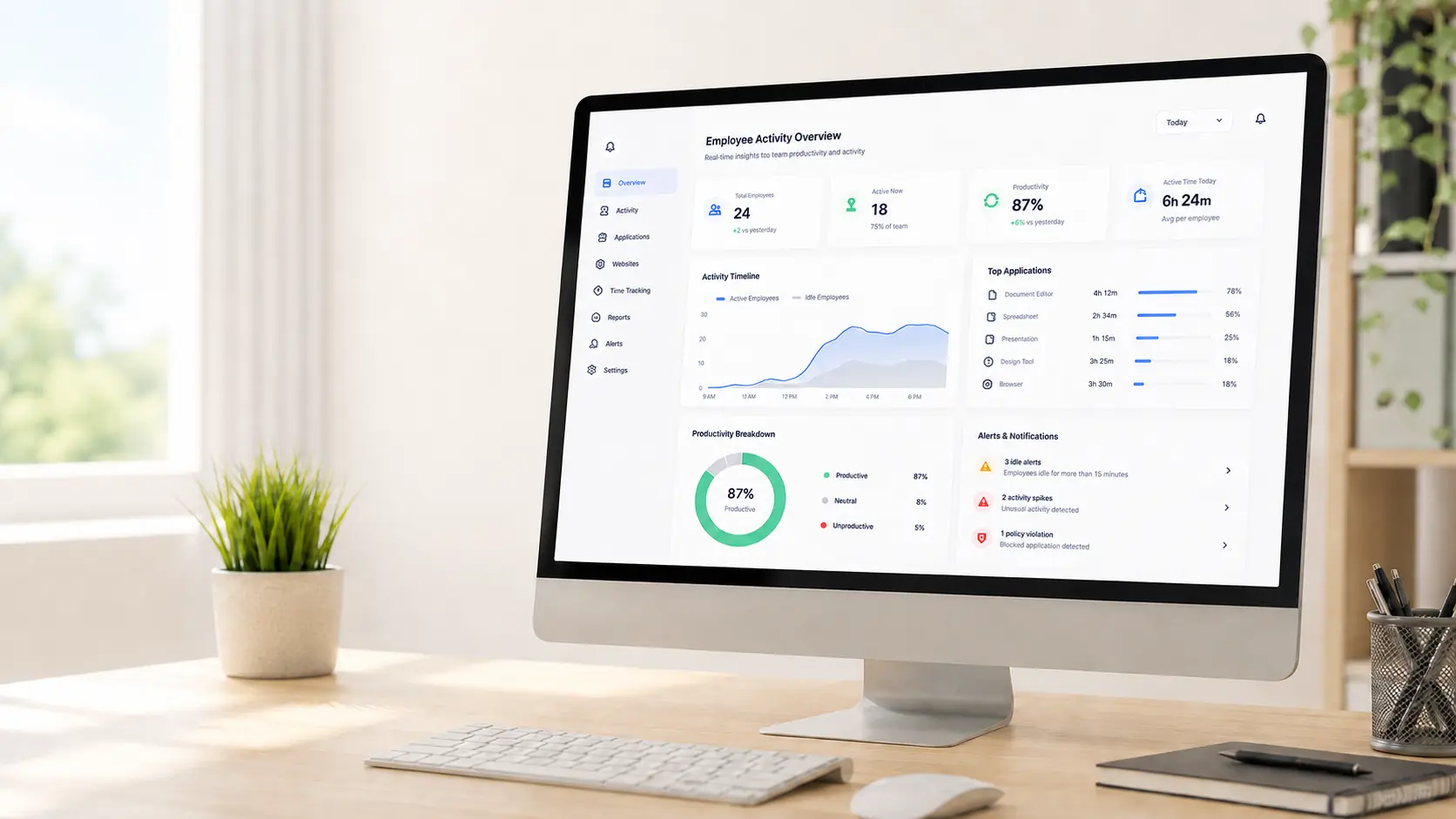
Monitoring software can track time, apps, websites, screenshots, activity, messages, location, and device details.
-
The feature alone rarely makes a tool bossware. What matters is how you set it up, why you use it, whether you tell workers, and how you use the results.
-
Monitoring often becomes bossware when it is secret, excessive, active outside work hours, or treated as proof of performance.
-
Ethical monitoring starts with a clear purpose, clear notice, limited data, sensible retention, employee access, and human review.
What is Bossware?
People call it bossware when the monitoring goes too far. For example, when it is hidden, excessive, unrelated to business needs, or used to punish workers.
Here is a simple example. A visible timer that records billable hours is ordinary time tracking. And secretly recording an employee's screen after hours is bossware.
Not every kind of monitoring is bossware. The line depends on four things:
- why you monitor,
- what you collect,
- whether workers know,
- how you use the data.
Where the Term "Bossware" Came From
The Electronic Frontier Foundation (EFF) made the word popular. In June 2020, the EFF published a report on employee-monitoring products it found invasive. The timing mattered. COVID-19 had just sent millions of workers home, so employers turned to software to watch them.
Adoption grew fast. Gartner found that the share of large employers using monitoring tools roughly doubled during the pandemic. Since then, the tools have become more automated and more powerful. That growth is a big reason the backlash has been so sharp.
The US Government Accountability Office uses a broader, neutral term: digital worker surveillance. It covers monitoring software, cameras, microphones, GPS trackers, mobile apps, and wearable devices.
What does Bossware Mean?
Bossware is workplace technology that watches, records, analyzes, or scores how employees behave.
The word signals that monitoring has become invasive, secret, excessive, or unfair.
Related terms include:
- Tattleware
- Employee-surveillance software
- Workplace surveillance
- Activity-monitoring software
- Productivity-monitoring software
- Remote employee monitoring
- Algorithmic management
These terms do not always mean the same thing. "Employee monitoring" is the broad category. "Bossware" is the part of that category that crosses ethical, privacy, or legal lines.
Why Bossware is On the Rise
Employers have watched remote workers for decades, and many vendors are not new. But three shifts turned a small category into a workplace flashpoint.
Remote and Hybrid Work
More and more organizations are adopting hybrid work model. Home settings also blur the line between work and personal life. That makes the same monitoring far more invasive. A webcam in an office is annoying but understandable. But a webcam in the house is invasive.
Automation and AI
Old surveillance needed a person to review footage or logs. That limited its reach. Modern tools run quietly and at scale. They watch every employee by default, not just people who raise concerns. AI then turns raw activity into scores and rankings.
A Privacy and Labor Backlash
Privacy laws and renewed interest in unions give workers more standing to push back. StandOut CV surveyed monitoring tools in 2021 and 2023. It found that location and GPS tracking and video monitoring grew the fastest, by about 45%.
Employer surveys show the motives. In Digital.com research, most employers wanted to check how staff spend their time (about 79%) and confirm that staff work the full day (about 65%). About half used monitoring to see whether workers used work devices for personal tasks.
Employee Monitoring Software vs. Bossware
Keep the neutral category and the critical label separate. Employee monitoring software is the broad group of tools employers use to record work for billing, security, compliance, or workflow. Bossware is the invasive, secret, or punishing use within that group.
How does Bossware Work?
Most monitoring platforms follow the same data flow:
Some products run all the time in the background. Others collect data only when a timer or shift is active. Many use AI to turn raw activity into productivity scores. Some even give each worker a daily score.
What can Bossware Track?
What bossware tracks depends on the product, device, operating system, permissions, and setup. The table below pairs each capability with its purpose, main risk, and the point where it becomes unreasonable.
Tools Commonly Labeled Bossware
In press coverage and privacy research, common examples include Teramind, Hubstaff, Time Doctor, ActivTrak, InterGuard, WorkExaminer, and RemoteDesk.
Here is the caveat. Naming a tool is not an accusation. Most of these platforms offer many features. Whether a rollout becomes bossware depends almost entirely on the setup: which features you turn on, whether you tell workers, whether monitoring stays within work hours, and how managers use the results.
A clear, minimal setup of a "monitoring" tool can be fair. A hidden, maximal setup of a "time tracker" can be surveillance.
Is Apploye Bossware?
The honest answer is not a simple yes or no.
Apploye is a time-tracking and employee monitoring platform. Like any tool in this space, it can look like ordinary software or like bossware.
In practice, Apploye is built to stay on the accountable side of the bossware line:
- Visible, worker-facing time tracking: Tracking runs from a timer the employee starts and stops. It is not silent background surveillance.
- Transparent, controllable screenshots: You can set the screenshot frequency, and the feature is meant to be used openly, not in secret.
- No keystroke-content logging: Apploye measures activity levels. It does not record the words a worker types, so it avoids the highest-risk data.
- No webcam or microphone surveillance: It does not turn a home into a recording studio.
- Records employees can see. Workers can review the screenshots and the idle time Apploye has recorded. A hidden system does not score them.
Avoid excessive Bossware monitoring and still track productivity
What are the Risks of Bossware?
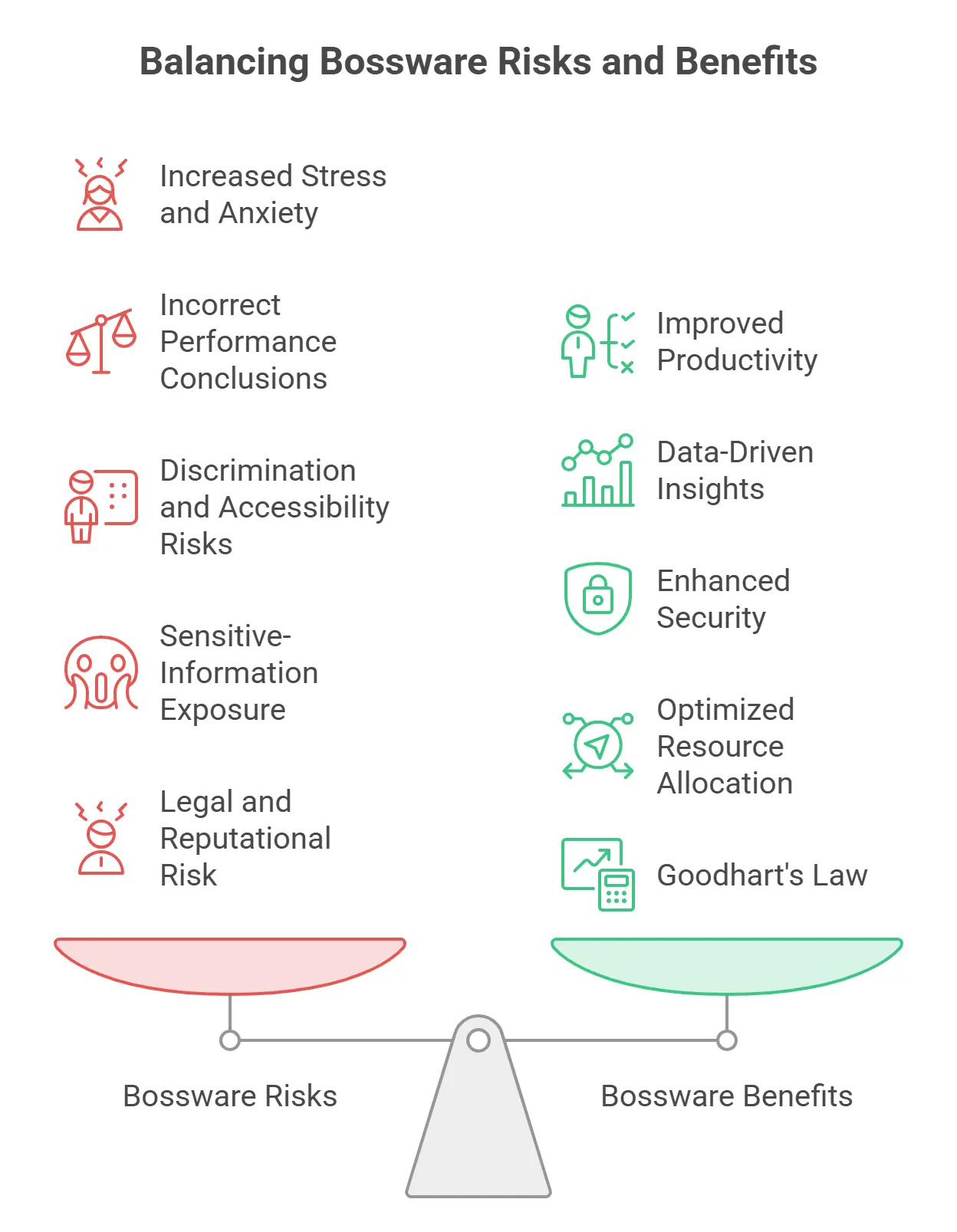
Stress and Loss of Trust
Constant surveillance makes employees feel they must always look busy. They may skip needed breaks, rush tasks, or spend energy gaming the system instead of doing good work.
The research supports this. In ExpressVPN survey data, about 56% of monitored employees felt stress and anxiety about being watched. About 32% said they took fewer breaks because of it. The GAO also found that digital surveillance can affect workers' health in both directions, including more anxiety and pressure to move faster.
Uncertainty makes it worse. Employees often do not know when tracking starts, when it stops, what managers see, how the data gets read, or whether it affects their job.
Incorrect Performance Conclusions
Monitoring tools measure what a computer can easily record. So they tend to undervalue strategic thinking, leadership, creative work, collaboration, relationship building, offline work, and hard problem-solving. A metric can be precise and still mean very little.
Heavy monitoring can also backfire. A 2022 Harvard Business Review study found that monitored employees broke rules more often than unmonitored ones. They took unapproved breaks, ignored instructions, and worked more slowly.
Discrimination and Accessibility Risks
An activity model may assume a productive worker uses a keyboard, mouse, screen, or app in a certain way. That assumption can hurt some employees. It can penalize people who use assistive technology, work by voice recognition, need medical breaks, work differently because of a disability, or need an accommodation.
The EEOC gives a clear example. A keystroke-based productivity algorithm could rate a voice-recognition user poorly, even when that person performs well. Outcomes like this can trigger the Americans with Disabilities Act. So this is not just an ethics problem. It is a legal risk most buyers never consider.
Sensitive-Information Exposure
Screenshots, recordings, messages, clipboard logs, and browsing data can expose a lot. That includes passwords, financial and medical details, customer records, personal and legal messages, and information about family members or other clients. The more data you collect, the more you must protect and the worse any breach becomes.
Legal and Reputational Risk
A monitoring practice can hurt your reputation before any court rules on it. Employees and customers object when a practice is secret, disproportionate, poorly secured, at odds with your public claims, or impossible to challenge.
Optimizing for the Metric (Goodhart's Law)
There is a well-known rule, often called Goodhart's Law: when a measure becomes a target, it stops being a good measure. Bossware is a textbook case. When the activity number becomes the goal, workers learn to improve the number, not the work. They keep extra apps open, jiggle the mouse, skip real breaks, chase easy tasks, and avoid hard work that looks quiet. The system then measures how well people game the system.
Is Bossware Legal in the United States?
There is no single US bossware law. Instead, a patchwork of federal and state rules may apply. They cover electronic communications, audio recording, discrimination, labor rights, biometrics, location data, personal devices, off-duty conduct, data security, and notice and consent.
Federal Communications Law
The Electronic Communications Privacy Act (ECPA) covers the federal Wiretap Act and the Stored Communications Act. It generally bans the intentional interception of wire, oral, or electronic communications, unless an exception applies. Whether it applies depends on what you capture, how you capture it, consent, and the system involved. Audio, message content, and communication monitoring need careful review.
Employment Discrimination
Federal anti-discrimination laws may apply when monitoring data or automated systems affect performance reviews, pay, promotion, discipline, accommodation, or termination. The EEOC's voice-recognition example shows the danger. Employers should check whether a metric hurts protected groups or workers who use accommodations. Other federal laws can apply too. The Occupational Safety and Health Act, the Family and Medical Leave Act, and federal wage-and-hour rules - when monitoring limits breaks or docks pay automatically.
Protected Concerted Activity and the NLRB
The National Labor Relations Act protects employees who act together over wages, benefits, safety, schedules, and other conditions. This applies whether or not they belong to a union.
This is the most active front in bossware regulation. On October 31, 2022, NLRB General Counsel Jennifer Abruzzo issued a memo. It signaled that intrusive electronic monitoring and automated management could break existing labor law when they interfere with protected activity. The memo pointed to older precedent. In a 1992 case, the NLRB faulted a casino for using guards with binoculars to watch employees. The memo suggested that keyloggers and passive digital monitoring could count as modern equivalents. Employers should not design or use monitoring to punish protected conversations or collective action.
Proposed Federal Legislation
Two bills from Senator Bob Casey (D-PA) show where federal policy may go. The Stop Spying Bosses Act would require employers to disclose monitoring. The No Robot Bosses Act would limit employment decisions made only by automated systems. Neither had become broad federal law as of this writing. So today they mainly signal the direction of travel.
State Laws
Several states already require notice. New York's electronic-monitoring law, effective in 2022, requires employers to notify employees. Connecticut (§31-48d) and Delaware have long-standing notice rules for certain electronic monitoring. And on January 1, 2023, California extended CCPA/CPRA privacy protections to employee data. That gives workers rights over the information companies collect about them.
The rules are often stricter abroad. In 2022, a Dutch court ruled that forcing an employee to keep a webcam on all day was a disproportionate intrusion. US employers with remote or global teams should assume the rules change by jurisdiction.
How to Detect Bossware
Read Workplace Policies
Review the employee handbook, acceptable-use and remote-work policies, privacy notices, device agreements, monitoring disclosures, and consent forms. Look for clear details on the data collected, purpose, work hours, devices, retention, manager access, and service providers.
Ask HR or IT
Fair questions include:
- Is monitoring software installed?
- What does it collect?
- Does it take screenshots?
- Does it count keyboard activity or record typed content?
- Does it collect website domains, full URLs, or page content?
- Does it run when I am not working?
- Who can see the data?
- How long do you keep it?
- Can I review my records?
- How do I challenge an error?
- Which third parties get the data?
Review Installed Apps
On your company device, look at the installed programs. But an unfamiliar program is not always bossware. It may handle security, updates, networking, accessibility, or device management.
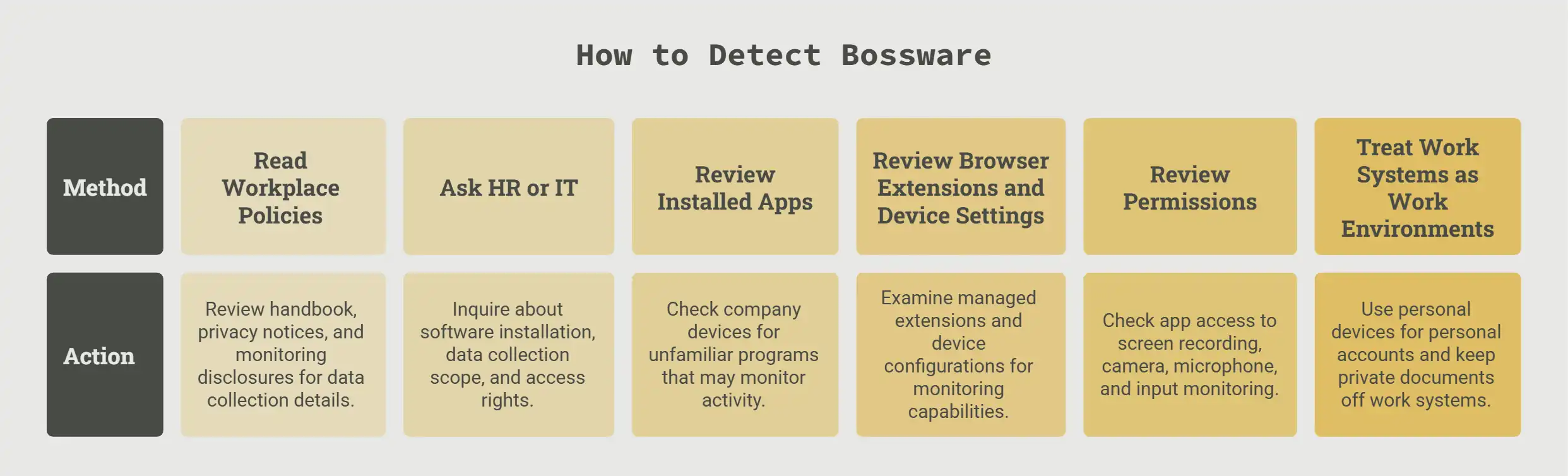
Review Browser Extensions and Device Settings
Company-managed extensions may handle security, passwords, content filtering, workflow, or monitoring. A managed device may let the organization install software, enforce updates, set security, restrict functions, or collect device details.
Review Permissions
Check which apps can reach screen recording, accessibility functions, camera, microphone, location, files, input monitoring, and background activity. A permission shows capability. It does not prove the app collects that data right now.
Treat Work Systems as Work Environments
Assume the company may log activity on its device, account, network, browser profile, or VPN. A few steps protect your privacy without evading authorized monitoring: use a personal device for personal accounts, keep personal email off work systems, keep private documents off company devices, and log out of personal services before you share a screen.
How Employers Can Avoid Creating a Bossware Culture
1. Document a Legitimate Purpose
Name the business problem, the data you need, why softer options fall short, who needs access, how you will measure success, and when you will review or end the practice. Avoid vague goals like "improving productivity."
2. Tell Employees Before You Collect
Explain what you collect, when, which devices and accounts you cover, why you need it, who can see it, how you calculate scores, how long you keep the data, which providers get it, and how workers can raise concerns.
3. Collect the Minimum You Need
Match each feature to a defined purpose. Billing needs time and project records. Attendance needs start and stop times. Security needs access or transfer logs. None of these needs screenshots, message content, webcams, microphones, or precise location by default.
4. Keep Monitoring at Work
Where you can, limit monitoring to scheduled or tracked time, relevant company devices, needed work apps, and the roles your purpose covers.
5. Guard the Intrusive Features
Screenshots, recordings, messages, cameras, microphones, typed content, precise location, and personal devices need extra justification and sign-off. Consider turning them off by default.
6. Let Workers See and Explain Their Data
Employees should be able to review their records, understand how you calculate activity, add context, correct errors, report technical failures, request accommodations, and challenge data used in a decision.
7. Do Not Rely on One Score
Before you act, verify the data, review the real job duties, weigh output and quality, check for technical errors, consider accommodations, ask the employee for context, and compare how you treat other workers.
8. Restrict Access
Use role-based permissions, access logs, manager training, approval steps, confidentiality rules, and regular access reviews.
9. Set Retention and Deletion
Document how long you keep each data type, why, when you delete it, whether backups follow the same rule, and when a legal or investigative hold applies.
10. Audit Vendors and Subprocessors
Know which companies process worker data, what each one gets, why the data moves, where it is stored, whether it feeds analytics or product work, whether customers can turn off optional processing, and how the vendor handles deletion and breaches.
11. Review the Policy with Employees and Counsel
Ask employees which data seems unnecessary, whether screenshots could catch personal or customer data, whether the system handles offline work, and whether aggregated data could do the job. Then review the final practice with employment, privacy, security, and HR specialists.
Conclusion
Bossware is workplace-monitoring technology used in a way that crosses from fair accountability into invasive surveillance. It usually crosses that line when monitoring is hidden, excessive, unrelated to a real purpose, active outside work, closed to the employee, kept without limits, shared without disclosure, or treated as proof of performance.
Ethical monitoring should be transparent, necessary, proportionate, secure, and open to correction. Employers should measure what they truly need; not everything the technology allows. Employees should know what you collect, why it matters, and how it may affect them. That is the difference between accountable monitoring and bossware.
Frequently Asked Questions
Is bossware the same as employee-monitoring software?
No. Employee-monitoring software is the broad category. Bossware is the intrusive products, setups, or management practices within that category.
Can bossware record keystrokes?
Some products count keyboard activity. Others record the actual words you type. These are different functions. Recording typed content creates far greater privacy and security risks.
Can employers monitor a personal computer?
It depends on the location, notice, consent, agreement, the data collected, and the law. Personal devices carry much greater privacy risk. Employers generally should not monitor them when they can give the worker a company device.
Can bossware access a webcam or microphone?
Some products can. This kind of monitoring is highly intrusive. It may trigger extra communications, recording, notice, and consent rules. A 2022 Dutch ruling also found continuous webcam use disproportionate.
Do employers have to disclose monitoring?
It varies. New York, Connecticut, and Delaware require notice for certain electronic monitoring. Even where no statute requires it, clear notice is still an important safeguard. The proposed federal Stop Spying Bosses Act would broaden disclosure rules.
Can a VPN block bossware?
Not reliably. A VPN changes how network traffic is routed. It does not stop software on the device from collecting screenshots, apps, activity, or device details.
Can bossware run when an employee is not working?
Some products run all the time or in the background. Others collect data only when a timer or shift is active. Off-hours monitoring carries a very high privacy risk.
Is time tracking considered bossware?
Not by itself. Transparent time tracking for payroll, billing, attendance, or project records can be fair. It becomes a concern when you add secret surveillance, needless screenshots, off-hours tracking, or automatic punishment.
About Author