






Teramind Software Review: I Tested Its Claims in 2026!
Verdict:
activity tracking.
Overall Score: 7.2/10




How Does Teramind Work? A Short Analysis!
Teramind operates by installing an agent on each employee’s computer and optionally on company servers. I set up the cloud-based Teramind deployment. It was straightforward to invite users via email and have them install the monitoring app.
Once the agent is running, it silently records a wide range of user activity in real time. Managers like me can log into Teramind’s secure web dashboard to view and analyze this data. It can also be in stealth mode or visible with a tray icon, depending on your settings.
In my experience using Teramind, it tracks nearly everything. Screenshots, video recordings, website URLs, app usage, file transfers, emails, print jobs, and even chat messages. I even tested its live screen and audio monitoring, which lets you listen through an employee’s microphone or watch meetings in real time. While powerful, I used this feature cautiously due to its intrusiveness.
Despite how invasive it can be, Teramind gives you control. You can blur sensitive data, limit tracking to work hours, or notify employees about monitoring. Ultimately, Teramind combines surveillance with real-time business intelligence. But how far you go depends on the boundaries you choose to set.
Teramind offers an exhaustive feature set covering monitoring, analytics, and security. It has virtually every tool you can think of for tracking employee computer usage
Usability
The interface is modern but cluttered; setup and configuration require significant time and IT know-how. There’s a learning curve tousinge advanced features effectively.
Excellent support on Windows; the Mac client is available but with reduced functionality. Limited Linux support and an Android app (for monitoring mobile devices) exist, but no iOS support.
8/10
Responsive 24/7 support and dedicated account managers for enterprise plans. The knowledge base and onboarding help are robust.
Value for Money
High price per user and minimum license requirements hurt value for small teams. However, for organizations that fully utilize its security features, the investment can pay off in risk reduction.
With that said, let’s get into the detailed review now.
Is Teramind Easy to Use?
In my personal experience, Teramind is not the most beginner-friendly tool. Don’t get me wrong – the interface is polished and looks like a modern web app, with a left-side menu, dashboards, and charts. But the complexity of what Teramind lies in the dozens of settings and modules.
On my first day using it, I felt overwhelmed trying to configure everything. From monitoring choices, rules to privacy settings, it really tested my patience. It’s more complex than simpler employee monitoring software like Apploye. However, it’s obvious why Teramind is like that, as it is quite feature-rich.
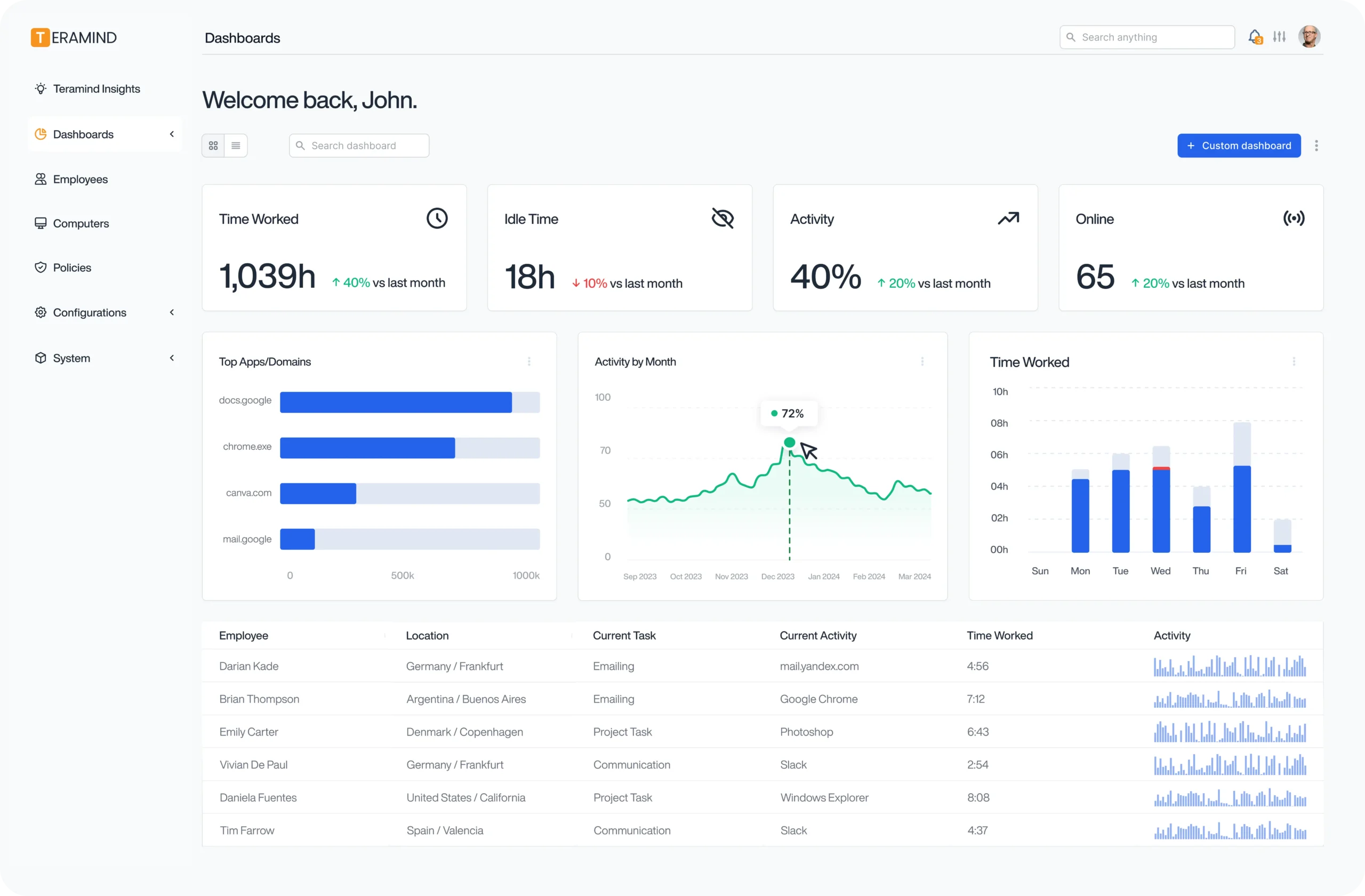
Let me share an example. As a manager, I had trouble with multiple terms like UEBA (User and Entity Behavior Analytics), OCR, SIEM integration, etc. I spent several hours in the Knowledge Base figuring out how all the reporting features worked. This isn’t a simple plug-and-play time tracker. It’s more similar to deploying a security software suite.
However, I must admit that after a week, the interface grew on me. I could easily navigate the analytics, recordings, and reports. One aspect that stood out is the complexity of deployment options. I could choose to host it on the Teramind Cloud (which I used) or host it on my servers. I’d say Teramind is best used with a tech-savvy manager at the core. Expect a learning curve if you’re like me!
User feedback echoes my sentiments: many users praise Teramind’s capabilities. However, completely thrash the setup complexity and invasiveness as downsides. I can confirm both in my experience.
Do the Teramind Features Hold Up to Its Claims?
Teramind advertises a vast array of features. I made it a point to test each major feature to see if it lives up to the claims:
Employee Monitoring & Hybrid Workforce Management
This is Teramind’s core usefulness: comprehensive employee activity monitoring for in-office, remote, or hybrid teams. The software truly covers every angle of digital monitoring I could expect.
Let me get to that one by one:
Website and Application Monitoring
Teramind automatically logs all websites visited and software applications run on the employee’s machine. In my dashboard, I could see a timeline of websites each user visited, with URLs and timestamps. It even flags categories properly most of the time. This helped me identify a few “time-waster” sites that some team members frequented. You can also block specific websites or apps if needed. I tested with YouTube, and it worked flawlessly.
Live Screen Monitoring with Audio Recording
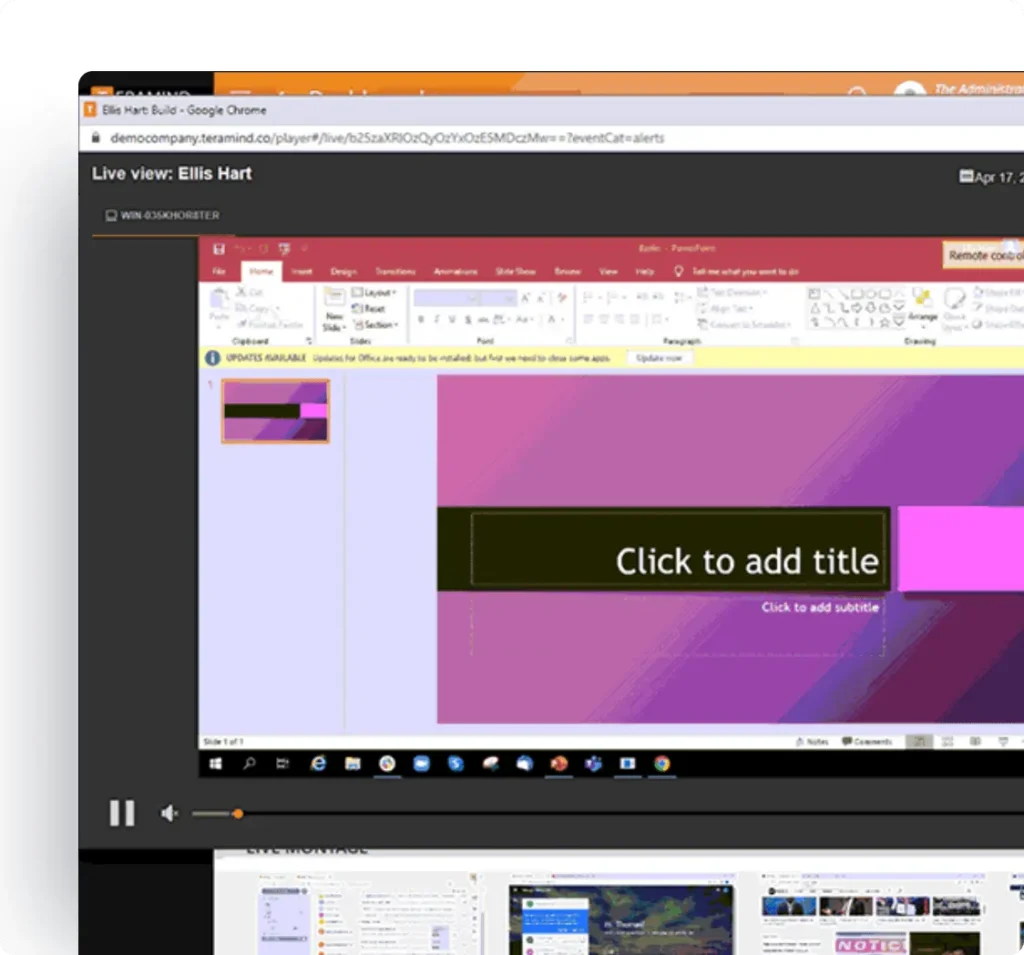
This feature is as powerful (and worrying) as it sounds. I was able to view any user’s screen in real time, without any delay. If enabled, Teramind can also capture system audio or microphone input. However, I didn’t want to use it on my employees as it felt too invasive.
What I used is the remote desktop control. It actually helped us in many IT support scenarios.
Live & Historical Feedback
Teramind provides both real-time alerts on activities and a historical log of all actions. I intentionally tried a few forbidden actions and saw alerts fire instantly – that’s quite impressive.
The historical logs are detailed: every file copied, every message sent, every login, etc., is recorded with a timestamp. It’s surprisingly easy to filter the data and check for a specific incident.
Social Media Monitoring
I must say this was a much-needed feature, and I wanted to check Teramind’s ability here. It not only logs time spent on social media sites, but also can capture messages/posts on platforms.
I opened LinkedIn on a monitored machine and typed a test post – Teramind logged the keystrokes and also captured a screenshot of the post. However, to maintain privacy, I removed the personal account monitoring as I didn’t need that. I found this very effective and necessary.
Email Monitoring
Teramind tracks corporate email activity, too. In my case, I integrated it with our Microsoft Outlook. I could see subject lines and participants for every email sent or received by monitored users. This raised some privacy flags for me. However, in industries like finance or healthcare, this might be required.
File Transfer & Web File Monitoring
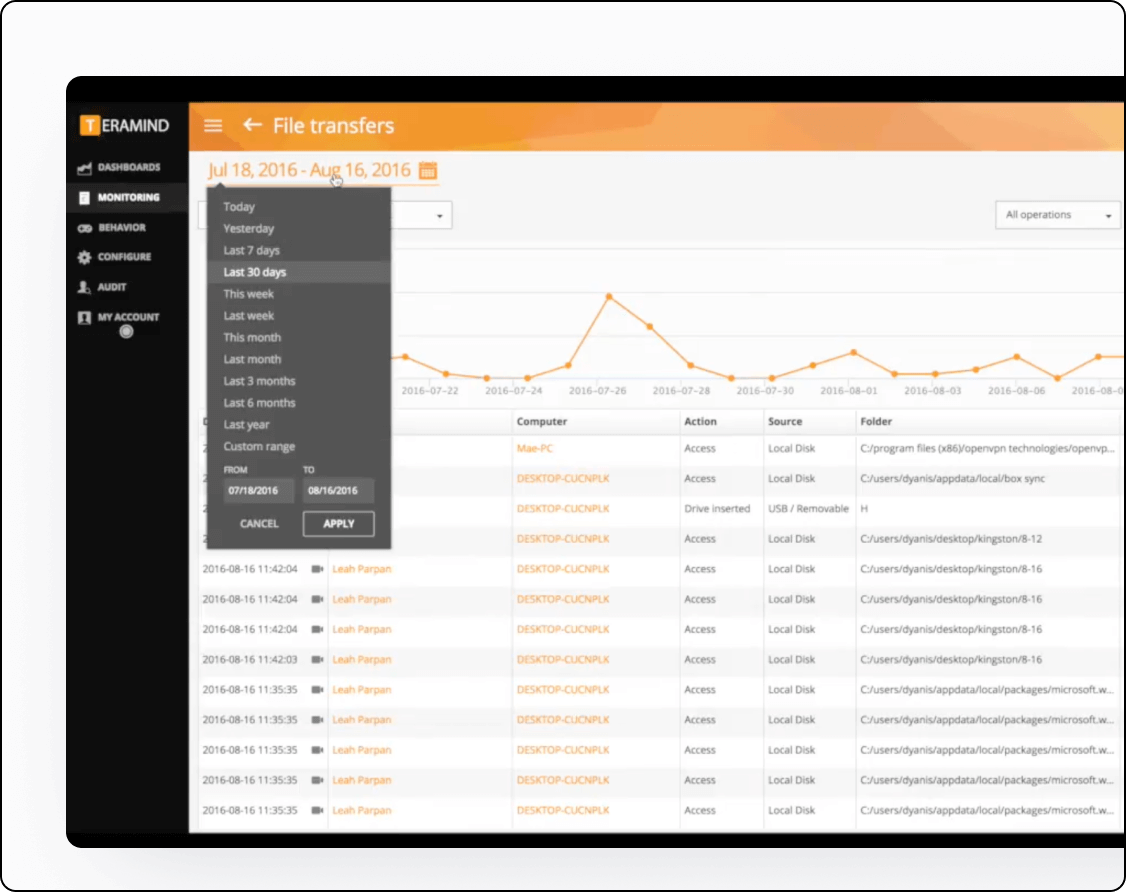
Any type of file transfer is quickly captured by Teramind. And I tested it with physical transfer as well as cloud (Google Drive, Dropbox, etc.). I tested by uploading a file to my personal Dropbox. Teramind not only noted it, but because I had DLP rules on, it scanned the file’s content for sensitive data. Printing is also treated in a similar way.
After using it for some weeks, I can confirm Teramind is one of the most invasive yet feature-packed tools for employee monitoring. It absolutely holds up to its claims of monitoring “every action”. In fact, it sometimes felt too much, and I turned off a few features to maintain employee goodwill.
The good news is that Teramind gives you that control. You can enforce privacy measures if you choose, though it requires conscious effort.
Strengths
- The visibility into employees is unmatched and exceptional.
- The flexibility and control in real-time are a game-changer.
- Suitable for remote + in-office teams
- Great privacy controls. I appreciated the flexibility for staying compliant and respectful.
Weaknesses
- Features like screen/audio recording and keystroke logging can raise trust and privacy concerns.
- Without a clear focus, it’s easy to get overwhelmed and lose productivity as an admin.
- On older machines, I noticed the agent slowing things down a bit, especially during intense monitoring.
- Fine-tuning what to monitor took trial and error. Not a dealbreaker, but can be bothersome for small remote teams.
User Activity Monitoring (UAM) and Behavior Analytics
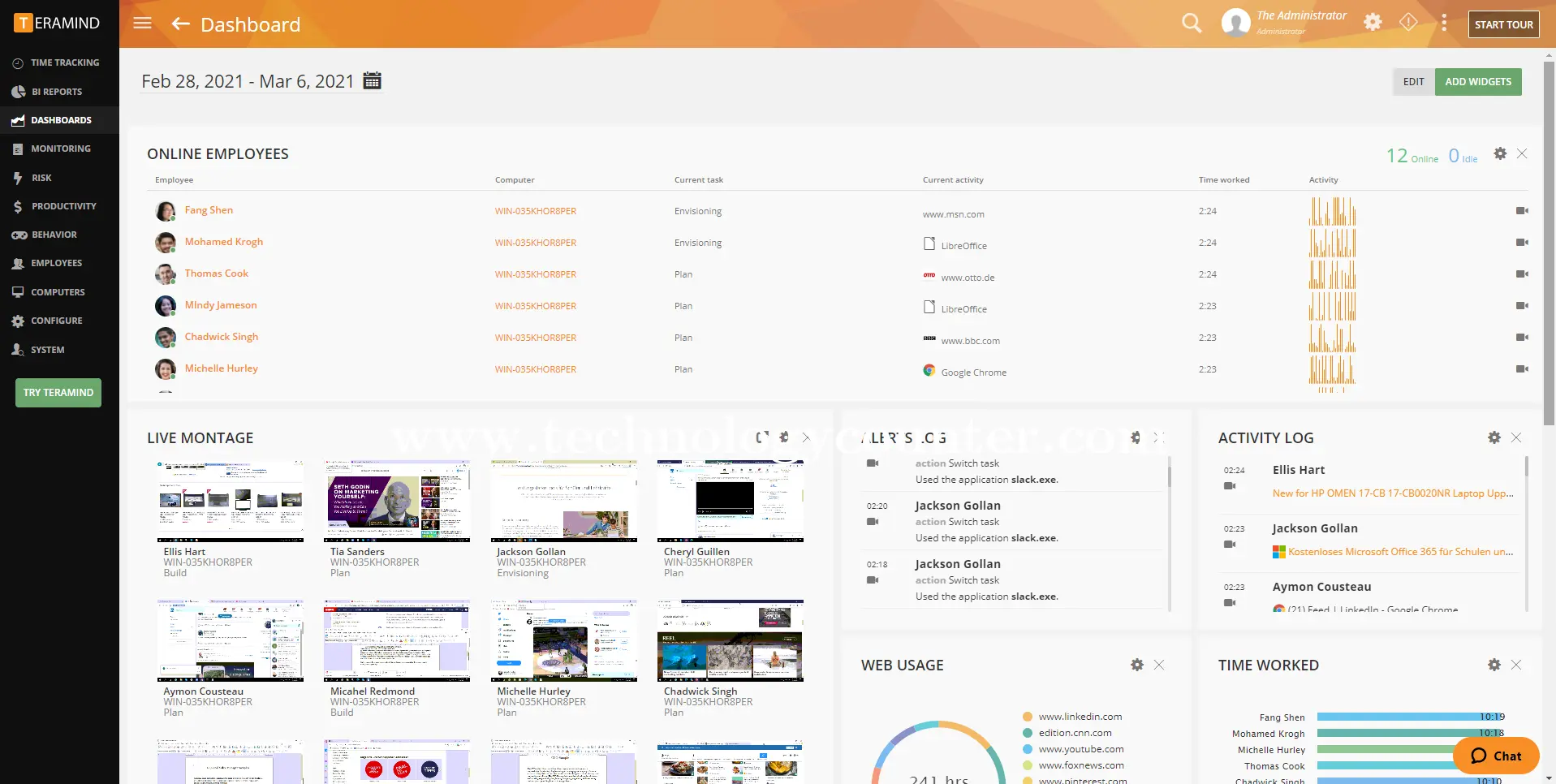
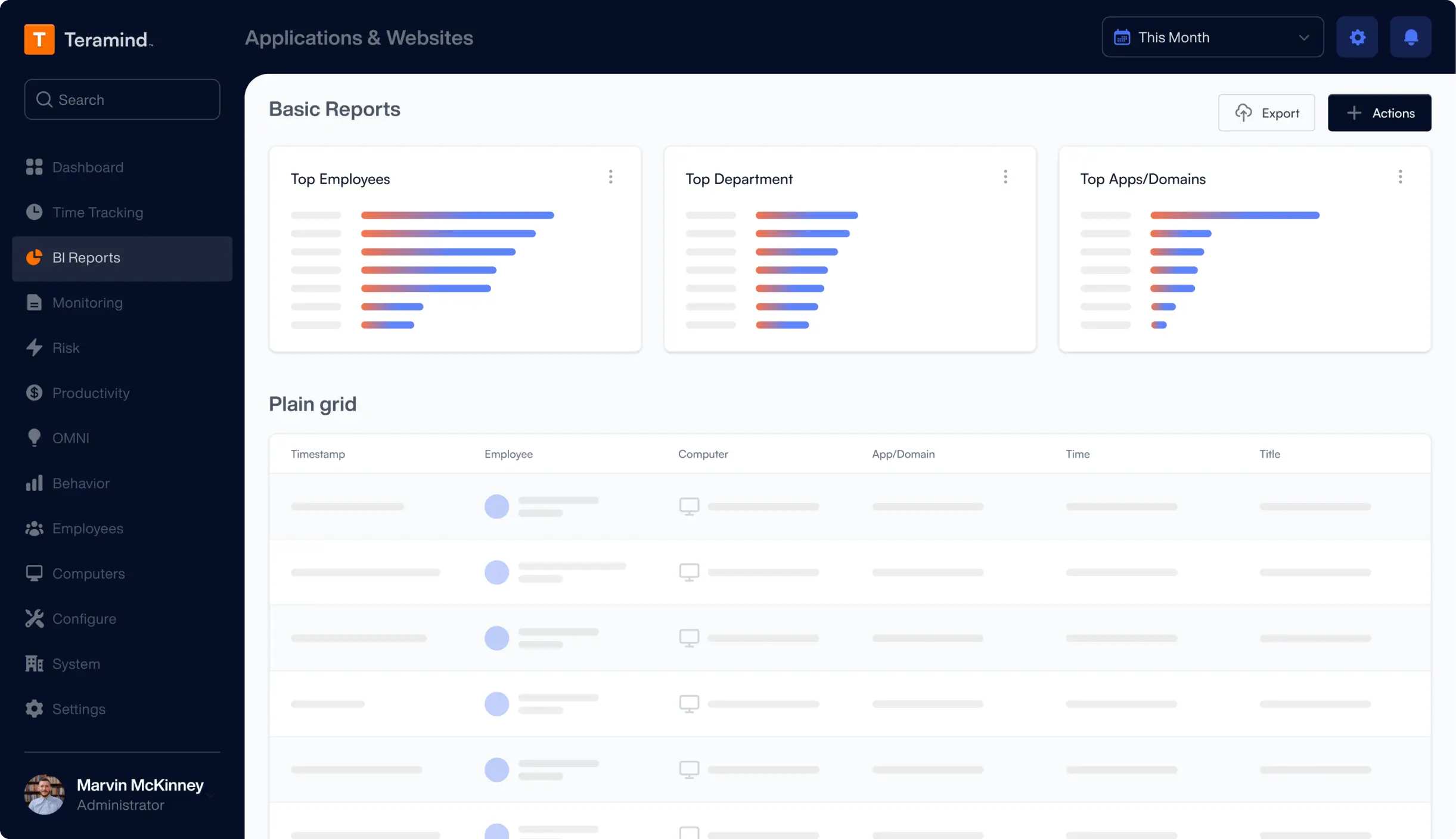
Teramind’s User Activity Monitoring (UAM) goes beyond raw recording. It’s about analyzing user behavior to detect anomalies and risky patterns. This is where the promised “behavior analytics” come into play.
In the dashboard, there’s a risk analytics section where each user gets a score based on their activities. Initially, I was skeptical, but I saw it rise for a particular user on a day they tried some unusual things. From that score alone, I got so much clarity that some other tools can’t provide.
The Comprehensive Behavior Analysis feature worked great in finding an anomaly. One of my team members clocked in at odd times, a few days in a row. As a manager, that’s golden; it can hint at problems like burnout or, worse, data theft. Teramind actually markets this as catching “anomalous behavior,” and I can confirm it does so pretty well.
One thing I need to emphasize is their User Behavior Advisory. It’s a separate service offered by Teramind. Basically, it offers Teramind’s own experts to analyse and provide support from the software metrics. However, I can’t really share any review as I didn’t use it.
As I already tested Teramind’s UAM, I know that it works. However, one thing to highlight: false positives can also happen. Early on, the system flagged a developer as high-risk simply because they were using PowerShell and command-line tools extensively. However, that wasn’t a red flag at all. So, while the behavior analytics are powerful, some tweaks are mandatory.
Another neat aspect is productive vs unproductive behavior analysis. Teramind can crunch the data to identify productivity patterns. They even have pre-packaged productivity rules (in the UAM plan). It’s a bit strict, but it’s a great feature to maintain a certain benchmark.
Strengths
- Teramind flags unusual behavior early.
- Behavior data is translated into easy-to-read scores and charts.
- Customizable rules for personalized monitoring.
- Teramind offers behavior analysts to help interpret trends or recommend actions.
Weaknesses
- Needs tuning to avoid false alarms.
- Steep learning curve.
- More security than productivity-focused.
- Enterprise-level complexity.
Process Optimization
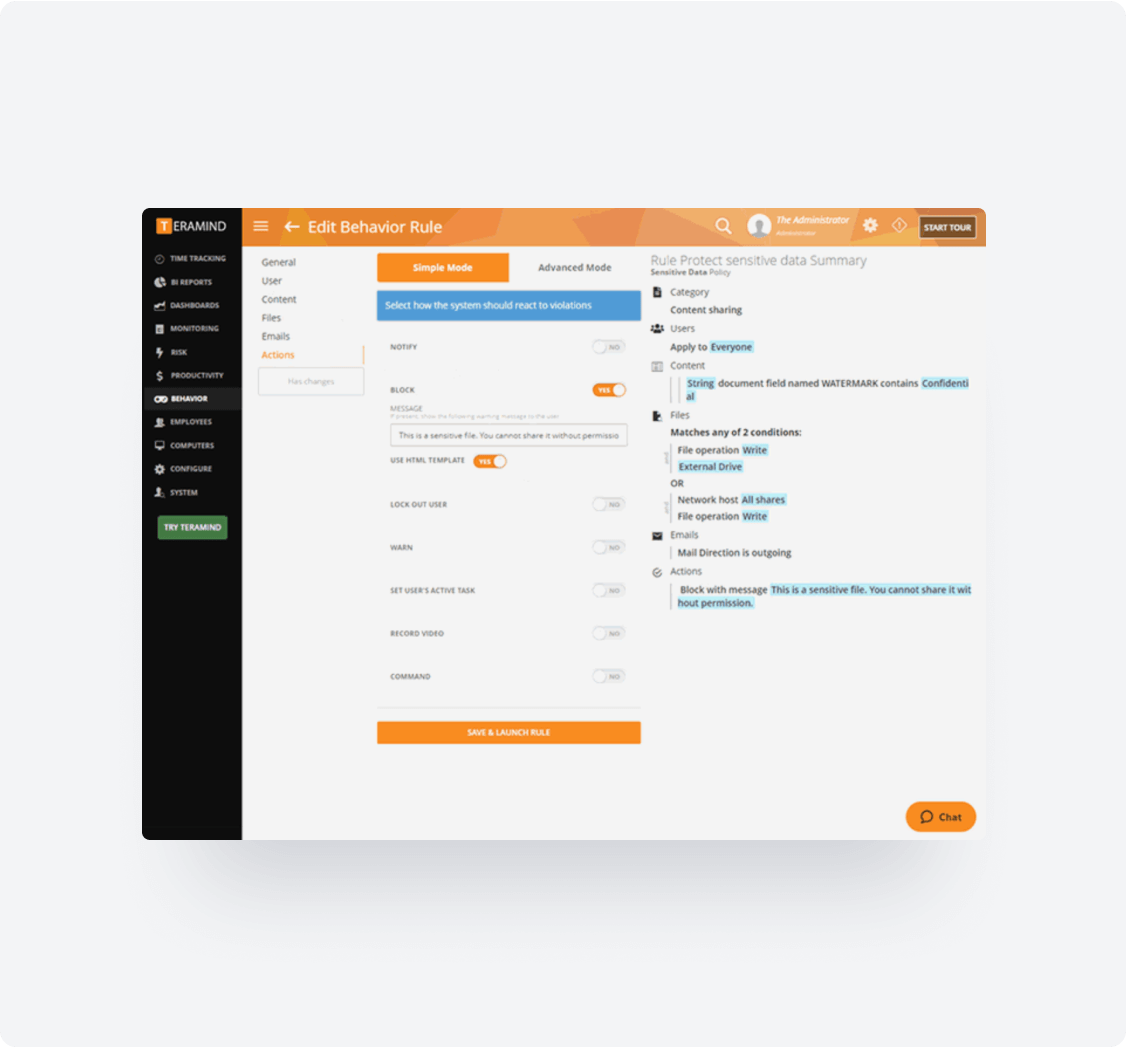
Teramind isn’t just for monitoring; it also helps improve workflows. I explored its Business Process Optimization by tracking how my team handled support tickets. The platform mapped user actions across apps like our CRM and billing tool. From this, I spotted inefficiencies, like one teammate regularly exporting to Excel mid-process. It wasn’t part of our standard flow and cost time. After noticing it, we fixed the step, saving a few minutes per ticket.
What impressed me was how Teramind visualizes workflows and flags deviations. It even recognizes actions inside apps, not just which apps were used. I also tested it for compliance: setting a rule to flag if HR skipped opening a required doc during onboarding. It caught the skipped step perfectly.
However, to get real value, you need to define what your processes look like. Teramind can’t guess that for you. It works best when you have standardized workflows and enough activity data to analyze trends. For larger teams or repetitive work, the insights can be powerful. The value for the creative team might be quite limited.
Strengths
- Tracks workflows in granular detail, including app actions and time spent.
- Flags bottlenecks, skipped steps, and deviations automatically.
- Helps enforce compliance by identifying missing or incorrect steps.
- Real-time visibility allows quick intervention when issues arise.
Weaknesses
- Requires upfront setup to define processes.
- Needs enough user data to generate reliable insights.
- Insights highlight issues, but don’t explain the cause.
- May be less useful for non-repetitive or creative work environments.
AI-Powered Real-Time Insights (OMNI) and Alerts
Teramind’s OMNI is like an AI-powered control center. In 2026, it’s tough to find tools without AI, and Teramind is no different. It surfaces the most important activity insights in real time. During my test, it flagged things like productivity drops and potential burnout.
As it’s not a chatbot, I didn’t feel too connected with OMNI at first. However, after a week of reviewing the insights, OMNI felt like a helpful assistant.
It even offered management-oriented prompts, such as asking whether contractors are really working themselves. One standout feature was OCR detection. I tested it by viewing an image with a fake credit card number. Teramind’s AI flagged it in real time, just from the screen.
Alerts and reports were another highlight. I set up instant alerts for DLP violations (which came via desktop/email within seconds) and daily productivity digests. I liked that I could customize what triggered alerts and how they were delivered.
OMNI is clearly designed to evolve. It doesn’t just react to rules—it looks for patterns, predicts issues, and offers time-saving insights. It’s not flawless, but it adds a useful intelligence layer on top of raw monitoring.
Strengths
- Surfaces key insights automatically (e.g., productivity dips, security anomalies, or burnout signals).
- Real-time alerts with automated responses are fast and reliable.
- OCR and AI pattern detection add smart oversight beyond basic rules.
- Custom reports and scheduled digests help automate routine oversight.
Weaknesses
- AI can misinterpret data without context.
- Relying only on OMNI may miss subtler issues.
- Feels beta-like, not fully mature yet.
- Requires tuning to avoid too many or too few alerts.
Insider Risk Management
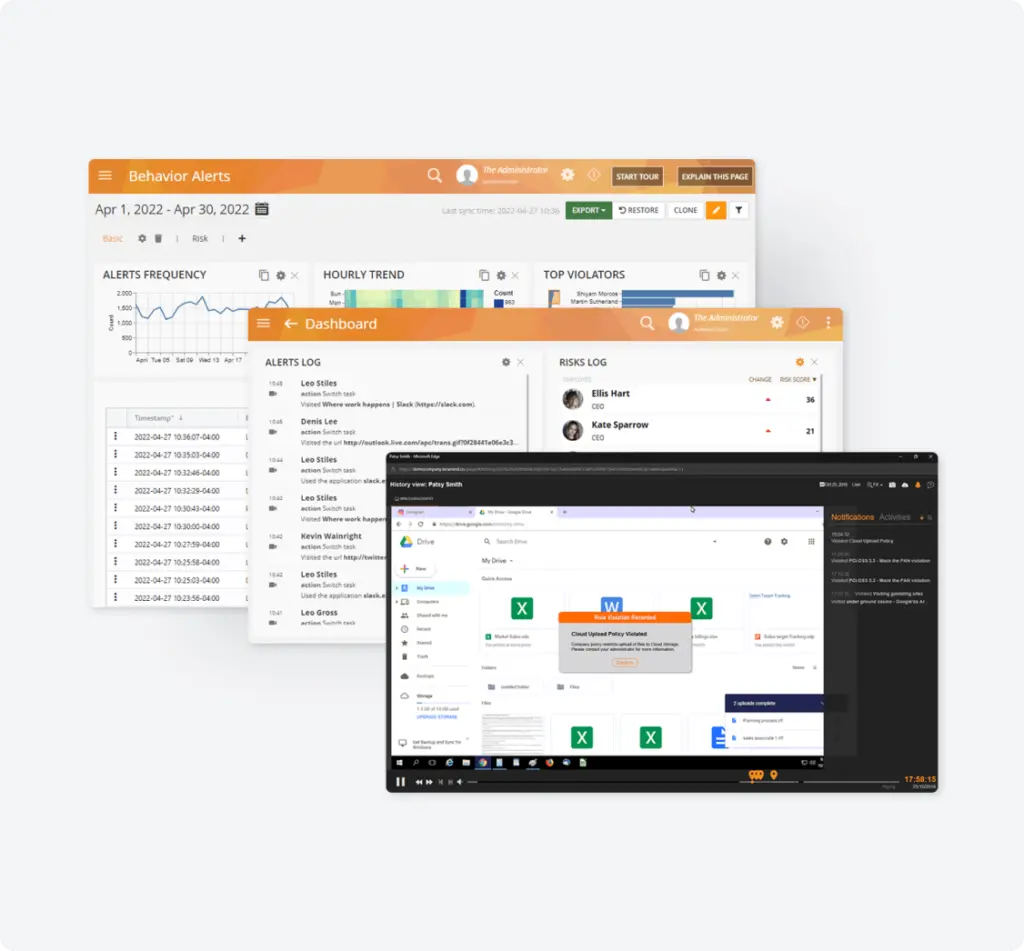
Teramind is clearly built with insider threats in mind. I created high-risk user profiles (e.g., sysadmins) and applied tighter controls. Monitoring CMD usage, blocking USB uploads, and more. What I liked is that the dashboard showed real-time summaries of policy violations and flagged incidents.
The platform supports role-based access control, so only admins can view sensitive logs. Pre-built rule templates (e.g., flagging mass emails or cloud uploads) made it easier to implement effective controls fast. In a simulated test, I tried downloading sensitive files before, and Teramind flagged and locked the account immediately.
Strengths
- Holistic insider threat detection using behavioral analytics + policy enforcement.
- Pre-built rules and templates accelerate setup.
- Real-time blocking, not just passive alerts.
- Audit-ready logs with full user activity trails.
Weaknesses
- Can feel invasive if not communicated transparently.
- Requires ongoing oversight to avoid alert fatigue.
- Legal/privacy boundaries must be considered carefully.
- Sophisticated insiders may still find ways to bypass.
Data Loss Prevention (DLP)
Teramind’s DLP capabilities impressed me. I tested common leak scenarios—emailing, uploading, and printing sensitive data. Teramind was successful to catch them all. It uses content-based analysis and OCR, even detecting sensitive info in images or screenshots. Automated responses also worked as Teramind claimed.
Over 200 templates cover GDPR, HIPAA, PCI DSS, etc. I enabled a few relevant rules and got compliance-grade coverage quickly. Logs included partial content snippets and context, which made my process pretty easy.
Strengths
- Catches sensitive data in emails, files, images, the clipboard, and print.
- Real-time blocking with customizable responses.
- Compliance-ready with built-in rule templates.
- Forensic logs and dashboards for audit trails.
Weaknesses
- Needs tuning to avoid false positives (e.g., devs using test data).
- May slightly impact workflow if overly aggressive.
- User trust must be managed (explain blocked actions).
- Only available in higher-tier plans.
Policy & Rules Management
Teramind’s Smart Rules engine is its backbone. You can also be as creative as possible with the rule management. I tried policies like:
- Alerting on excessive unproductive website time
- Flagging activity after work hours
- and blurring screenshots of personal webmail.
The rules worked independently to share an alert, almost instantly. It can even block or notify users, which is great for quick response. Pre-made templates help beginners get started. For advanced rules, I layered multiple conditions (e.g., user group + time + app + action).
Strengths
- Powerful, flexible rule engine for any scenario
- Templates make setup fast and guided
- Supports proactive compliance enforcement
- Enables educational alerts for transparency
Weaknesses
- Complex logic can lead to misconfiguration
- Ongoing maintenance needed as org policies evolve
- Advanced rules require technical comfort
- Poor alert tuning may overwhelm admins
Customer Support
Teramind’s customer support stands out for being genuinely helpful and engaged. In my experience, support agents were quick to respond, patient with questions, and clearly knew the product inside out. Whether I needed help configuring a complex rule or clarifying a dashboard alert, they walked me through it step by step.
I especially liked how they didn’t rush to close tickets. Their live chat is active, and for more in-depth issues, I received clear follow-ups via email. Overall, the support team made me feel like they actually knew what they were doing.
Multi-Platform Compatibility
Teramind’s full capabilities shine on Windows. Keystroke logging, OCR, and session recording worked perfectly.
However, Mac support felt like an afterthought. While it captured basic activity, it lacked several critical functions. That includes detailed video playback, content-based DLP scanning, and reliable behavior rules.
On the other hand, I also faced issues with the Android agent. It’s functional but limited mostly to app usage and activity tracking. No real GPS or phone call monitoring. iOS support is nonexistent, which ruled out visibility for team members using Apple devices.
I believe not having good support on Apple devices is a total letdown. For a Windows-only business, it’s not much of a headache.
Is Teramind Pricing Fair?
Now, let’s talk dollars and cents. Teramind is on the pricier side of employee monitoring tools. And that’s quite an important factor for any company to judge its true value. Here are the details of the 4 plans Teramind offers right now:
(minimum 5 users)
Basic monitoring: screen recording/live view, website & app tracking, limited data for forensic audit, behavior rules, and customizable dashboard.
Full user activity capture, unlimited behavior rules, keystroke logging, OCR, pre-packaged productivity rules, and SIEM integration.
(Data Loss Prevention)
Content-based DLP rules (200+ templates), sensitive data detection & redaction, malicious activity blocking, automated data leak prevention actions.
Custom Pricing
Custom enhancements – in-app field parsing for fraud detection, API access, self-hosting options, GovCloud support, premium support & services, and mass scalability.
So, is this pricing fair? It depends on your use case. Teramind is certainly more expensive than many simpler tools. For context, typical employee monitoring in 2026 ranges from about $3 to $15 per user per month.
For example, Apploye’s plans go from free or ~$4.5 up to ~$10 per user. Teramind’s $30+ premium tiers put it at the high end of the market.
However, it’s also offering a lot more in terms of security and analytics. In a way, Teramind isn’t just an employee monitoring tool. It’s also an insider threat management and data protection platform.
If you compare it to dedicated DLP or UEBA security solutions, those can cost similarly high (or more).
From my viewpoint:
- For small businesses (SMBs) that just want to track productivity or enforce basic compliance, the Starter plan at ~$15/user/month (minimum 5 users) can feel expensive.
- In contrast, mid-sized companies or those in regulated industries (finance, healthcare, legal) might find the UAM or DLP tiers ($30–$35/user/month) justifiable.
One downside I personally found annoying: the 5-user minimum license. Common in enterprise software, but it locks out freelancers or tiny teams who want powerful features without overpaying.
Another consideration is ROI: If Teramind prevents just one major incident a year, that could pay for itself many times over. For example, if a data leak could cost $100k and Teramind ($30/user) is deployed to 50 users (~$1,500/month, $18k/year), then it’s totally worth it.
To put it plainly: If your main goal is boosting productivity and simple time tracking, Teramind is probably not cost-effective. If your goal is to prevent insider threats and data leaks on top of monitoring, Teramind is an investment that makes sense.
Apploye vs. Teramind: Why Apploye Wins for Most Teams
Having personally used both Teramind and Apploye, I can confidently say they cater to different needs. However, for most SMBs, Apploye is the smarter, simpler, and more cost-effective choice.
Don’t get me wrong. Teramind is built for heavy-duty surveillance and data security, and it does everything well. Apploye is more focused on what most businesses care about. Improving productivity, managing time and tasks, tracking attendance, and keeping workflows efficient.
Teramind’s features come at a steep price and steep learning curve. You’re paying for serious security tools. But if you don’t need that level of control, it’s overkill. Apploye, in contrast, is fast to deploy, easier on the team, and packed with practical features - all in one clean interface.
Here’s how they compare:
remote team monitoring
Insider threat detection, surveillance,
and data security
Ease of Use
Android, iOS, Chrome
Limited: Windows, partial Mac/Android,
no iOS
Transparent and stealth mode, pause/resume tracking, employee dashboards
no employee-facing features
Missing
Not supported
Pricing
no minimum
minimum
Best For
security-heavy orgs
Final Verdict on Teramind
Teramind is not meant for everyone. So, who should actually use it on a daily basis?
Teramind is best for:
- Security-first industries like finance, healthcare, legal, or government that need strict compliance.
- Large enterprises with insider threat concerns, such as call centers or R&D teams handling sensitive data.
- Organizations with strict compliance mandates (e.g., FISMA, NIST, ISO 27001).
- MSPs or IT security firms managing employee monitoring for clients.
- Remote/hybrid teams needing close oversight, like dev teams with previous IP theft risks.
Teramind is not ideal for:
- Small businesses on a budget; the ~$15–$35/user subscription is very expensive.
- High-trust or creative cultures, where invasive monitoring might harm morale or conflict with company values.
- Mac- or mobile-first teams, as Teramind’s feature support is limited on iOS and lacks full Mac parity.
- Teams needing project management or billing tools.
- Firms under strict labor or privacy laws.
In summary, Teramind is not for everyone. It’s a specialized tool for specific high-need cases. Most other scenarios can be addressed by simpler, cheaper, or more employee-friendly solutions.
Frequently Asked Questions
Yes, Teramind is legal if used with proper consent and follows local labor and privacy laws. Always inform employees about monitoring and comply with regional regulations like GDPR or HIPAA. Transparency in usage is key to staying within legal boundaries and avoiding ethical issues.
Pros include advanced monitoring, insider threat detection, and strong data protection features. Cons are high cost, complexity, and potential privacy concerns. It’s powerful for security-focused teams but may feel invasive or excessive for simpler use cases.
Pricing starts around $15/user/month for the Starter plan, billed annually. Advanced plans like UAM and DLP cost $30–$35/user/month. There’s a five-user minimum and no free tier, making it pricey for small teams.
By default, Teramind does not access webcams or record video through your device’s camera. It focuses on screen, app, and file activity unless specifically configured otherwise by administrators. Always review company policies and settings to understand what's being monitored.
Teramind does not record audio or listen through your microphone in standard configurations. Its monitoring is mostly visual and data-based unless an organization adds custom integrations. An audio recording would require explicit permissions and may breach privacy laws.
It improves security, ensures compliance, and helps prevent data loss or insider threats. Detailed logs and behavior analytics support audits, HR actions, and IT investigations. It’s ideal for regulated industries or companies needing tight activity oversight.
Yes, Teramind can capture screen activity and take periodic screenshots or video sessions. This helps visualize user behavior and provides context during investigations. Screen recording is configurable based on policies, roles, or incident triggers.