How to Set Up a Call Center for a Small Business - 7 Simple Steps!
Key Takeaways
-

Pick the basics first: set call goals, choose one phone system, and map call steps. A small team can start with shared scripts, hours, and a simple menu.
-
Hire or train agents to speak clearly, solve common issues, and log each call. Use short scripts, call rules, and practice so customers get fast, friendly help.
-
Track key numbers like wait time, missed calls, and first-call fixes. Then, review calls each week and fix weak spots.
Running a small business is hard, and building a customer service center from scratch is harder. Almost 50% call center managers cite high agent turnover and absenteeism as their single biggest operating problem. Plus, it’s expensive to replace a well-trained agent, almost $10,000 to $20,000 expensive.
Without a clear plan, that investment can spiral before you've handled your first call. This guide walks you through the practical steps of setting up a call center for a small business.
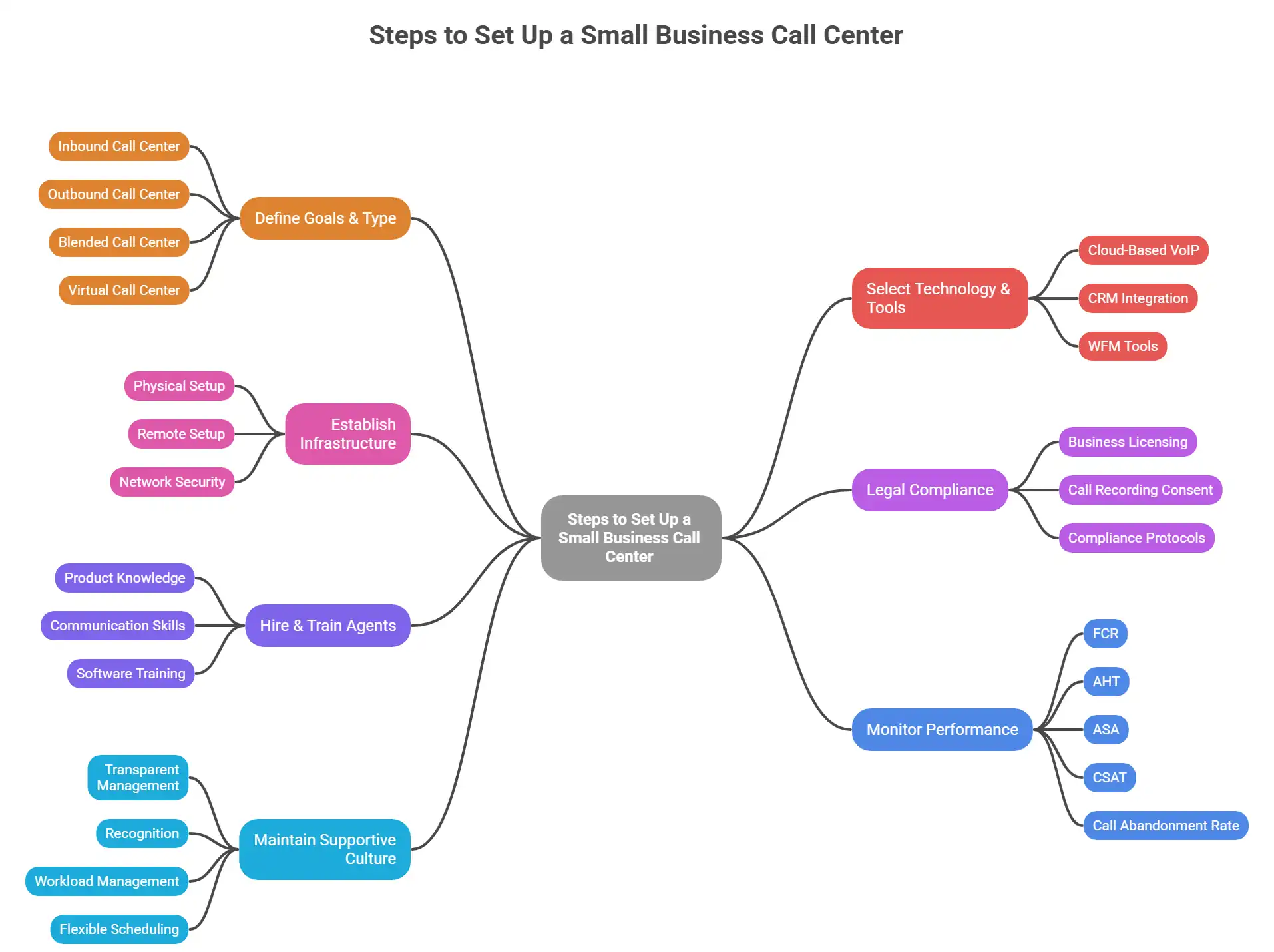
Steps to Set Up a Small Business Call Center
Setting up a small business call center starts with defining goals and ends with process and culture optimization. Let’s get into each step in detail.
Step 1: Define Goals & Type
Before the software, staff, and office, be clear on what your call center will do. The type you run shapes every downstream decision. From your tech stack to your hiring profile.
Inbound Call Center (Customer Support Center)
An inbound model handles incoming calls from customers needing help. Order issues, technical support, and billing questions are the usual operations in this type. This is the most common for a small business customer service center or help desk. If your primary goal is retaining customers and resolving problems on the first interaction, start here.
Outbound Call Center (Sales & Telemarketing Outreach Center)
Outbound call centers focus on proactive reach-outs. Sales calls, appointment reminders, lead follow-ups, and more. Call center services in this model are typically metrics-heavy and tougher than the inbound type.
Blended Call Center
A blended model is a mix of inbound and outbound. Agents switch between responding to incoming inquiries and making outbound calls during low-traffic windows. For small teams, it’s the most cost-effective and productive choice.
Virtual Call Center
A virtual call center operates with remote agents connected through cloud-based software. As of 2024, around 51% of call centers support remote work, making the virtual model the fastest-growing option. It eliminates office overhead and opens you to a global talent pool.
Last of all, don’t mix up a call center and a contact center. If you just want to focus on inbound or outbound calls, then it’s a call center. And when your business goal is to interact across phone, email, live chat, SMS, and more, then it’s a contact center.
Step 2: Select Technology & Tools
Call center setup requirements include tools that ease each process. Choosing the right tools saves costly migrations later while improving overall productivity.
Cloud-Based VoIP
For small businesses, a cloud-based VoIP system is almost always the smarter choice over on-premises hardware.
Business.com data shows that an on-premises setup (20-person) can cost around $14,500 in hardware. That’s roughly $725 per agent seat, before the annual maintenance fees. And don’t even get me started on the licensing. That’s another thousand or two gone.
Compared to that, cloud-based platforms typically cost $20 to $300/user/month. Virtual call centers also cost 20–30% less to operate than physical ones over time. However, while choosing a cloud-based solution, make sure to check these features:
- Automatic Call Distribution (ACD): Routes incoming calls to the right agent automatically, reducing wait times and improving First-call resolution rates.
- Interactive Voice Response (IVR): Lets callers self-serve or get routed before reaching an agent.
- Call Recording: Standard for quality assurance, compliance, and agent training.
- CRM Integration: Sync with a CRM gives agents instant customer history, speeding up resolution and personalising interactions.
- Call Center Workforce Management (WFM): Forecasts call volumes and manages scheduling so you're never over- or under-staffed.
- Real-Time Analytics & Dashboards: Tracks live queues, agent availability, and performance metrics.
Recommended Tool Stack for Call Centers for Small Businesses
- CRM: Salesforce, HubSpot, or Zoho CRM
- VoIP/Call Center Platform: RingCentral, Dialpad, or Nextiva - all are cloud-based platforms with built-in ACD, IVR, and recording.
- Workforce Management: NICE WFM or integrated WFM modules in your call center platform.
- Employee Management & Scheduling: Apploye - ideal for call center monitoring and employee productivity tracking.
Step 3: Establish Infrastructure
Infrastructure isn't just desks and computers. It’s the whole system that enables your workers to put out the best effort, regardless of location.
Physical vs. Remote Setup
For an in-office call center setup, each agent needs a computer, noise-cancelling headset, stable broadband, and access to your call center software. On average, call center setup costs around $500 to $1,000 per agent for essential hardware. Then there are the office space, utilities, and furniture costs.
For a virtual call center, the per-agent hardware requirements are mostly identical. However, the savings on real estate costs are huge. A virtual setup can start from as little as $1,000 upfront for a small team. So, if budget is an issue, starting virtually is great, provided you have a strong monitoring system in place.
Network and Security
Whether your agents are in-office or remote, network reliability is non-negotiable. A dropped call during a live customer interaction is a direct satisfaction hit. Ensure dedicated bandwidth for VoIP and basic security protocols for your setup. On top of that, encrypted connections, secure login, and role-based data access.
Step 4: Legal Compliance
Compliance from day one provides the safeguard that no other process can. It saves you from troublesome audits, operational expenses, and many more.
Business Licensing and Tax Registration
Start by registering your business properly. Obtain all required local or state licenses, and secure your EIN (Employer Identification Number). Always double-check to see if you need any additional permits to run a call center in your state/location.
Here are some of the core compliance protocols to integrate into your business:
Call Recording Consent
US federal law requires single-party consent for call recording. However, in some states, including California, Florida, and Illinois, it requires all-party consent. Fortunately, there’s an easy solution to this.
Play a disclosure at the start of every call: 'This call may be recorded for quality and training purposes.’
Make sure to document your recording policy and include it in your privacy notice.
Step 5: Hire & Train Agents
Your technology is only as good as the people using it. In a small business, that applies even more. One disengaged or underprepared agent can damage the overall customer experience to the core.
So, start with hiring people not just with call center experience, but with genuine soft skills. Empathy, active listening, calm under pressure, and natural problem-solving - these qualities can’t be trained in a week. Emotional intelligence is far harder to develop post-hire.
Set structured behavioural interview questions and short role-play scenarios during the hiring process. Those will help you to understand the applicants’ required skills. The more rigorously you assess candidates lesser the chances of turnover.
Training Your Agents
Coming to the training side of the hiring process. Did you know that Inadequate training directly impacts 20-30% of the attrition rate? So, there’s no room for you to offer subpar training and expect the agents to be loyal.
To train your call center heroes, follow these 3 pillars:
- Product and Service Knowledge: Agents must understand the products and services to the core. So you should have a simple yet detailed guide for them to learn from. A comprehensive knowledge base, troubleshooting, and product documentation are great materials to start with.
- Communication and Call Handling: Train on call structure, de-escalation techniques, and handling difficult customers professionally. Include recorded call examples, both strong and weak, for real-world analysis.
- Software and Tools Training: Here’s where many agents mess up. Ideally, your agents should be adept at using the internal tools. So, organize weekly training sessions to make them more confident in CRM, WFM, and the call platform.
Internal knowledge base, guides, and video tutorials aren't just useful during onboarding. They empower agents to resolve issues independently during live calls, improving your First-Call Resolution rate.
Step 6: Monitor Performance
Defining and tracking the right metrics should start before day one. How? With a pilot program of 4-6 weeks with a small agent group. That’ll provide you with the data to optimise staffing, improve customer experience, and identify agents who need further training.
First-Call Resolution (FCR)
FCR measures the % of customer issues resolved in one interaction. According to SQM Group research, a good FCR rate falls between 70% and 79%; world-class performance is 80% or above.
The impact of FCR is well-documented. Another research shows that every 1% improvement in FCR produces a 1% improvement in CSAT and a 2.5% improvement in employee satisfaction.
Average Handle Time (AHT)
AHT covers total agent time per call. From talk time to post-call wrap-up. It’s tough to set a global average as it varies by industry and call type. However, generally, longer calls are better compared to short sessions. Lower AHT paired with poor FCR is a sign that calls are being closed prematurely, not resolved.
Average Talk Time
The main distinction between average talk time and AHT is that the latter includes hold and wrap-up time. Measuring both of these metrics may seem counterintuitive. However, analysing both ensures where time is actually going during calls.
Average Speed to Answer (ASA)
The industry-standard benchmark is the 80/20 rule. Answer 80% of incoming calls within 20 seconds. ASA measures how close you are to that target, factoring in routing and queue time. Consistently missing this benchmark is a clear signal that you need more agents on the floor. Or, your IVR routing needs adjustment.
Customer Satisfaction Score (CSAT)
CSAT is highly important for a call center. Post-call surveys that ask customers to rate their experience. CSAT benchmarks for call centers fall between 63% and 78%.
CSAT drops 15% on average every time a customer has to call twice for the same issue. That’s why FCR and CSAT should be tracked together to get the best outcomes.
Call Abandonment Rate
The % of callers who hang up before reaching an agent. The acceptable range is usually around 5-8%. Anything above 10% signals a staffing, routing, or IVR problem that needs immediate attention.
Step 7: Maintain Supportive Culture
Call center work is genuinely demanding. Agents handle frustrated customers, strict performance targets, all while being empathetic and professional. Also, the repetitive tasks make it easy for burnout and turnover to increase. And the numbers are stark: 87% of call center agents report high stress, and the industry's annual turnover rate is 30–45%.
The obvious answer to reducing turnover and burnout is a friendly culture. Call center managers believe improving agent job satisfaction can increase CSAT by 62%. It can also boost efficiency by 56% and improve agent retention by 39%. Now, to make your call center a supportive one, here’s what you can do:
- Transparent management: Regular 1-on-1 check-ins and honest communication about team goals build trust and reduce anxiety.
- Recognition and appreciation: Build a simple recognition programme — weekly shoutouts, performance bonuses, or a team leaderboard. A small appreciation can make your agents feel heard and valued.
- Workload management: Tools like Apploye help managers track agent workloads and rebalance scheduling before burnout takes hold.
- Flexible scheduling: Remote options and flexible shifts help agents maintain work-life balance. Better balance means a refreshed mind and productive workflow.
What to Keep in Mind When Setting Up a Small Business Call Center
Four areas will shape your operational success from day one. Compliance, engagement, budget, and scale.
Compliance
Every call center that handles personal data or processes payments operates under legal obligations. GDPR, TCPA, CCPA, HIPAA, or PCI DSS are standards depending on your industry. So, build compliance into your processes from the start:
Document your data handling practices, configure call recording disclosures, and include regulatory agent training. If you want to include compliance reactively, it can get quite expensive and cause legal complications.
Budgeting
Plan for two cost categories, right from the start. On the setup side, the minimum starting cost for a small call center is around $5,000. That can rise up to $15,000+ for on-premises setups with 10–15 agents. A virtual setup can start as low as $1,000.
On the recurring side, budget for agent salaries, software subscriptions, and WFM tools. Calculating these budgets early will provide freedom to invest more in employees and business growth.
Scalability
Choose systems that grow with you from the start. Cloud-based platforms make scaling straightforward. Add agent seats, phone numbers, or new features without owning physical infrastructure. The global call center outsourcing market is forecast to grow to $655.98 billion by 2032 at a 9.3% CAGR. So, the businesses that invest in scalable infrastructure now will be the frontrunners in the future.
Conclusion
Setting up a small business call center isn't complicated; it just needs a clear plan. Define your model, choose cloud-based tools with ACD and CRM integration, hire for empathy, and build compliance in from day one. Track FCR, CSAT, and ASA, use Apploye to manage your team, and invest in culture.
Frequently Asked Questions
How much does it cost to start a call center?
Startup costs range from $5,000 for a lean virtual setup to $15,000+ for an on-premises operation. Recurring costs like agent salaries, software subscriptions ($20–$300/user/month), and workforce tools are the larger ongoing commitment. Model both before you launch.
How does a call center make money?
Inbound models generate value through customer retention; outbound models drive revenue via sales and lead conversion. For BPO-style operations, revenue comes from per-call or per-agent client fees. The key lever in any model is efficiency — lower cost per call ($2.70–$5.60 industry average) combined with high FCR and CSAT.
Can I start a virtual call center from home or with remote agents?
Yes, and it's usually the smartest starting point. Around 51% of call centers now support remote work. Also, virtual setups cost 20–30% less to operate than physical ones. All you need is cloud-based VoIP software, a computer, and a reliable internet connection per agent.
What equipment do I need?
Each agent needs a computer, a noise-cancelling headset, and stable high-speed internet. Keep a budget of $500–$1,000 per agent for hardware. In-office setups add networking infrastructure. Remote setups eliminate most of that overhead.
How many agents do I need, and how do I calculate it?
Use the Erlang C formula, which factors in call volume, average handle time, and your service level target. For a new small business call center, starting with 3–5 agents and scaling from real call data is more practical.
What's the best software stack for a small business call center?
A lean stack covers three tools: a cloud VoIP platform (RingCentral, Dialpad, or Nextiva), a CRM (HubSpot or Zoho. And lastly, an employee management tool like Apploye for scheduling, time tracking, and remote agent monitoring. Add workforce management software as headcount grows.
Should I outsource to a BPO or keep it in-house?
BPO works when you need speed, flexible capacity, or lack bandwidth to hire and train. In-house gives you better quality control, brand consistency, and direct access to customer insights. For most small businesses, a 3–5 agent in-house virtual team is the sweet spot.
Is call recording legal, and what do I need to do for compliance?
Legal in most places, but consent rules vary. US federal law requires single-party consent, while many states (California, Florida, Illinois) require all-party consent. Play a disclosure at the start of every call, document your recording policy, and include it in agent training and privacy notices.
What metrics matter most when I'm just starting?
Focus on four: First Call Resolution, Average Speed to Answer, Customer Satisfaction, and Agent Turnover Tate. These four together give you a complete picture without overwhelming a new team with KPI complexity.
What is the 80/20 rule in call centers?
It's the industry-standard service level target. Answer 80% of incoming calls within 20 seconds. Consistently missing it signals a staffing or routing problem. It doesn't mean the other 20% are ignored. It means the overwhelming majority of customers should reach an agent quickly, keeping abandonment rates low.
About Author