Workforce Forecasting: Importance, Methods, and Steps
Key Takeaways
-

Workforce forecasting uses real hours-worked data alongside business objectives to predict necessary staffing.
-
You must model supply and demand forecasting separately. All the real planning choices happen in the space between the two.
-
Most forecasts fail due to flawed workforce management habits. It includes annual-only updates, headcount-based capacity math, and no operational input from HR.
Most problems with staffing don’t just happen overnight. For example, talent shortages quietly build until a project stops. Again, a team keeps working overtime week after week. Meanwhile, you see a hiring request shows up three months too late.
These signs pile up slowly until you fall behind. With workforce forecasting, you can catch those problems sooner. You can check what’s coming, notice the weak points, and prepare ahead of time.
Here, you’ll learn the key methods, a six-step process, and which data actually helps your forecasting work.
What is Workforce Forecasting?
It connects business goals to specific talent requirements. Thus, you can make decisions on hiring, training, and human resource allocation before starting a project. Your goal is to have the right people with the right skills available at the right time.
Why is Workforce Forecasting Important?
Here's what forecasting actually solves —
- Prevents Talent Shortages: When you see a skill gap six months out, you have time to hire, upskill, or reassign. Without a forecast, you find out when a project is already delayed, and a client is already frustrated.
- Reduces Unnecessary Labor Costs: Overstaffing is as costly as understaffing. A forecast shows where headcount exceeds real demand. Thus, you can reallocate before payroll bloats.
- Reduces Reactive Hiring: When a role opens with no talent pipeline behind it, time-to-fill stretches and quality drops. Forecasting builds the lead time you need to hire well.
What Makes a Workforce Forecast Accurate?
Most organizations can produce a forecast. But forecast accuracy comes down to three inputs.
Use Historical Hours
Headcount tells you how many people are on your payroll. It doesn’t tell you how many productive hours are actually available. In fact, accurate forecasting models run on hours logged —
- per role
- per project
- per period
With that data, you can figure out the true capacity per hire. You can also use an evidence-based baseline to forecast what you’ll need in the future.
Start Apploye free and track real hours per role, per project
Separate Demand from Supply
Always remember, demand and supply move independently.
- Demand changes when a contract lands, a product line grows, or market trends change.
- Supply changes when a key hire leaves, a team lead gets promoted, or an onboarding stretch runs long.
So, model them separately, then compare. The gap between them is actionable. This gap often appears first in workload management data.
Run Multiple Scenarios
Single-point forecasts are precise and almost always wrong. That’s why I build strategic forecasting with at least three versions —
- Conservative (slow growth, higher attrition)
- Baseline (most likely)
- Optimistic (fast growth, low attrition)
When reality diverges from the baseline, you already have a contingency ready.
Five Workforce Forecasting Methods
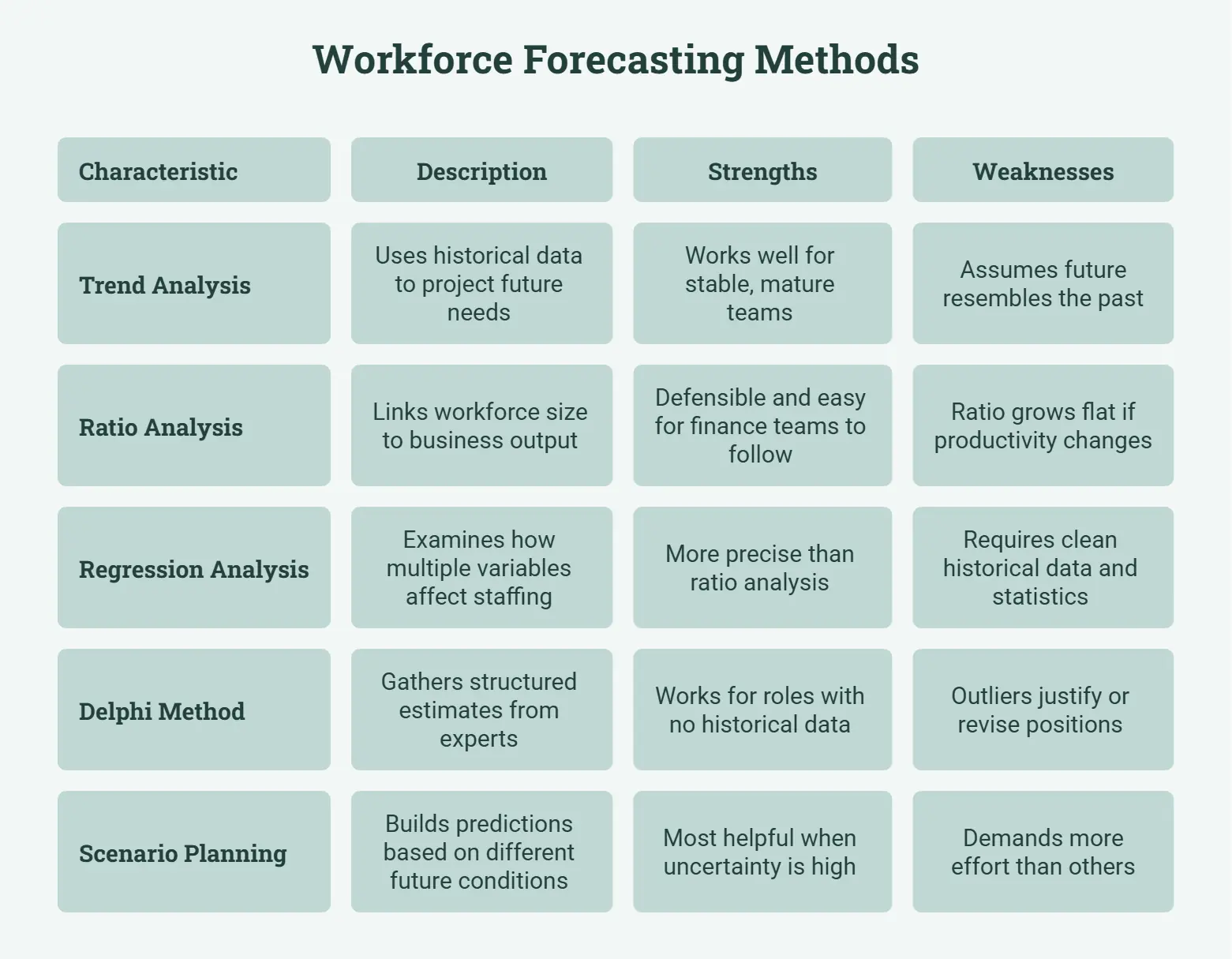
Different situations demand different approaches. These five cover the main options in use today.
Forecast Demand With Trend Analysis
Trend analysis uses historical data to project future staffing needs. If your team has grown 15% per year for three consecutive years and revenue targets suggest similar growth, trend analysis concludes that pattern forward.
It works well for stable, mature teams. But it has its weaknesses. It assumes that the future resembles the past.
Scale Headcount With Ratio Analysis
Ratio analysis links workforce size to a business output metric like customer demand or revenue targets. Here’s a common example.
For support teams, a standard ratio is one agent per 200 active clients. When client growth is forecast to reach 2,000, the math produces a clear staffing target of 10. This method is defensible and easy for finance teams to follow.
But the risk is that the ratio grows flat if productivity or scope changes significantly over time.
Model Complex Variables With Regression Analysis
Regression models examine how multiple variables affect staffing requirements at once.
It might show that every $1M in revenue generates 1.8 engineering-hours of maintenance work. It’s more precise than ratio analysis. But it requires clean historical data and comfort with the underlying statistics.
Gather Expert Input With the Delphi Method
The Delphi method gathers structured estimates from subject-matter experts through multiple rounds of anonymous input. Here —
- Department heads independently submit headcount projections.
- A facilitator consolidates them and shares the summary back without attribution.
- Outliers justify or revise their positions.
After two or three rounds, the group converges on a shared view. This method works for roles with no historical data, such as new products or emerging skill sets.
Prepare for Multiple Futures With Scenario Planning
With scenario planning, you build separate predictions based on different future conditions. You don’t rely on a single trend. Instead, you define a few distinct scenarios and calculate your staffing needs for each.
This approach demands more effort than others. But it’s also the most helpful when uncertainty is high. Because of that, leadership teams enter every planning cycle with pre-set answers for each possible situation.
How to Run a Workforce Forecast in Six Steps
To run a workforce forecast, follow the given steps properly —
1. Define What the Forecast Must Answer
Every forecast exists to support a specific decision. So, I link that decision back to my strategic workforce management objectives.
- Is the question about hiring for a new product line?
- Absorbing a seasonal volume spike?
- Planning annual headcount budgets?
The narrower and more concrete the question, the more useful the output.
2. Collect Historical Workforce Data
Pull at least 12 to 24 months of data, including —
- Headcount
- Hours worked
- Attrition
- Hiring timelines
- Project completion rates
You get more signal from hours worked than from headcount data. If your team has never done this systematically, run a time audit first to understand where hours are actually going.
3. Build the Demand Forecast
Translate business objectives into role-level staffing requirements. If revenue is projected to grow 30%, the model scales with it.
As revenue grows, sales and customer success usually grow too. On the other hand, product and infrastructure depend more on how complex the product is. Therefore, write down every assumption clearly.
That way, reviewers can question specific numbers without having to rebuild the whole model.
4. Map Your Current Supply
Project what your existing workforce will look like at the end of the forecast period. Also, make a calculative expected attrition using your —
- Historical rate
- Planned promotions
- Leaves and absence management records
- The productive ramp time for new hires
You can consider typically 60 to 90 days for individual contributors, longer for senior roles. This supply chart tells you —
- How much of the demand gap can your internal talent cover?
- How much external hiring will you need?
5. Close Gaps With a Concrete Plan
Compare demand and supply forecasts side by side. For each gap, set a specific action. It could be —
- External hire
- Training programs for internal upskilling
- Contractor engagement
- Scope adjustment
Plus, assign a budget, a timeline, and an owner.
6. Review and Adjust Every Quarter
A workforce forecast isn’t a paper you write in January and dust off in December.
See, real results rarely match predictions, and fresh data keeps coming in. Thus, every three months, you should compare what you expected with what actually happened. Things like hours worked, how many people left, and how long hiring took.
Then you adjust the model. This back-and-forth turns a static plan into a living one.
Conclusion
Workforce forecasting works when you treat it as a continuous process. If you want to get it right, define a specific question. Also, feed it real hours data, model demand and supply separately, and revisit the numbers every quarter.
If your current forecast rests on headcount assumptions alone, you must fix it first.
Frequently Asked Questions
How is workforce forecasting different from workforce planning?
Workforce forecasting predicts future needs. On the other hand, workforce planning defines how you can meet them. So, forecasting comes first. It’s the plan that you execute based on the forecast output.
What data do you need for workforce forecasting?
Historical headcount, actual hours worked by role and project, attrition rates, hiring timelines, and business growth targets. Hours-worked data is the most commonly overlooked input.
How often should you update a workforce forecast?
Quarterly at a minimum. Monthly is better for fast-moving teams. Annual-only updates are too slow for most organizations to act on meaningfully.
What is the Delphi method in workforce forecasting?
A structured process where experts independently estimate future staffing needs. Results are shared anonymously, consolidated, and refined over two to three rounds until the group reaches a shared view.
Can small businesses do workforce forecasting?
Yes. A spreadsheet with 12 months of hours-worked data, attrition history, and revenue projections is enough to build a useful demand model. Enterprise software is not a prerequisite.
What is the difference between demand forecasting and supply forecasting?
Demand forecasting estimates how many people the business will need. Supply forecasting estimates how many it will actually have. The gap between them drives hiring, training, and retention decisions.
About Author