Time Tracking and Work-Life Balance: 5 Ways to Find and Stop Over Work
Key Takeaways
-

A time audit, hard stop times, and structured focus blocks work together to establish work-life balance.
-
When you track hours per person and per project, workload imbalances show up before they reach the individual as burnout.
-
Always-on culture builds gradually through unchecked habits, not through any single decision your team makes.
Your team is working hard. But you don't actually know how hard until the hours are logged.
I've seen this pattern repeat throughout remote and hybrid teams. The schedule looks reasonable on paper. But the real hours tell a different story. Someone is absorbing more than their share, and nobody flags it until their mental health is already exhausted.
That’s why I'll share with you the ways time tracking and work-life balance connect. Alongside, you’ll know what you can do right now to protect your team's personal time.
What Does Work-Life Balance Mean at Work?
In practice, remote and hybrid work setups erased the old physical signs of when work stops. Now, you don’t commute, nor leave the office. So, the day itself no longer has a natural finish.
Now, the flexible work arrangements have no clear boundary. You have the official hours on paper, but your team's work hours go longer. Little by little, an always-on culture takes over until overtime feels normal.
5 Ways Time Tracking Protects Work-Life Balance
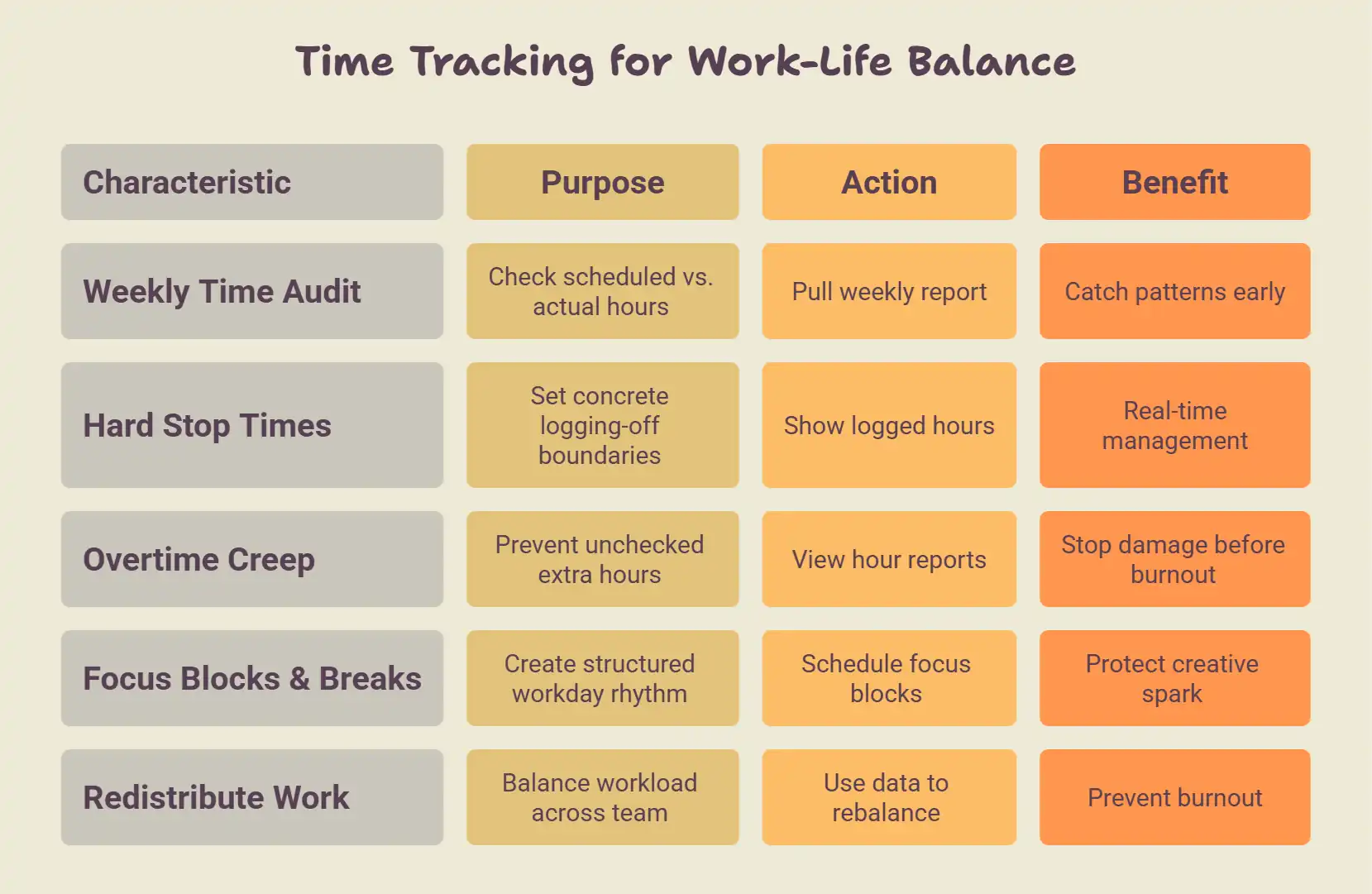
Time tracking gives you a record of what actually happened versus what was planned. The five methods below show you how to use that record to protect your team's personal time before the damage is done.
Run a Weekly Time Audit on Your Team
A weekly time audit means you review logged hours across your team at the end of each week. You do it to check —
- Who hit their scheduled hours?
- Who ran over?
- Which projects pulled the most time?
Your goal is to catch patterns early. So, if you see one person running 20% over their hours for three weeks straight, you know that’s a workload problem.
Therefore, pull a simple report each Friday. Look for consistent gaps between scheduled and actual hours. Those gaps are where work-life balance breaks down, and where work stress quietly builds before anyone says a word.
Set Hard Stop Times with Tracked Hours as Evidence
A hard stop time only works when you have data behind it. Without logged hours, "stop at 6 pm" is just a suggestion.
But tracked hours change that. When a team member can show 8.5 logged hours for the day, the case for logging off is concrete. This is where real-time management shifts from a concept to an operational habit. The numbers make the boundary visible to everyone, including the people setting deadlines.
Start with Apploye today and track your team's hours for free
Catch Overtime Creep Before It Becomes Burnout
Overtime creep is what happens when extra hours become the default without anyone deciding they should be. It starts with one late session that nobody notices.
And when you leave it unchecked, it compounds. See, if your team runs 10% over their hours every week, they’ll hit burnout long before anyone notices the trend. Besides, the cost of overtime shows up in output quality, error rates, and team morale as well.
In this case, I view the weekly hour reports to notice the pattern early. When I see the spike, I address the workload and stop the damage before it reaches the person doing the work.
Schedule Focus Blocks and Protect Break Time
Focus blocks are fixed windows in the day reserved for deep work. That means your team has no meetings, no interruptions. Instead, break time takes place between them.
Together, they turn a shapeless workday into a rhythm your team can actually sustain. But without a clear plan
- People skip breaks
- Scatter their focus
- Pack the day until they never fully recharge their batteries
Moreover, protecting break time also protects the creative spark that deep work depends on.
Try Apploye free and give your team's day real structure
Redistribute Work When Hours Spike
An hour spike in one person's log usually means the workload isn't distributed evenly. One team member is absorbing tasks that should be spread across the team.
Sadly, you won't catch that without visibility. But when your team tracks hours per person, the imbalance shows up clearly. You see who's at capacity and who has room.
So, use that data to rebalance before the overloaded person burns out.
How Apploye Helps Managers Protect Team Work-Life Balance
Most scheduling tools tell you when people are supposed to work. Apploye tells you what actually happened.
- It gives you timestamped logs of hours worked per person, per day, and per project.
- You can see the overtime spikes in reports before they become a burnout problem.
- Its Pomodoro timer gives your team a built-in work-break rhythm. Thus, your team gets focus time and recovery time across the shift.
Altogether, you can avoid guesswork and end-of-quarter surprises. In return, your teams get to maintain proper work-life balance.
Take control of your team's work hours.
Conclusion
Time tracking and work-life balance work together when you treat logged hours as a management tool. If your team runs a weekly audit, you catch overtime creep early. Again, if hours spike in one place, you redistribute before burnout hits.
Frequently Asked Questions
How many hours per week is considered overworked?
Most labor standards set 40 hours as the full-time baseline. For staff members who consistently work beyond 50 hours per week, the risk of burnout rises sharply, and productivity starts to drop.
Can time tracking itself cause stress for employees?
Time tracking can increase work stress for employees if it's framed as surveillance. When time tracking is positioned as a workload visibility tool, most teams adapt quickly and see it as protection. As a result, they don’t feel pressure and get stressed.
What's the difference between time tracking for productivity vs. for balance?
Productivity tracking measures output per hour. Meanwhile, balance tracking measures whether hours stay within healthy limits. Both use the same data, but the goal determines how you read it. For teams carrying a significant mental load, balance tracking is a more useful lens.
How do I convince my team that time tracking isn't surveillance?
To convince your team that time tracking isn't surveillance, show them the data first. When employees see that logged hours protect them from unreasonable workloads and after-hours requests, they quickly stop the resistance.
Does time tracking work for creative or non-desk roles?
Yes. Creative roles benefit from focus block scheduling and break protection. While some consider that the tracked hours are for measuring creativity, they keep the workday from expanding without limit.
About Author