Which Time Tracking Method Is Right for You? Methods and How to Decide
Key Takeaways
-

The method you choose decides what your hours can prove later. For example, manual logs won’t support a client invoice the way automatic tracking or a timer will.
-
The right method is one you can stick with when your schedule breaks down, not when everything runs smoothly.
-
Automatic tracking and clock-in/out generate solid records. On the other hand, Pomodoro and manual timesheets give you patterns and estimates.
You've tried logging hours at the end of the day. By then, two meetings, a client request, and a handful of small tasks have blurred together. You enter something reasonable and move on. But reasonable isn't billable, and it isn't defensible.
With that being said, I’m here today to fix that. I'll share with you which time tracking method is right for you. By the end, you'll know which method fits your workflow and what each one can actually prove.
What Does The Right Time Tracking Method Mean?
You must match the method to how you work. Besides, the right method determines what you can prove later.
Automatic tracking and clock-in/out logs generate records you can show a client, a payroll system, or an auditor. Meanwhile, manual estimates and pen-and-paper notes generate approximations. That gap matters more as your work scales.
4 Time Tracking Methods and When Each One Works
Not every method fits every worker. The one that sticks is the one that costs you the least effort on your worst day. Here's how each option holds up in practice.
1. Pick Automatic Tracking When You Lose Hours to Task-Switching
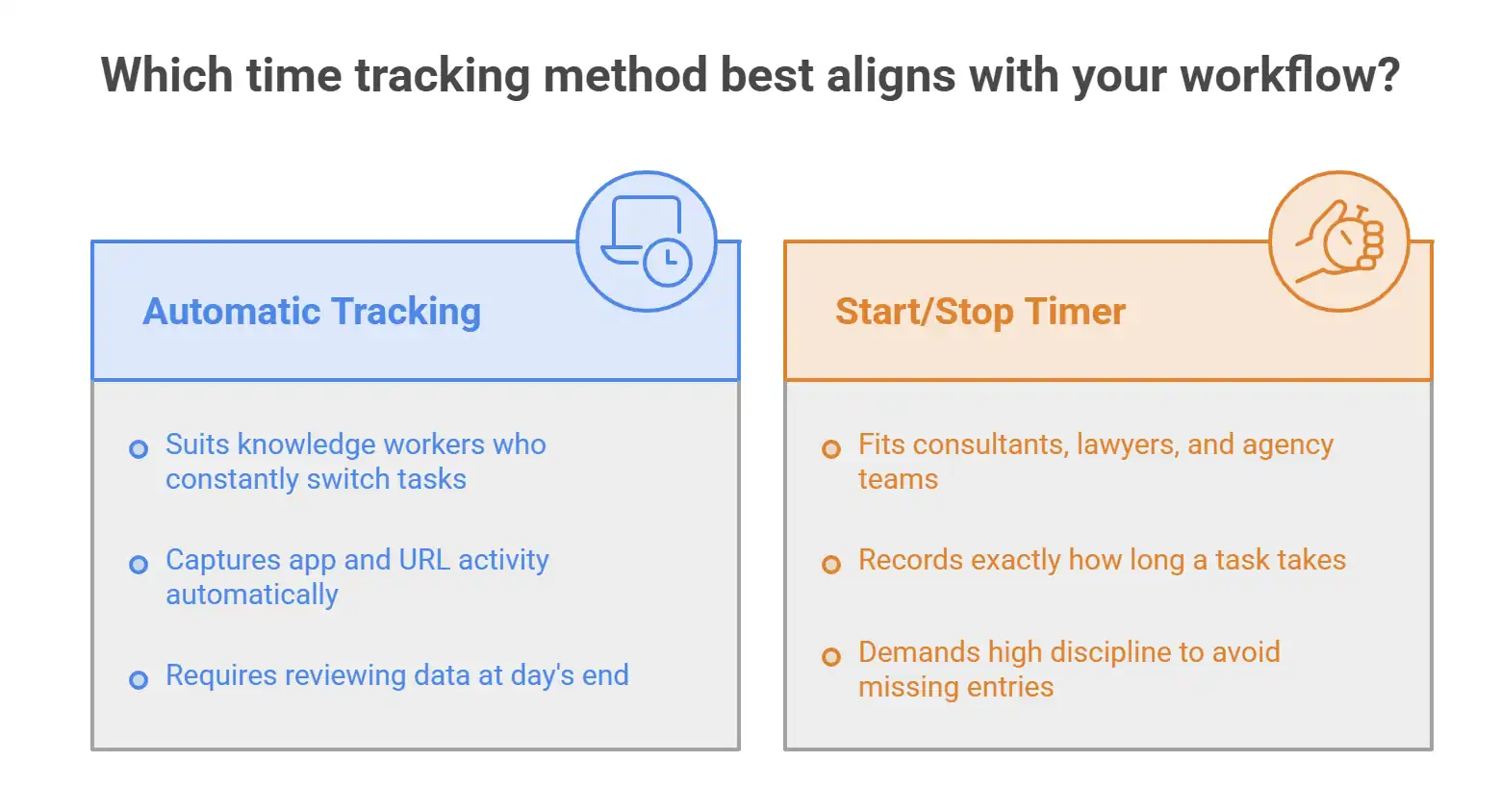
An automatic time tracker runs in the background of your device. It logs which apps and websites you use, and for how long. Later, you review the data at the end of the day and confirm what counts.
This method suits knowledge workers who constantly switch tasks. Examples could be designers, writers, developers, and support agents. The more you context-switch, the more manual logging fails you. You finish a session and genuinely cannot reconstruct where two hours went.
Try Apploye free and catch every lost hour automatically
2. Use a Start/Stop Timer When Every Minute Is Billable
A start/stop timer records exactly how long a task takes. You hit start when you begin, stop when you finish, or break. The log builds itself as you work.
This method fits consultants, lawyers, and agency teams who bill clients by the hour. Every item on your task list needs its own entry. Plus, each must be linked to a project management system, client, or deliverable.
Here, the trade-off is discipline. If you forget to start the timer, that time is gone.
3. Run a Manual Timesheet When Your Work Follows a Fixed Pattern
A manual timesheet is a log you fill in yourself at the end of a shift, a day, or a week. You record what you worked on and for how long.
This works when your day is predictable. A customer support agent who handles the same queue for eight hours needs a clean record of work hours for payroll.
But the problem starts when work varies. The longer you wait to fill in the timesheet, the more you rely on memory.
4. Try the Pomodoro Method When Focus Is the Real Problem
The Pomodoro technique breaks your workday into 25-minute focused sessions, each followed by a short break. Here, you track completed sessions instead of clock time.
This method fits anyone who struggles with distraction more than with logging. Writers, students, and solo operators often find it easier to commit to 25 minutes than to an open-ended work block. The structure creates momentum.
The catch is that it’s not a billing tool. Pomodoro data tells you how many focused sessions you completed. But it doesn’t tell how many tracking hours a client owes you for. Use it alongside another method if billable accuracy matters.
How to Match Your Method to Your Work Type
Even after having the method list, you must narrow it down. Run both filters below before committing to a time management system.
1. Identify What You Need to Prove With Your Hours
Start with the end result. Ask yourself what your tracked hours need to do once they exist.
- If they go on a client invoice, you need task-level accuracy. In this case, a start/stop timer is the only method that holds up.
- If they feed into payroll for a fixed shift, clock-in, clock-out is enough.
- If you need to show a pattern of focused work over time, Pomodoro Technique session counts give you that.
- If you just want to know where your day went, an automatic time tracker answers it without any effort.
So, pick the method that produces the record your situation actually requires. Every other consideration is secondary.
2. Test the Method Against Your Worst Workday
Most time management techniques work fine on a calm, structured day. The real filter is whether the method survives your hardest one.
Think about a day when you had long meetings, tasks shifted mid-afternoon, and you finished late.
- Would you have remembered to start and stop a timer through all of that?
- Would you have filled in a manual timesheet accurately at the end?
If the answer is no, that method will fail you consistently.
Therefore, choose the method you can maintain when things fall apart, not just when they run smoothly. A slightly less precise method you use every day beats a precise one you abandon by Wednesday.
How Apploye Lets You Track Time the Way You Actually Work
The best time tracking software locks you into one method. You get a timer, or you get automation, but often not both. Apploye timesheet software covers all of it.
- You can run automatic tracking for days when tasks pile up and context-switching takes over. It also lets you switch to clock-in, clock-out for shift-based work.
- Moreover, you can use the built-in Pomodoro timer to structure focused sessions. Meanwhile, your team can log hours manually when a simple timesheet is all you need.
- Plus, every method feeds into the same activity data. Apploye also records app and URL usage, idle time, and labor analytics across your shift.
Whatever method you choose, the fundamentals of how to track time stay the same. Pick a system you'll actually use, and make sure it produces a record you can defend.
Try every time tracking feature completely free inside Apploye
Wrapping Up
If you’re searching for the answer to which time tracking method is right for you, ask yourself, “What do your hours need to do?” If they go on an invoice, you need task-level accuracy. Again, if they feed payroll, shift boundaries are enough. Then again, if focus is the problem, structure your sessions first.
Start with that answer, then choose which time tracking method is right for you.
Frequently Asked Questions
Can I use more than one time tracking method at the same time?
Yes. Many people pair methods, like a start/stop timer for client work and a Pomodoro timer for focus sessions, for example. The key is that each method serves a different purpose. And often using two methods for the same task creates conflicting records.
What is the most accurate time tracking method?
Automatic time tracking is the most accurate because it runs without input from you. Start/stop timers come close when used consistently. Manual timesheets are the least accurate. That’s because accuracy drops the longer you wait to fill them in.
How do I know if my current method is causing me to lose billable hours?
Compare your tracked hours against your actual output for one week. If the numbers don't match what you delivered, your method has gaps. Automatic tracking or a start/stop timer will close them.
Is automatic time tracking an invasion of privacy?
It depends on the tool. Some log keystrokes or take hidden screenshots and can be considered an invasion of privacy.
What time tracking method works best for remote teams?
Automatic tracking works best for remote teams as it runs without relying on each person's habits or memory. It produces consistent data throughout the whole team, regardless of time zone or schedule.
About Author