How to Handle Sensitive Call Center Data [5 Simple Strategies]
Key Takeaways
-

To handle sensitive call center data, start with access control. Agents should see only the private customer information their role requires. Mask fields by default, enforce unique logins, and audit permissions regularly.
-
Keep payment and identity data away from agents entirely. DTMF masking and IVR routing remove human handling at the most vulnerable data-validation points.
A call center processes hundreds of customer interactions daily. Each one carries names, payment details, health records, or account credentials. That volume creates real exposure.
And trust me, when I say that most breaches don't start with an external attack. They start with an agent who sees more than they should, or a process that was never properly defined.
The consequences are serious. In 2024, a single data breach costs companies around the world an average of $4.88 million. That’s why you must know how to handle sensitive call center data. Today, we’ll show you exactly that!
What is Sensitive Data in a Call Center?
Any data that can identify, locate, or financially impact a customer falls under this category and requires strict protection.
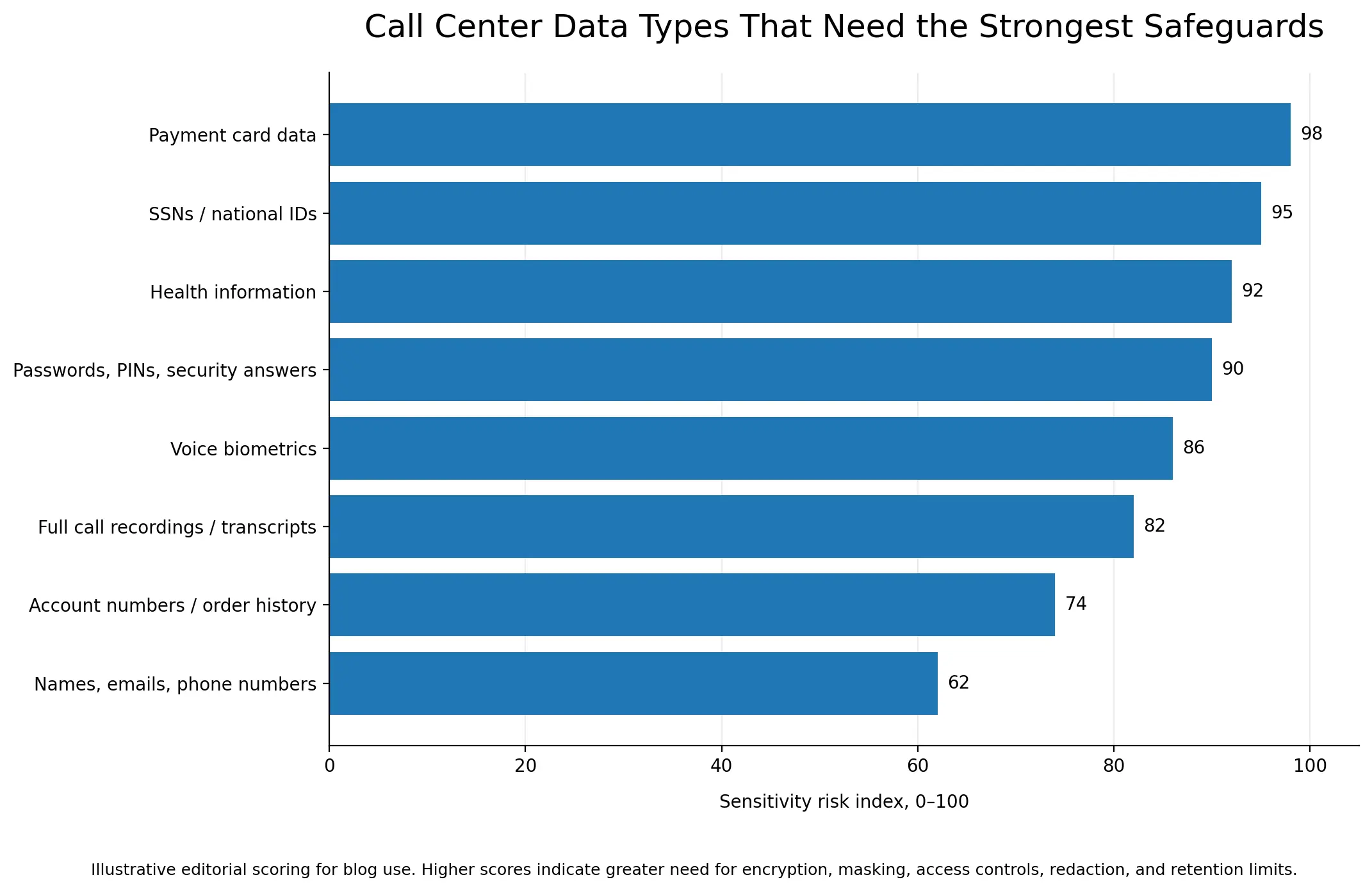
Contact centers collect and process several distinct data types daily, such as —
- PII (names, addresses, SSNs, contact data)
- Financial data (card numbers, account details)
- PHI in healthcare call centers
- Call recordings and transcripts as data assets
Strategies to Handle Sensitive Call Center Data
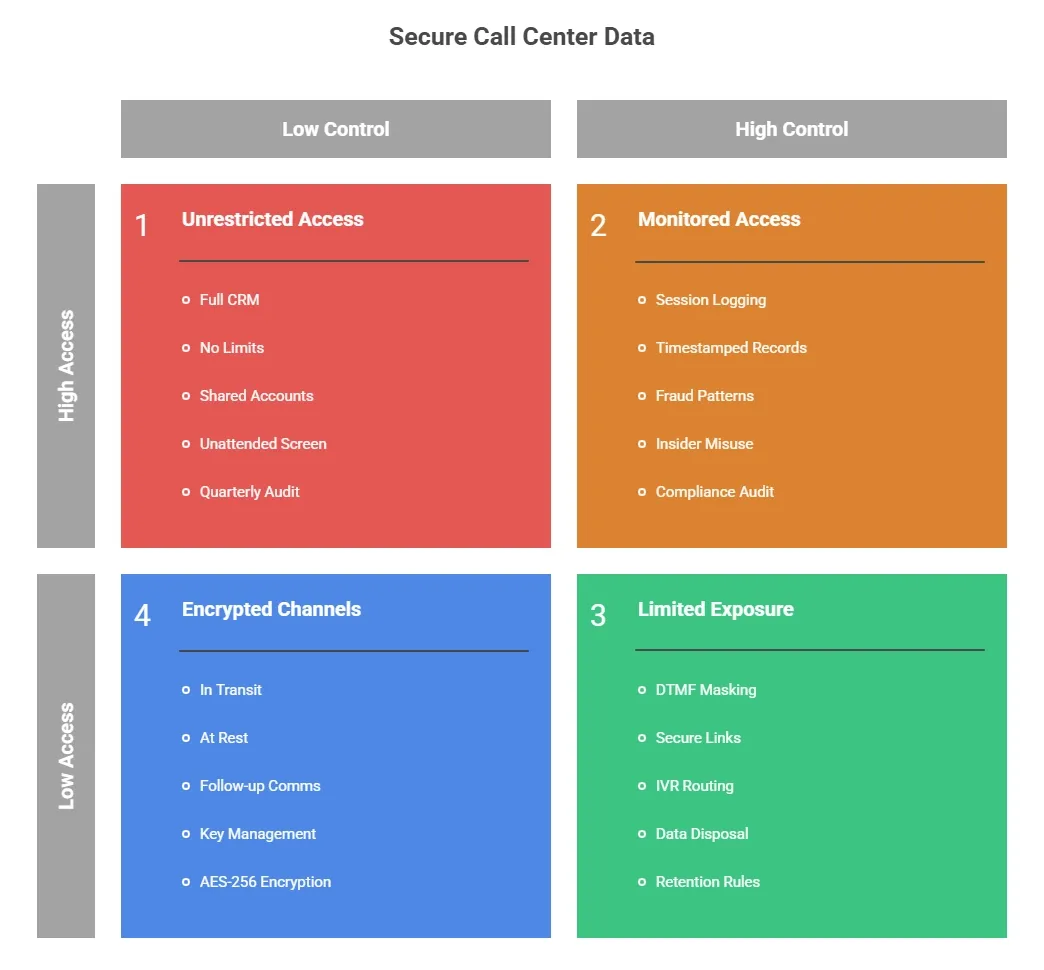
Call centers face constant exposure to sensitive customer information. I’ll talk about strategies below that cover access control, encryption protocols, audit logs, and data disposal.
1. Control What Each Agent Can See Before the Call Starts
Most contact center access problems are design failures. An agent gets full CRM access on day one, as no one sets limits. And that access never gets reviewed.
Role-Based Access Control (RBAC) fixes this. Here's what makes RBAC work in practice —
- Mask Sensitive Fields by Default: SSNs show as XXX-XX-1234. Card numbers display only the last four digits. Agents who don't need full personal identifiers never see them.
- Require Unique Login Credentials Per Agent: Shared accounts break audit logs. If three agents share one login, you can't trace a data access event to a single person.
- Set MFA at the Application Level: Network-level MFA is a baseline. Agents accessing CRM platforms or call monitoring systems need a second authentication layer at the application itself.
- Configure Auto Session Timeout: An unattended screen is an open door. Sessions should lock after two to five minutes of inactivity.
- Audit Permissions Quarterly: Access granted during onboarding rarely updates when an agent changes roles or leaves. Regular reviews catch credential misuse before it becomes a compliance gap.
2. Keep Payment and Identity Data Out of the Agent's Hands
The safest data is data an agent never touches. For payment and identity verification, three approaches make this possible —
- DTMF Masking: The customer enters credit card information via phone keypad. Actual tones are replaced with flat tones. So, the agent hears nothing, and the recording captures nothing. Data routes directly to the payment processor. It also satisfies PCI-DSS scope reduction.
- Secure Web Links: The agent sends a URL. Then, the customer enters card or identity details in an isolated browser session. The agent sees no input and no data at any point.
- IVR Routing: For SSN or date-of-birth verification, the system prompts keypad entry. The agent receives only a pass or fail result.
3. Encrypt Data at Every Stage of the Call Lifecycle
Data moves through VoIP lines, CRM fields, call recordings, and cloud backups. So, encryption protocols need to follow that movement at every stage.
Here's where it applies —
- In Transit: TLS 1.3 for network transmissions. SRTP for live VoIP voice. Any data moving between systems needs an encrypted channel.
- At Rest: AES-256 for stored recordings, CRM databases, and backups. Remember, call recordings and transcripts are protected records.
- In Follow-up Communication: Agents sending PHI or account details after a call must use approved encrypted channels only. One misaddressed standard email is a reportable breach under GDPR and HIPAA.
- Key Management: Define who holds decryption keys, who can request access, and how often keys rotate. Encryption without key governance is incomplete.
4. Monitor Who Accesses Data and When
Access controls alone don’t tell you much. You need to know how they're actually used. Session logging fills this gap. It records every data access with a timestamp, agent ID, and the content viewed.
So, I watch for patterns that signal fraud attempts or insider misuse —
- Access outside scheduled shift hours
- High-volume record pulls in short windows
- Repeated failed login attempts
Apploye’s employee monitoring software handles this on its own. It records session logs with time stamps. These logs let you see what agents are doing right now and what they did before. So, when you start a compliance audit or look into a breach, the information is already ready.
Let’s build the audit trail your compliance team needs
5. Set Clear Rules for Data Retention and Disposal
The longer you hold data in your system, the more it increases breach risks. So, start with defined retention windows by data type —
- Call recordings are kept for 30 to 90 days unless legally required longer
- CRM records linked to an active customer relationship
- Payment logs are deleted immediately post-transaction under PCI-DSS
Automated deletion is safer than manual processes. Set triggers that remove data when the retention period ends.
But for disposal, file deletion isn't enough. Digital records need overwrite-based wiping. Meanwhile, shred paper notes and printed records immediately after use.
Under GDPR, you must document the deletion. Remember, customers can request proof that you removed their data.
Sign up for Apploye to protect your call center data
Wrapping Up
Now, you know how to handle sensitive call center data. But you must run the right controls consistently across every agent and every shift. Things like access restrictions, encryption, compliance alignment, etc., work when you treat them as daily operational standards.
Apploye helps call center managers maintain that standard. Its activity logs, session monitoring, and workforce analytics give direct visibility into agent behavior. Hence, you can easily catch access anomalies early and maintain the audit trail that GDPR, HIPAA, and PCI-DSS require.
Frequently Asked Questions
What types of data does a call center need to protect?
Call centers must protect PII (names, addresses, SSNs) and PHI (medical records, insurance details). Also, they must safeguard payment card data (card numbers, CVVs), and call recordings or transcripts that capture any of the above.
What is DTMF masking, and how does it protect call center data?
DTMF masking lets customers enter card digits via phone keypad. The system replaces real tones with flat tones — the agent hears nothing. Data routes directly to the payment processor, bypassing the agent entirely. This reduces PCI-DSS compliance scope.
How do you prevent insider threats in a call center?
Limit data access using RBAC and least privilege principles. Require unique agent logins, configure session timeouts, and maintain activity logs. Workforce monitoring tools flag unusual access patterns before they become incidents.
Is call recording subject to GDPR?
Yes. GDPR requires explicit customer consent before recording. Recordings must be deleted once their purpose ends, stored securely, and access-logged. Customers can request deletion at any time — and that deletion must be documented.
What should a call center do after a data breach?
Isolate the affected system immediately. Follow the internal notification chain. Under GDPR, report to authorities within 72 hours. Under HIPAA, notify affected individuals. Also, document every containment step for the post-incident compliance review.
About Author