How to Run a Remote Call Center without Losing Team Visibility
Key Takeaways
-

A remote call center needs call center monitoring software, VoIP, ACD, IVR, CRM integration, and data security controls in place before your first agent goes live.
-
Structured onboarding, call center workforce management, shift scheduling, KPI tracking, and remote QA protocols keep customer service quality stable across every time zone.
Most virtual call centers fail because managers can’t see what is happening across their distributed team. So problems don’t announce themselves. Instead, CSAT scores start dropping. SLAs get missed. Agents quietly disengage from their shifts.
That’s why knowing how to run a remote call center means solving the visibility problem first. Then, you build the operating model, scheduling system, and performance tracking around it.
I’ll exactly cover that. You’ll learn about the key strategies to run operations efficiently, and the tools that keep your distributed team performing consistently.
What Do You Need to Run a Remote Call Center?
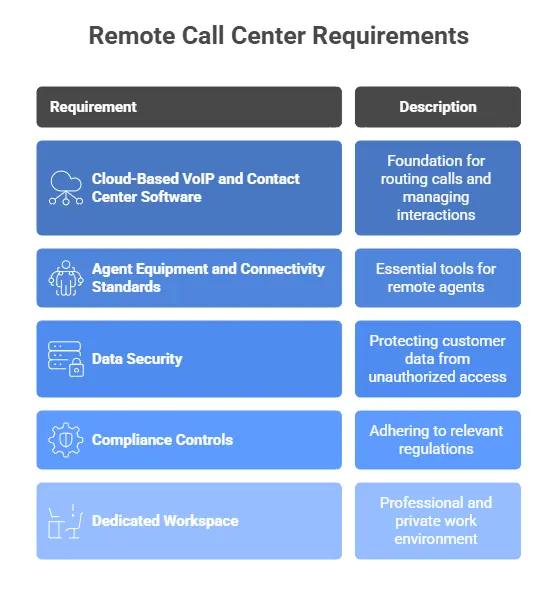
Before you manage a single agent or track a single call, you need the right infrastructure in place. Here is what every virtual call center requires to function.
1. Cloud-Based VoIP and Contact Center Software
Voice over Internet Protocol (VoIP) is the foundation of every remote call center. It routes voice calls over the internet instead of physical phone lines.
But VoIP alone is not enough. You need a full contact center software stack built around it.
- Automatic Call Distribution (ACD): It routes incoming calls to the right agent based on skill set, availability, or priority. Without ACD, calls land randomly, which leads to increased wait time spikes.
- Interactive Voice Response (IVR): This handles the first layer of customer interaction. It collects information before a call reaches an agent.
- CRM Integration: It connects your customer data to every call in real time. Agents see account history, previous interactions, and open tickets the moment a call connects.
- Omnichannel Routing: This brings voice, email, chat, and social media into one platform. Without it, agents switch between tools constantly. Customer context gets lost between channels.
2. Agent Equipment and Connectivity Standards
Every remote agent needs four things before they take a single call.
- A dedicated work device. It could be a laptop or a desktop to run your contact center software. Personal devices create security gaps and inconsistent performance.
- A noise-canceling headset to keep background noise off the line.
- A minimum 25 Mbps internet connection for stable VoIP calls without lag or dropped audio. Remember, Ethernet over Wi-Fi is the standard.
- A two-factor authentication device to protect system access.
3. Data Security
When agents connect from personal internet connections, your customer data travels through the infrastructure. And you can’t control it. So, it’s the core security problem in every virtual call center.
- A VPN solves the first layer. It encrypts the connection between your agent's device and your call center systems. So, the data doesn’t move over exposed networks.
- End-to-end encryption protects data in transit beyond the VPN.
- Role-based permissions add a second layer of control. Hence, each agent accesses only what their role requires, nothing more.
4. Compliance Controls
Compliance adds another set of requirements on top of security.
- GDPR governs how you handle personal data for European contacts.
- PCI controls apply when agents process payments.
- TCPA sets consent and calling rules for US outbound operations.
Relevant Read:
What is Operational Compliance and How to Improve It?
5. A Dedicated Workspace
Every remote agent needs a workspace that is —
- Quiet enough to hold a professional conversation
- Private enough to handle sensitive customer data
- Dedicated enough that distractions do not interrupt active calls
Set clear workspace standards during hiring and confirm them before onboarding begins.
Key Strategies to Run a Remote Call Center Efficiently
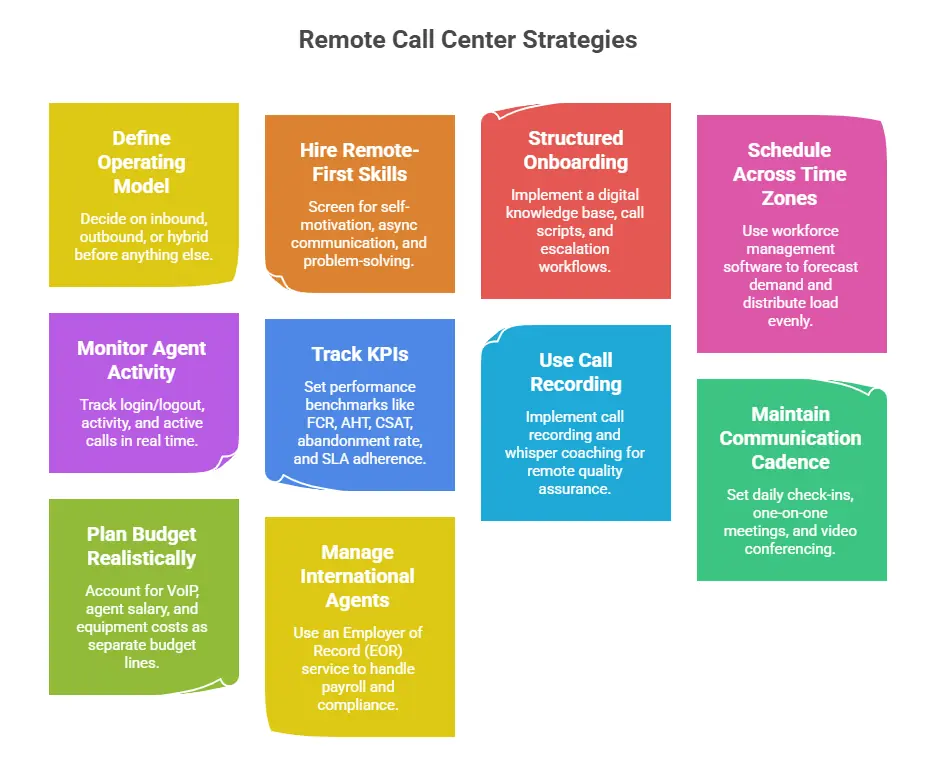
Follow the strategies to run your remote call center effectively —
1. Define Your Operating Model Before Anything Else
Your operating model is the first decision. Everything else, from staffing, routing configuration, KPI selection, to training scope, follows from it.
- Inbound call centers handle incoming customer contacts. It includes customer support requests, billing questions, technical issues, and order management. Here, the priority is resolution speed and service quality.
- Outbound call centers run agent-initiated calls, such as lead generation, sales prospecting, appointment setting, and market research. Here, the priority is contact rate and conversion.
- Hybrid models run both. They work well for mid-size operations that need to support existing customers while generating new ones.
2. Hire for Remote-First Skills, Not Just Call Center Experience
Remote agent hiring requires a different screening filter. Yes, virtual contact center experience matters. But the following matters more, like —
- Self-motivation
- Async communication ability
- Independent problem-solving
They decide whether an agent actually performs without supervision. So, screen specifically for these traits during recruitment.
- Ask candidates how they structure their workday without a manager present.
- Confirm they have a dedicated workspace and equipment that meet your standards.
Meanwhile, the global talent pool removes geographic constraints entirely. Distributed workforce recruitment lets you hire the right person regardless of location.
Important Read:
Essential Things when Hiring Remote Teams
3. Build a Structured Remote Onboarding Process
Structured onboarding directly confirms how fast a new agent performs. According to a Glassdoor survey, proper onboarding improves retention rates by 82%. That number matters more in remote call centers, where disconnected agents exit faster.
- A digital knowledge base gives agents reference material from day one.
- Call scripts set the standard for how conversations should run.
- Escalation workflows tell agents exactly what to do when a call goes beyond their scope.
4. Schedule Shifts Across Time Zones Without Burning Agents Out
Use remote workforce management software to forecast call volume by hour and day. That way, your shifts map to actual demand.
Time zone scheduling gives you 24/7 SLA coverage without keeping agents on back-to-back shifts. But that advantage disappears fast when you concentrate high-volume hours on a small group.
So instead, distribute the call load evenly across shifts. I also built overlap windows between time zones to maintain continuity.
Meanwhile, shift adherence tracking keeps your distributed team accountable to their scheduled hours.
5. Monitor Agent Activity and Performance in Real Time
Track what your agents are actually doing during their shift. Real-time agent monitoring software gives you —
- Login and logout logs
- Activity tracking
- Active call visibility
Monitor your remote call center agent performance live
6. Track the KPIs That Reveal Operational Health
Set your performance benchmarks before your first agent takes a call. Without them, you have activity but no direction. For instance —
- FCR reveals routing and training gaps.
- AHT tracks time per call, yet chasing it without watching
- CSAT produces fast calls that leave customers unsatisfied.
- Call abandonment rate points directly to staffing or scheduling problems.
- SLA adherence confirms whether your team meets response time commitments consistently across shifts.
So treat these call center KPIs as a system.
7. Use Call Recording and Whisper Coaching for Remote QA
Remote quality assurance works when you build a consistent review system around your calls.
- Call recording keeps everything stored, searchable, and available for review. So instead of relying on agent self-reporting, you hear exactly how conversations unfold.
- Whisper coaching lets supervisors guide agents through difficult calls in real time without the customer hearing. Thus, agents get support exactly when they need it most.
- QA scoring turns individual call reviews into measurable performance data.
8. Maintain Communication Cadence to Keep Teams Cohesive
Remote team cohesion breaks down quietly. So set a communication cadence. I try to implement —
- Daily team check-ins keep agents aligned on priorities.
- One-on-one meetings give managers a direct read on how each agent is performing and feeling.
- Video conferencing with cameras on maintains the personal connection that async communication cannot replace on its own.
At the same time, async communication tools like Slack and Teams cover the gaps between meetings. Instead of waiting for a scheduled call, agents handle quick questions in real time without interrupting active calls.
Employee engagement drops when communication is always reactive. So, build your rhythm right into the schedule.
9. Plan Your Remote Call Center Budget Realistically
Plan your budget before you hire your first agent. See, VoIP subscription pricing typically runs $25–$50 per user per month. Yet your largest ongoing expense is remote agent salary.
Meanwhile, the call center equipment budget covers laptops, headsets, and connectivity support. It can average $300–$800 per agent upfront. Thus, account for call center software, workforce, and equipment costs as three separate budget lines.
10. Manage International Agents Without a Physical Entity
You don’t need to set up a legal entity in every country while hiring international working-from-home agents. Just use an Employer of Record (EOR) service like Deel to handle —
- Cross-border payroll
- Local labor law compliance
- Tax obligations on your behalf
That said, labor law compliance still varies by country. So, verify jurisdiction-specific requirements before onboarding. Thus, an EOR removes the operational barrier to building a high-quality distributed team. That too, without the overhead of multinational entity registration.
Wrapping Up
Knowing how to run a remote call center efficiently comes down to one thing: operational clarity. The right VoIP infrastructure handles the technology layer. Meanwhile, a defined operating model keeps your team aligned. Real-time monitoring, KPI tracking, and remote QA systems handle performance.
Apploye gives you the visibility layer to make it work. You can use it for time tracking, idle detection, activity monitoring, and productivity scoring across every shift. So instead of guessing, you always know exactly what your remote team is doing.
Frequently Asked Questions
What software do I need to run a remote call center?
You need VoIP software for call routing, an ACD system to distribute calls, and IVR for self-service handling. Also, you need CRM integration for customer context. Plus, remote workforce management tools for scheduling and performance tracking.
How do I monitor remote call center agents effectively?
Use real-time monitoring tools that combine activity tracking, idle detection, and call recording. These give you visibility into agent behavior and output without requiring physical presence on the floor.
How do I handle compliance for a remote call center?
Implement VPN access, data encryption, and role-based permissions as your security baseline. Then apply TCPA call consent laws for outbound operations. Meanwhile, implement GDPR for European contacts and PCI controls when agents process payments.
What KPIs should I track for a remote call center?
Track FCR to measure resolution quality, AHT for call efficiency, and CSAT for customer satisfaction. Plus, you should track the abandonment rate for staffing gaps. Also, track SLA adherence to confirm consistent response time commitments across all shifts.
About Author