How to Reduce Resistance to Time Tracking Among Employees: 6 Simple Steps

Key Takeaways
-

Employee resistance to time tracking software signals a rollout problem. When you fix the rollout, the resistance reduces quickly.
-
Sequence matters more than the tool. Explain the "why" first, set a clear time tracking policies framework, run a small pilot, and get managers tracking before anyone else does.
-
When employees see their own activity data in real time, they consider monitoring as a shared record rather than a top-down judgment.
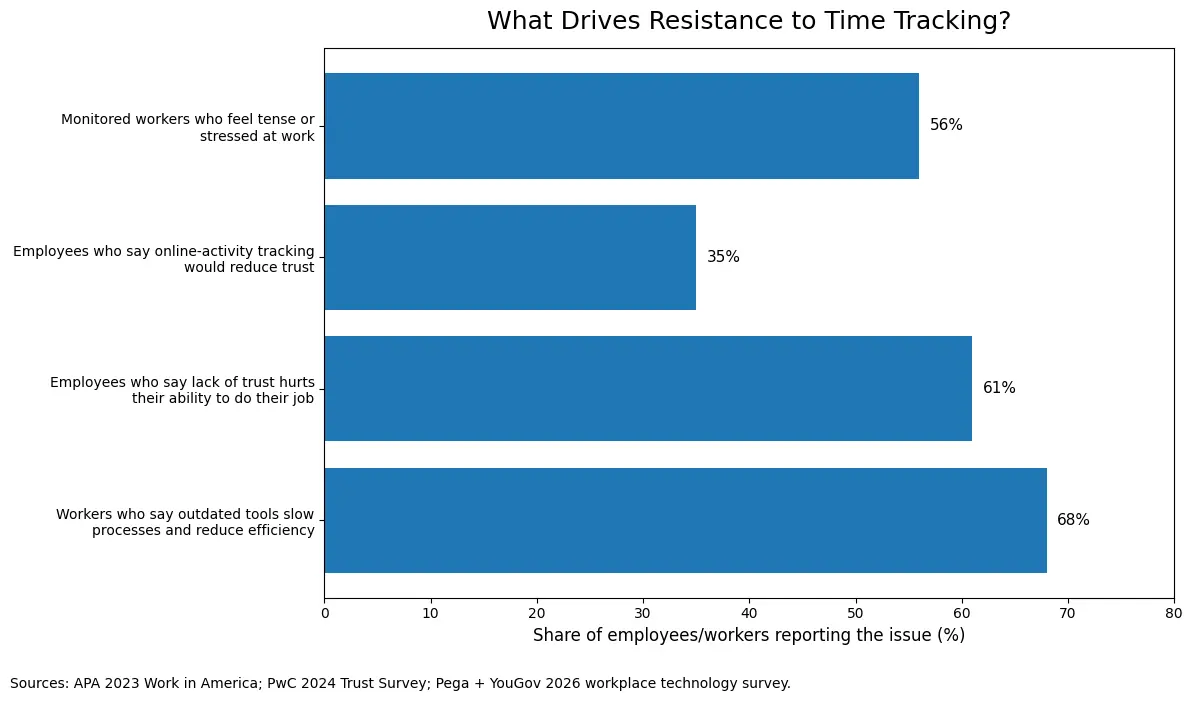
Most managers assume employee resistance is about the time-tracking software itself. It's not. Most employees who resist time tracking aren't afraid of accountability.
Instead, they are reacting to fear and unclear data policies. Most crucially, a system that hands all the visibility to managers and none to them. Let’s break down why this happens and how to reduce resistance to time tracking among employees.
How to Reduce Resistance to Time Tracking Among Employees: Step by Step
1. Explain the "Why" Before Tracking Time
The single biggest rollout mistake is leading with the time-tracking software instead of the reason. Before your team ever logs in, tell them exactly why you're tracking time. Avoid corporate reasons. I, for instance, explain —
- Fairer resource allocation and workload distribution
- More accurate project management estimates
- Cleaner payroll processing and payroll accuracy
When employees understand the purpose first, they treat the tool as a solution rather than surveillance.
2. Write a Clear Data Policy First
A time tracking policies document allows your employees to understand what actually happens to the data. So, before rollout, document and share exactly —
- What gets tracked (active monitoring, app usage)
- Whether there will be screenshot monitoring or not
- What doesn't get tracked (keystrokes, personal apps, off-hours activity)
- Who sees the data
- How long it's stored
- How it won't be used
However, never share vague answers. Also, instead of making your policy long, keep it honest.
3. Pilot With a Small Group
Don't roll out time tracking software to your entire team on day one. Instead, run a two-week pilot with a small, willing group first.
Let them test the tool, flag friction points, and report back. That creates feedback loops before problems spread. I’ve noticed two things happen here —
- You find usability problems before they spread
- Early adopters become internal advocates
4. Let Employees See Their Own Data
The standard rollout gives managers all the visibility and employees none. That's the wrong direction. And it's exactly what turns employee time tracking software into employee surveillance in practice.
Your employees should get to see their own —
- Time data collection outputs and activity logs
- Workforce productivity and performance scores
- Logged hours through real-time tracking
In return, they stop imagining what the data says about them because they already know.
Besides, shared visibility turns employee monitoring into a two-way record. That shift alone removes a significant layer of resistance.
5. Let the Managers Track Too
When employees see that their managers don’t track themselves, it triggers their fear. They made them believe that this tool is to control them.
So your managers need to track their time before asking anyone else to. Plus, participation from leadership creates reciprocal accountability. Hence, the data no longer flows in one direction.
When everyone operates under the same rules, the system reads as a shared standard.
6. Automate to Reduce Manual Load
When employees spend more time logging their work than doing it, the tool becomes the problem. So choose a time tracking software with automated tracking built in.
How Apploye Reduces Resistance Through Transparent Monitoring
Most time tracking tools give managers full visibility. But the employees stay in the dark. Apploye inverts this. Your employees approve tracking before it starts. Plus, every piece of time data collection is visible to them, too.
- Configurable screenshots to show employees exactly what gets captured and when
- Use app and URL tracking to give your team a clear record of their own activity patterns
- Utilize daily productivity reports to give employees visibility into the same data their manager sees
Hence, your team can understand the data about their work and start using it for their improvement.
Try Apploye free and see how transparent tracking removes resistance
Conclusion
How to reduce resistance to time tracking among employees, well, it doesn't fix itself. It builds when leadership skips the explanation or leaves employees with no visibility into their own data.
If your team is pushing back, start with the rollout. Also, fix the communication gap first, and adoption usually follows.
Apploye is built around that. Employees approve tracking before it starts. They can also ask the managers to enable or disable taking screenshots. Meanwhile, nothing runs in the background without their knowledge. When both sides see the same picture, pushback tends to stop.
Frequently Asked Questions
How long does it take for employees to accept time tracking?
Acceptance typically takes two to four weeks with a well-structured rollout. Teams that receive a clear "why," a pilot phase, and access to their own data adapt faster.
Should salaried employees track time too?
Salaried employees benefit from time tracking as much as hourly workers. It reveals workload imbalances, supports accurate project scoping, and prevents burnout. Without it, overwork stays invisible until it becomes a retention problem.
What should a time tracking data policy include?
A time tracking data policy should cover what you track, what you don't, and who accesses the data. Also, it should include how long you store it, and what you'll never use it for. One page is enough.
How do you handle an employee who flat-out refuses?
An employee who refuses time tracking is usually reacting to a specific fear, not defying policy. Have a direct one-on-one, ask what concerns them, and address it specifically. Most resistance resolves at this stage.
Does remote work make resistance harder to manage?
Remote work increases resistance because tracking feels more invasive in a home environment. In this case, clear boundaries help. Thus, monitor work hours only, share what's tracked upfront, and give remote employees direct access to their own data.
About Author