ROI of Time Tracking: What It Is and How to Measure It

Key Takeaways
-

The best time tracking apps deliver an average annual ROI between 200% and 400%.
-
To measure ROI, subtract what the software costs from your total financial gains and divide by the cost.
-
When you count idle hours as active, don’t flag entries on the wrong projects, and uneven team tracking, all drain the ROI gradually.
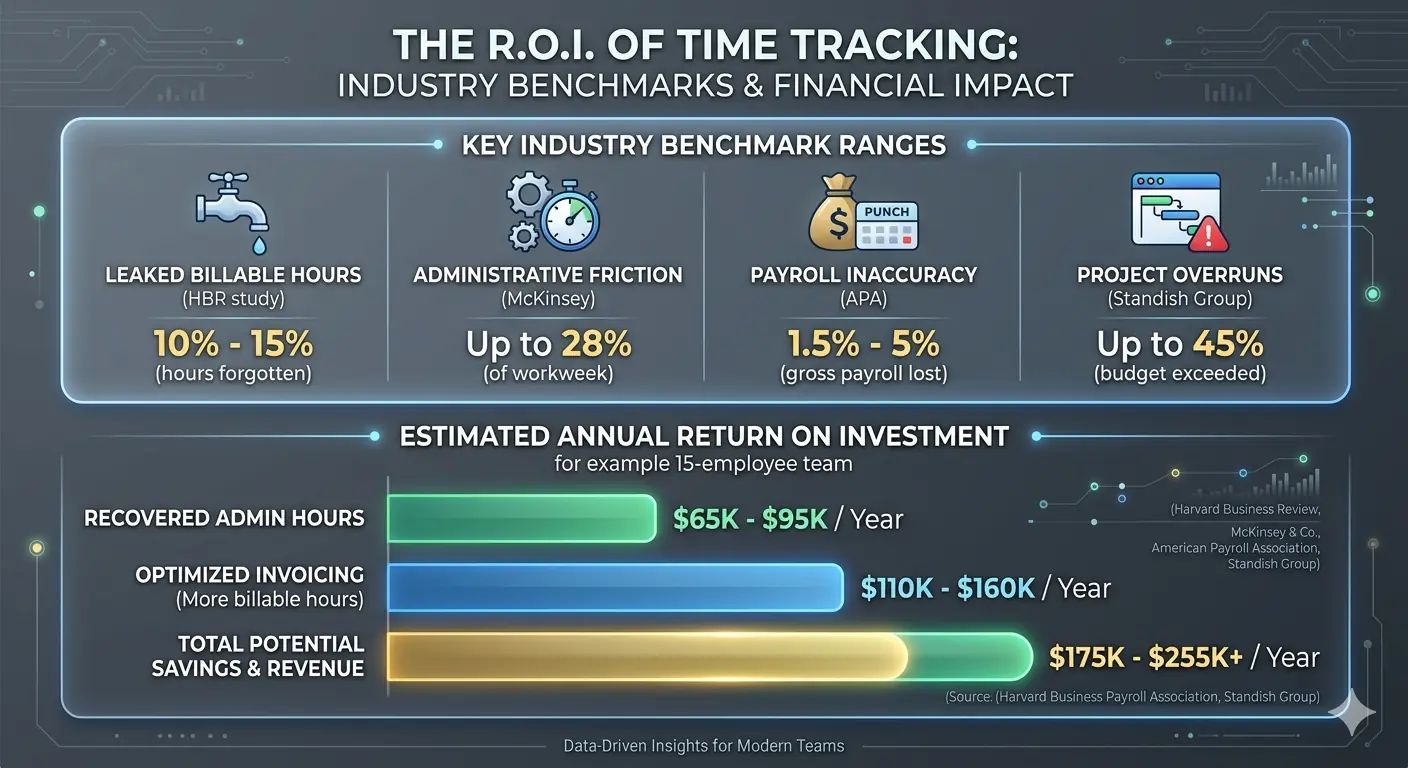
How much billable time did your team lose last month? One missed hour per person per week, at an average hourly rate of $150. It costs a 10-person firm $75,000 in lost billable hours revenue each year.
That's the real cost of weak time tracking returns. This write-up breaks down where the return on investment actually comes from. Most importantly, how to calculate the ROI of time tracking, and what stops most businesses from capturing it.
What is the ROI of Time Tracking?
Industry benchmarks put the average annual return at 200–400%. It’s driven by —
- Recovered billable hours
- Fewer payroll process errors
- Lower compliance risk
Moreover, time tracking creates value in three directions —
- Revenue you stop losing
- Costs you stop paying
- Decisions you stop making on guesswork.
Most businesses only count the first one. Yet the compounding gains come from all three working together.
What Drives the Most ROI from Time Tracking?
Managers often miss where ROI really appears. The four examples here have the strongest financial and operational impact.
Recover Lost Billable Hours
Billable hours are the most direct ROI lever you have. Most professional services teams log time hours after the work is done. As a result, they end up with —
- Missed entries
- Underbilled clients
- Revenue that disappears before it reaches an invoice
Start Apploye free and track every billable hour in real time
Minimize Payroll Errors at the Source
For one, some workers report fewer hours than they actually worked. On the other hand, others record time they never spent on the job.
The bottom line is, your payroll figures aren’t correct. Therefore, HR and finance spend hours every pay period just to fix them.
Reduce Compliance Risk Before It Costs You
Time tracking protects you from costly compliance violations. The FLSA (Fair Labor Standards Act) requires accurate records of hours worked, overtime, and breaks. Without them, a regulatory audit can result in a fine or a back-payment order.
The risk is not hypothetical. FLSA lawsuits have risen 417% since 1997. Restaurants, healthcare providers, construction firms, and hotels take the hardest hits.
Automatic time logging timestamps every shift and overtime hour. So you can pull any record on demand rather than relying on retroactive fixes under pressure.
Scope Future Projects on Real Data
Your project estimates are only as accurate as the data behind them. Without time logs, you quote from gut feel. Gut feel underestimates almost every time. So your margins shrink before the project even starts.
This is exactly why tracking time in project management matters beyond simple billing. When your team tracks time for each task, you build performance benchmarks from real work durations.
Use that data before writing your next proposal. This way, you can create tighter quotes, your budgets stay on track, and no room for scope creep.
How Do You Calculate Time Tracking ROI?
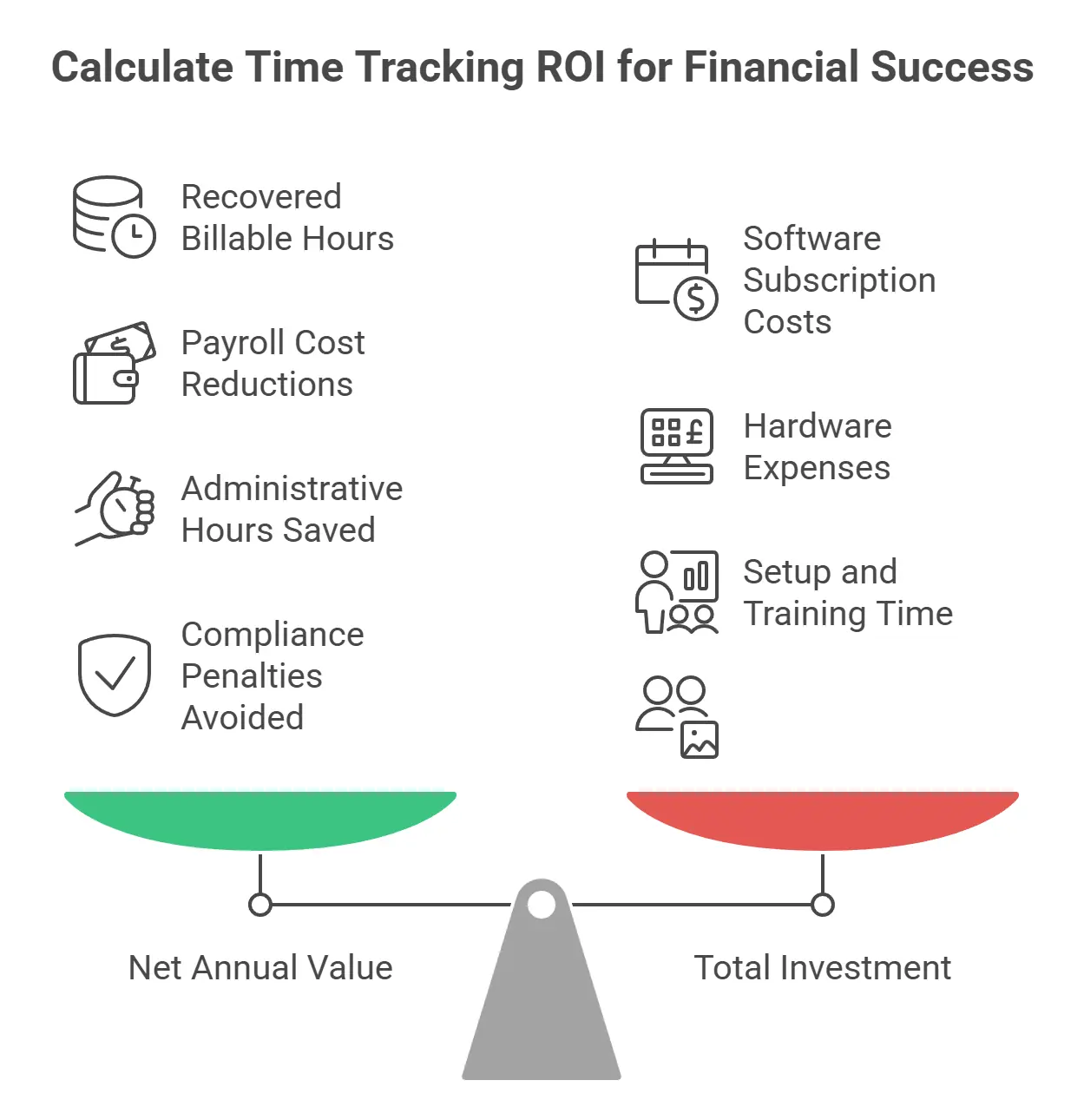
Time tracking ROI follows the standard formula —
Net Annual Value is the total financial benefit your tracking system produces in a year. That includes —
- Recovered billable hours
- Payroll cost reductions
- Administrative hours saved
- Compliance penalties avoided
Total Investment covers your annual software subscription, any hardware, and the time your team spent on setup and training.
Run this calculation once per year against your baseline numbers. It’ll show you whether the tool is earning its cost.
Plug In Your Actual Numbers
Here's a practical example.
- Your team recovers $40,000 in previously missed billable hours.
- Payroll corrections save $8,000.
- Admin time saved is worth $4,000.
- Total gain: $52,000.
- Your software costs $4,000 per year, including setup.
- Net Annual Value: $48,000.
So, the ROI: ($48,000 / $4,000) × 100 = 1,200%.
The formula scales to any team size.
Why Does Time Tracking ROI Fail?
Here's where it breaks down.
- Reports Treated as Archives: You collect time logs but never review them on a regular cycle. Thus, you miss noticing patterns, and the same inefficiencies repeat each month.
- Idle Time Misread as Productive Time: Unreviewed idle hours inflate your team's apparent output. In fact, accountants report that 92% of their clients deal with time theft
- Logs Assigned to the Wrong Projects: When employees guess at categories or log broadly, project-level data becomes unreliable.
- Inconsistent Tracking Across the Team: If half the team logs time and half doesn't, your reports cover a partial picture. When you make decisions on partial data, it produces partial results.
- No Feedback Loop Between Logs and Outcomes: Tracking without a review cycle is just storage. ROI requires comparing what was logged against what was actually delivered.
How Apploye Helps You Get More ROI from Time Tracking
Your team logs hundreds of hours. But the activity data shows half of the hours of actual output. That gap is where your ROI goes.
But Apploye makes it visible through its —
- Employee Monitoring to cross-check logged hours against the real app and URL usage
- Idle Detection to automatically remove idle time from your output figures
- Productivity Scoring to see who's at capacity and who has room before workload gaps surface
- Daily Productivity Reports to give yourself a consistent review trigger instead of catching issues at month-end
Eventually, you’ll see that the ROI calculations start to match what your team logged and actually produced.
Start Apploye free and stop losing revenue to untracked hours
Conclusion
The ROI of time tracking depends on where you start. If you’re new to tracking, focus on billable hour recovery and payroll accuracy first. Those deliver the fastest return. If you’re already tracking but the numbers feel flat, fix the review process.
Apploye adds the layer most tracking tools skip. Its idle detection and activity monitoring keep your time data accurate between reviews. Thus, the ROI you calculate actually matches what your team produces.
Frequently Asked Questions
How long does it take to see returns from time tracking?
Returns from time tracking typically show up within the first quarter. Payroll and billing improvements come fastest. Longer-term gains, like better project estimates, take three to six months of consistent data to surface.
Does ROI vary depending on team size or industry?
ROI from time tracking does vary by team and industry. Professional services firms see the highest returns because billable hour recovery is immediate. Meanwhile, larger teams gain most from payroll savings. Again, smaller teams benefit most from compliance protection and admin time freed up.
What is the difference between billable and non-billable hours in an ROI calculation?
Billable hours are time charged directly to clients. Non-billable hours cover internal work like admin and training. A strong ROI calculation accounts for both. Reducing non-billable time and recovering missed billable hours each drives real, measurable returns.
Can time tracking reduce overtime costs?
Yes, time tracking reduces overtime costs when managers see real-time hour totals per employee. Thus, managers can redistribute workloads before overtime kicks in, rather than after payroll is processed.
About Author