How to Build a Call Center Workforce Management System
Key Takeaways
-

A call center workforce management system helps teams predict call volume, plan shifts, and keep wait times low while using the right number of agents each day.
-
To build one, start with clear goals, past call data, simple forecasting, smart schedules, and live tracking so managers can spot gaps and fix issues fast.
-
The best systems also track time off, breaks, and agent skills, making it easier to match people to demand, cut costs, and improve customer service.
Call center WFM is the practice of managing your call center workforce with a proven framework or system. It combines forecasting, scheduling, real-time call center monitoring, and performance reporting into one operational framework.
Whether you run a customer service center or virtual call center, this guide helps you to build a WFM system that actually works – step by step.
Why Build a Call Center Workforce Management System?
Less operational cost, efficient scheduling, better customer satisfaction - do you need more? Call center WFM is a game-changer, and here are the reasons why:
Bottom Line Disruption
Without structured workforce planning, you're either overstaffing or understaffing. Both are critical as one wastes your budget while the other destroys CSAT. Research found that contact center & WFM integration produced a 22.6% increase in revenue. It also reduced 18% in operational costs.
Customers Don’t Like to Wait
According to Zendesk's CX data, 72% of customers want immediate service when they contact a business. Industry data shows 38.2% will abandon a call after just one minute on hold. WFM forecasting ensures your service center is staffed for demand. So, you don’t end up getting negative reviews on every platform
Turnover is Expensive
Call center attrition runs at 30–45% annually, with poor scheduling cited as a top driver. A Deloitte study found that cutting turnover by just 1% at a 30,000-person operation saves $32.9 million per year. Think of the possibilities.
Balanced schedules, transparent shift policies, and agent autonomy. All of these WFM outputs directly attack attrition at the core.
Real Impact Driver
Deloitte's 2024 survey of 600 leaders found that companies show 35% less reports of agents feeling overwhelmed on calls with AI. WFM is the infrastructure that makes it happen. An efficient WFM system can enable smarter scheduling, real-time adherence, and faster intraday responses. It completely changes how agents work.
Core Components of a WFM System in Call Centers
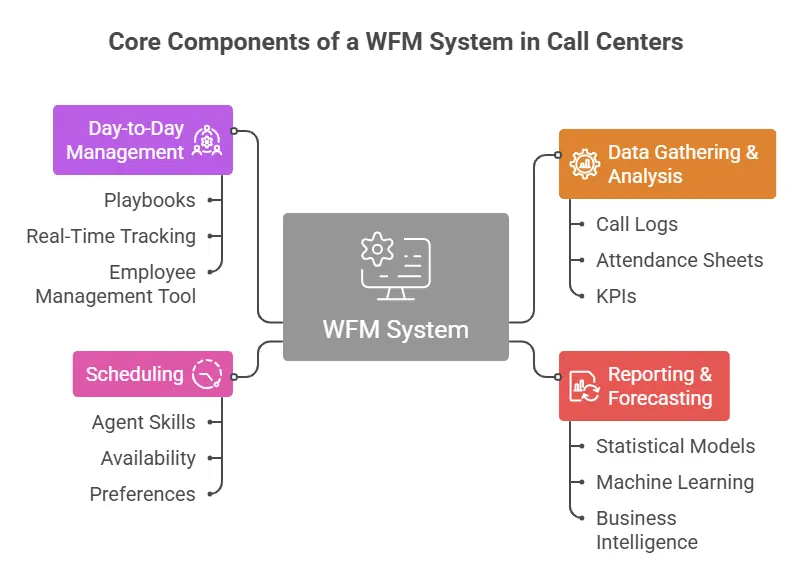
Data gathering, forecasting, scheduling, and management are some of the core components of a WFM system. Understanding each component unlocks the key to a successful call center WFM system.
Data Gathering & Analysis
Every call center keeps call logs, attendance sheets, and KPIs. However, many don’t follow a SOP or structured guideline day after day. Managers become busy with micromanaging when they should strategise using data.
A call center should gather these few KPIs and more:
- Average Handle Time (AHT): The average time spent on a customer interaction, including hold and wrap-up.
- First Call Resolution (FCR): How often customer issues are resolved in a single call, with no follow-up needed.
- Productivity Level: The ratio of active work time to idle time for each agent.
- Schedule Compliance: Whether agents are showing up and working their scheduled shifts.
- Customer Satisfaction (CSAT): How customers rate their experience after receiving call center services.
These are certainly not all KPIs, mostly core ones. However, you also need to be careful how you analyse the data. A standard should be set, but with guardrails for agents. Because numbers alone won’t reveal whether an agent was sitting idly or struggling with documentation.
Use Apploye to track time, apps, and URLs
Reporting & Forecasting
The data you gathered helps predict future demand. Modern WFM platforms apply statistical models (like ARIMA) and machine learning to project call volumes. Across different time horizons, within hours. And the reports can be of Intraday, weekly, or 30–90 days.
The key is layering business intelligence on top. The more data you feed, the better the output. Marketing calendar, planned product launches, and seasonal shifts - every data point helps. A model that doesn't know about your upcoming campaign will consistently underforecast.
Scheduling
Scheduling in a call center is a multi-variable puzzle. You’re dealing with agent skills, availability, and preferences for your forecasted demand. It’s a tricky process but a rewarding one.
Shrinkage is basically the % of total unavailable hours over total scheduled hours. Most call centers run 25–35% shrinkage. The formula:
Ignore shrinkage in your scheduling, and you'll be consistently understaffed.
Day-to-Day Management
Even the best schedules don’t often cause perfect execution. Agents call in sick, and a product issue generates a surprise call spike. Intraday management determines how you can actually provide the best customer service.
Most great WFM teams have one thing in common: pre-built playbooks. You should have every scenario covered in detail to act when required. If volume exceeds forecast by 15%, which breaks get staggered or agents to call in? Real-time employee tracking means you can prevent issues, not just act as they happen.
That’s why an employee management tool like Apploye matters. It’s an all-rounder tool that can track attendance as well as productivity. Enabling you to take action with insights before it’s too late.
Use Apploye for attendance and activity data
How to Build a Call Center WFM System in 8 Steps
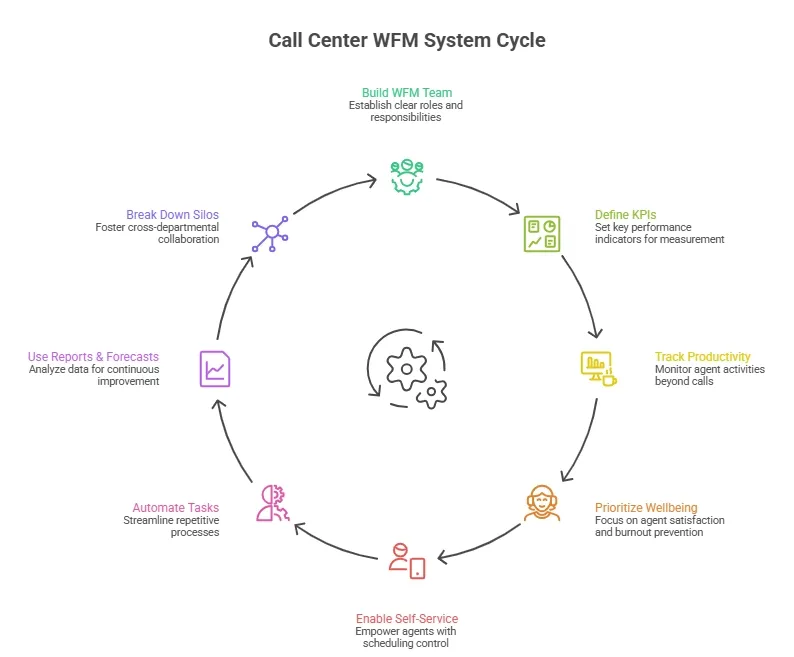
Here's the actionable roadmap to build an effective WFM system. These steps apply to both fresh and struggling. Start with the team formation and end with process optimisation.
1. Build Your WFM Team First
This is where most businesses falter. Tools don't run themselves. Before selecting software, the most crucial step is to establish clear roles:
- WFM Manager - owns strategy, forecasting methodology, and cross-departmental relationships.
- Scheduling Analyst - builds schedules, manages shift swaps, processes time-off requests.
- Real-Time Analyst (RTA) - monitors intraday adherence and escalates deviations.
- Reporting Analyst - produces performance reports and trend analyses.
Then choose WFM software that supports data visualization, historical analytics, and employee performance dashboards. Moreover, the tool should integrate with your existing Automatic Call Distribution (ACD) and Customer Relationship Management (CRM) systems.
2. Define Key Performance Indicators (KPIs)
To manage, you must measure. Without having your KPIs set for agents and employees, it’s difficult to track anything effectively. Set these core metrics before anything goes live:
- Service Level: % of contacts answered within a target threshold (e.g., 80% in 20 seconds).
- Schedule Adherence: % of time agents are in their scheduled state. Benchmark: 85–90%+.
- Average Handle Time (AHT): talk + hold + after-call work. Track by agent and queue.
- Forecast Accuracy: keep a <5% variance between forecasted and actual volume.
- Occupancy Rate: % of logged-in time spent on contacts. Set a threshold at 85%, as high occupancy often leads to burnout.
The best practice is to review the Service Level and adherence intraday. And for AHT, occupancy, and forecast accuracy, a weekly and monthly review is good enough. Depending on your requirement, you can add more KPIs to get optimal data points.
3. Track Productivity Not Just Calls
Call volume and handle time tell you what happened, but they don't tell you why. A complete WFM system should not only track calls but also track the agents. This is more crucial for virtual call centers where direct supervision is impossible. So, that means capturing after-call work (ACW) patterns, idle time, response times across chat and email, etc.
McKinsey research shows that productivity improves by 20–25% in organizations with connected employees. So, why should you let go of that extra productivity without reason? That’s why tools like Apploye matter. It adds a critical layer: tracking active work time, app usage, and idle periods objectively across distributed agents. So WFM analysts have real data rather than supervisor assumptions.
Track active time and idle gaps with Apploye
4. Prioritize Agent Wellbeing & Effectiveness
Agent well-being isn't just a policy to have on paper - it’s a direct quality-of-life improvement. With call center attrition running at 30–45% annually, burnout is one of the most expensive problems a contact center ignores.
Fortunately, the root causes are not unknown. Back-to-back peak shifts, unpredictable schedules, and shady time-off policies are the most common ones. Supported. Your WFM scheduling model should build genuine recovery buffers between high-volume periods. Many call centers just focus on the minimum break required by law.
Shift-bidding systems, where agents express preferences, consistently reduce voluntary attrition without sacrificing coverage. Additionally, time-off policies need to be written down, communicated clearly, and applied fairly. Finally, use adherence data as a coaching tool, not a compliance weapon. Monitoring should always be led with proper support, not penalties.
5. Enable Agent Self-Service
Giving agents control over routine scheduling tasks is one of the most cost-effective moves in WFM. Let me explain why.
Salesforce's research found that 59% of customers prefer self-service for resolving simple issues. And scheduling can address that. In a call center, that translates directly into faster resolution of scheduling conflicts and measurably higher agent satisfaction scores.
There are multiple ways to integrate self-service. online schedule viewing, a peer shift-swap feature, and digital time-off requests. These significantly reduce the time agents waste chasing approvals. Additionally, knowledge bases, FAQs, and training modules can also relieve a lot of stress from agents’ workloads.
Handle leave requests in Apploye from anywhere
6. Automate Repetitive Tasks
Manual WFM processes are a hidden tax on your team's capacity. By the time you realise it, the cost becomes too high. Daily reporting, tracking, and meetings can take too much time. Due to that, process improvement, trend analysis, and workforce planning never get finished.
Workers spend nearly 33% of their time on repetitive, low-value tasks. That’s almost 3 hours of an 8-hour working day. Imagine how much time is wasted that could be easily automated.
In a WFM context, automation should cover schedule generation, real-time adherence alerts, and intraday forecast updates. Report distribution is another high-value automation target. Daily performance summaries, weekly KPI snapshots, and monthly trend reports should land in stakeholder inboxes automatically.
7. Use Reports & Forecasts to Continuously Improve
Building a WFM system is not a one-time project. The best contact centers treat reporting outputs as a continuous improvement loop.
For basic forecasts, review the accuracy weekly. Compare forecasted vs. actual volume by interval. If you consistently underforecast Monday mornings, investigate and recalibrate the model.
Post-event analyses are also critical as it shows whether your models are actually working. After every major volume anomaly, document what happened and how your model performed. Lastly, watch occupancy trends carefully. A creeping rise in occupancy without a headcount increase signals a growing demand gap before it becomes a service crisis.
8. Break Down Cross-Departmental Silos
A WFM system can forecast perfectly based on historical data and still get blindsided. The most operationally mature contact centers treat WFM as a cross-functional discipline to avoid that.
That starts with a formal intake process: marketing shares campaign calendars 3–4 weeks in advance. Product and engineering flag planned releases and known defect communications. HR shares onboarding cohort timelines and planned departures. These inputs help your forecast model to pinpoint how to handle staffing.
Aberdeen Group's research found that 57% of leading organizations are investing in better collaboration between service, sales, and marketing to drive improved CSAT. And adding the finance department’s input can solve almost all budgetary issues before it happens.
Start with a standing weekly sync of no more than 30 minutes with representatives from marketing, product, HR, and finance. Keep it structured and straightforward.
Conclusion
Building a call center remote workforce management system is easy if you follow a structured, data-driven rhythm. Start with data, assess it, use it for forecasting, and create schedules that account for shrinkage and respect agent preferences.
Tools like Apploye can play a practical role in the WFM system. Handling attendance, productivity, time-offs, and scheduling is cohesively integrated in a single app. So, you don’t have to worry too much about management.
Try Apploye free for 10 days, no card needed
Frequently Asked Questions
What is WFM in a call center?
Workforce management (WFM) ensures the right agents are available at the right time. It covers forecasting, scheduling, real-time monitoring, and performance reporting. Every contact center, help desk, and support center depends on it. Without WFM, staffing decisions are little more than expensive guesswork.
What's the best workforce management solution for call centers?
Large enterprise contact centers often rely on NICE CXone, Verint, or Genesys. The best tool depends on your team's size and operational complexity. For scheduling, attendance, and productivity tracking, Apploye is a strong fit. It works especially well for virtual call centers and distributed support teams.
How do I create an effective WFM strategy?
Start by analyzing your historical call volumes, AHT, and seasonal trends. Use that data to build accurate demand forecasts for your service center. Then create skills-based schedules that factor in shrinkage and agent preferences. Review your KPIs regularly and adjust as your call center evolves.
How do you calculate staffing requirements?
Use the Erlang C formula — it's the industry standard for call centers. Feed in your forecasted volume, average handle time, and service level target. The output tells you the minimum number of agents needed per interval. Then apply your shrinkage rate to get your final scheduled headcount.
What is shrinkage in a call center, and how do you calculate it?
Shrinkage is the time agents are scheduled but unavailable to handle contacts. It includes vacations, training, sick days, breaks, and late arrivals. Most call centers run a shrinkage rate of 25–35%. Calculate it as: (Total Unavailable Hours ÷ Total Scheduled Hours) × 100.
Is it better to build or buy WFM software?
For most call centers, buying purpose-built workforce management software makes more sense. Pre-built platforms come with forecasting engines, scheduling tools, and ready integrations. Building custom software requires significant engineering time and deep domain expertise. Many teams combine a WFM platform with tools like Apploye for productivity and time management.
About Author