How to Implement Time Tracking in a Company the Right Way
Key Takeaways
-

Most time tracking system rollouts fail because of a trust problem.
-
Before you launch, write a clear policy that defines what counts as trackable employee time.
-
Run a pilot with one small team first. After launch, build a weekly habit of reviewing employee feedback and the data behind it.
You announce time tracking apps to the team. Within a week, half your team is asking if they're being watched. Even worse, you see incomplete logs, and one person has logged eight hours of "project management" with no context.
That's not a software problem. It's a rollout problem. Up next, you’ll know how to implement time tracking in a company without losing team trust. I’ll cover everything from writing your first policy to reviewing data that helps to implement.
Why Most Time Tracking Implementations Fail?
I’ve seen three failure points that kill most rollouts before the data gets useful.
Employees Fear the Data
Most employees assume time tracking means someone is watching their every move. That assumption ruins adoption before it starts.
In fact, 56% of employees feel anxious about being monitored at work. Hence, trust breaks before the system launches. In return, you get inaccurate logs, tool avoidance, and resentment instead of data.
So, I’d say employee monitoring isn’t the fear. The real fear is what you plan to do with what it shows.
Try Apploye free and give your team full visibility
Categories Stay Undefined
If you don't define what counts as trackable employee time, your team will define it inconsistently for themselves.
- Does planning the day count?
- Slack messages?
- Internal meetings?
- Breaks and lunches?
Without clear categories, one employee logs everything and another logs nothing. That inconsistency makes your timekeeping system unreliable from day one.
Data Remains Unused
Productivity analytics has no value if it sits in a dashboard nobody opens. Most companies launch the time tracking system, collect the hours, and stop there.
Yet the real return comes from what you do with the data each week. So, do your managers —
- Spot overloaded team members and act on workload management?
- Use Sprint progress insights to identify which projects consume the most time?
- Make resource allocation and scheduling decisions from facts rather than gut feel?
If not, then the tool is of no use.
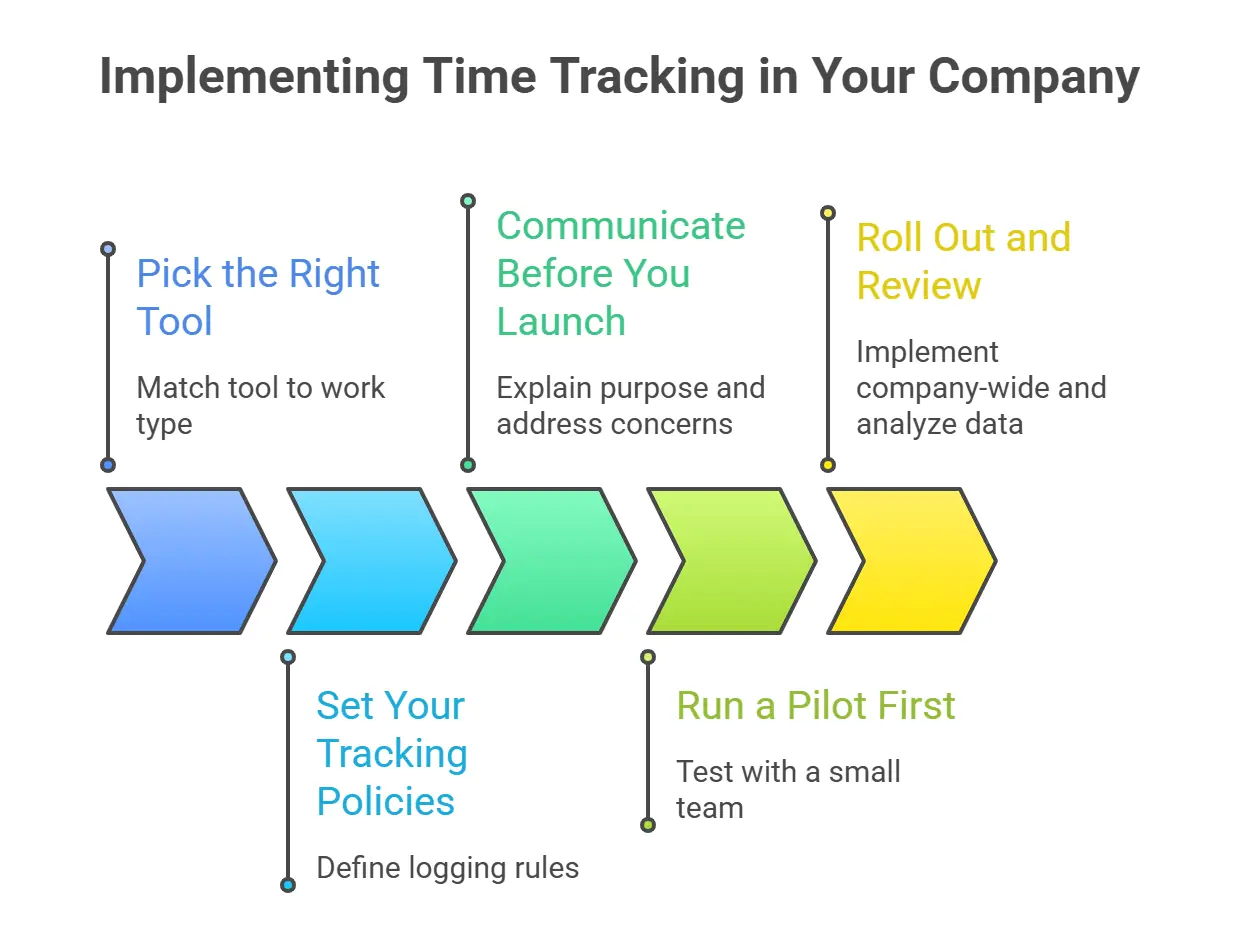
How to Implement Time Tracking in a Company
Pick the Right Tool
Match the tool to how your team actually works. For example —
- Agencies billing clients need task-level tracking.
- Remote and hybrid work models need automatic logging and idle detection.
- In-office hourly workers need a simple clock-in and clock-out.
That’s why, pick one tool your whole company will use. Also, look for automatic time tracking, payroll integration, and cross-platform access at a minimum. Plus, most tools offer a free trial. Use it before you commit.
Set Your Tracking Policies
Write down exactly what your team should log before the tool goes live.
You must define whether employees use real-time tracking or log retroactively at day's end.
Then clarify which activities count —
- Client work and billable utilization
- Internal meetings and project management planning time
- Slack communication and async collaboration
- Breaks and lunches
Most importantly, set rules for breaks and overtime. Finally, share the policy document in the kickoff meeting and keep it somewhere your team can find it afterward.
Communicate Before You Launch
Hold a meeting before anyone installs anything. I’d generally explain why the company is tracking time, whether that's
- Accurate billing
- Workload planning
- Payroll accuracy
Don’t miss explaining the micromanagement concern directly. Make clear that managers will use the data to balance workloads and plan resources.
In my case, I ensure that team leads track their own time first. When leadership models the behavior, you’ll see faster adoption throughout the rest of the team.
Run a Pilot First
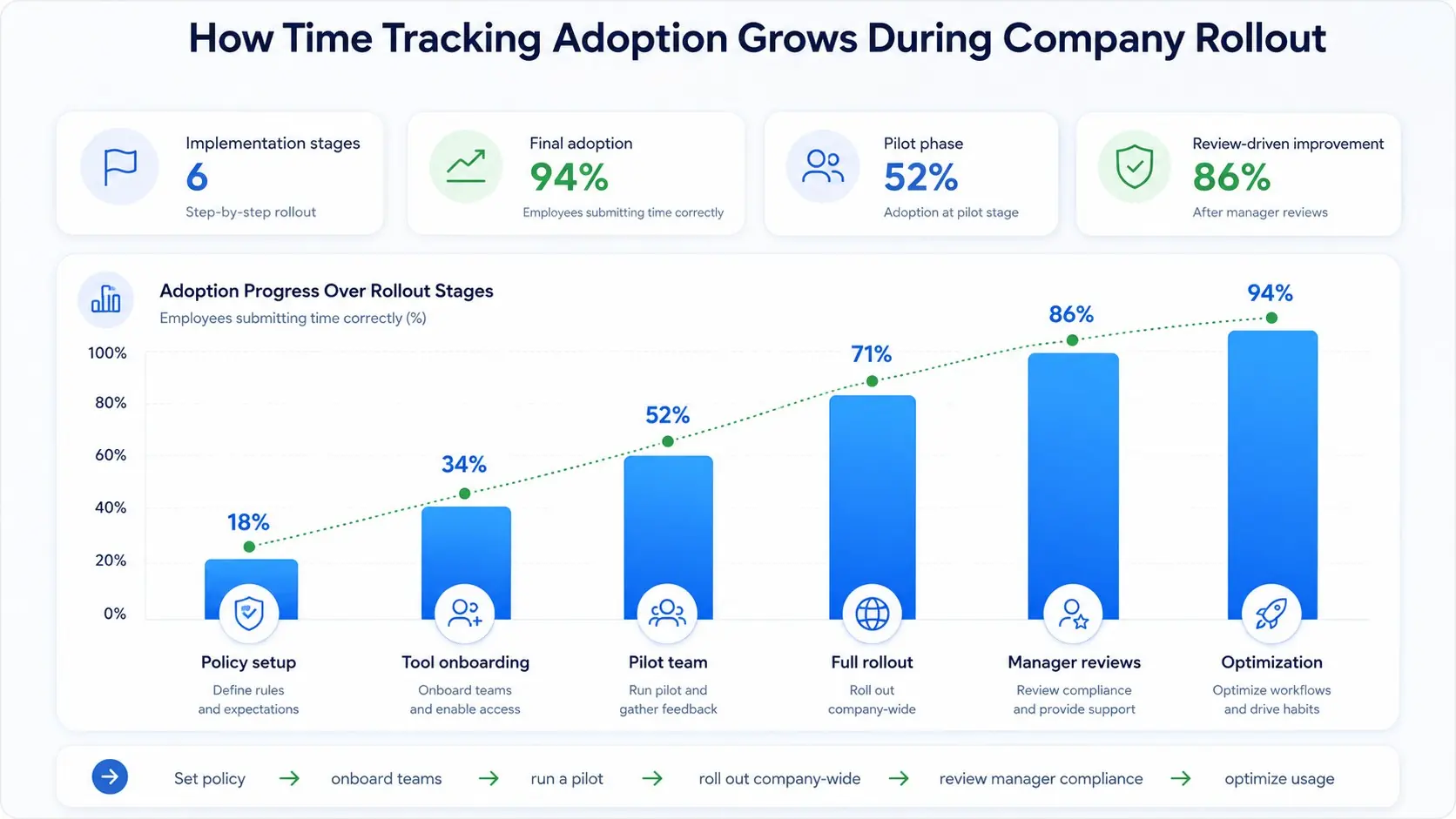
Launch with one small team for two to three weeks before a company-wide rollout. Pick a group that's receptive and has a clear use case, like a client-facing team with billable hours.
During the pilot, note where employees struggle with categories, forget to log time, or raise concerns. Use that feedback to fix your policy and training materials.
Hence, a clean pilot prevents complex problems from hitting the full team at once.
Roll Out and Review
Once the pilot is clean, roll it out to the rest of the company.
- Set a fixed start date
- Run a short training session for each team,
- Make time tracking part of new hire onboarding
Then build a weekly review habit. Plus, look at —
- Which projects run over budget
- Which team members carry the heaviest loads
- Where idle time spikes
Keep in mind that the data only pays off if someone actually looks at it.
How Apploye Helps You Roll Out Time Tracking Without Pushback
Most rollouts look fine on day one. Within two weeks, logging drops off, and you can't tell if the data reflects what's actually happening. Apploye gives you the visibility to know.
It lets you use —
- Timesheet approval to verify and sign off on logged hours during the pilot
- Live Feed to see which team members are actively working in real time
- Employee monitoring to cross-check time logs against actual app and URL usage
- Time and activity reports to spot logging gaps and workload problems across the team
So you locate adoption problems in week one, not after three months of bad data.
Get a demo and see how Apploye transforms your team
Final Words
When it comes to how to implement time tracking in a company, the software is the easy part. Trust is the hard part. If your team doesn't understand why you're tracking, start with a clear policy and communication plan before you pick a tool.
Frequently Asked Questions
What should a company's time tracking policy include?
A time tracking policy should define which activities count as trackable work. Also, whether logging happens in real time or retroactively, rules for breaks and overtime, and how managers will use the data.
Should time tracking be automatic or manual?
Automatic tracking is more accurate and requires less effort from employees. Meanwhile, manual tracking gives more control over what gets logged. Most teams benefit from both. Automatic helps for hours and manual for task-level detail.
How long should a time tracking pilot run?
A time tracking pilot should run for two to three weeks. That's enough time to find logging gaps, test the tool under real conditions, and collect feedback before a company-wide rollout.
How do you handle employees who forget to log time?
Employees forgetting to log time usually signals a tool or category problem, not a behavior one. Simplify the categories, set a daily reminder, and assign one person to check for missing entries each day.
Does time tracking count as employee monitoring?
Time tracking records hours and tasks worked. Employee monitoring goes further. It covers activity, screenshots, and app usage. Basically, the two overlap when software includes activity data, so transparency with your team is essential.
About Author