How to Motivate Employees to Track Time: 7 Practical Methods
Key Takeaways
-

To motivate employees to track time, explain why it matters to them, not just managers. Show how time tracking supports fair pay, less manual work, clear goals, and better workload balance.
-
Use time-tracking software that’s easy to use, offers quick check-ins, and supports mobile access. When the habit feels fast and smooth, employees are more likely to follow it.
-
Build trust by being clear about what is tracked and what is not. Praise good habits, remove blockers quickly, and use time data to help, not punish, employees.
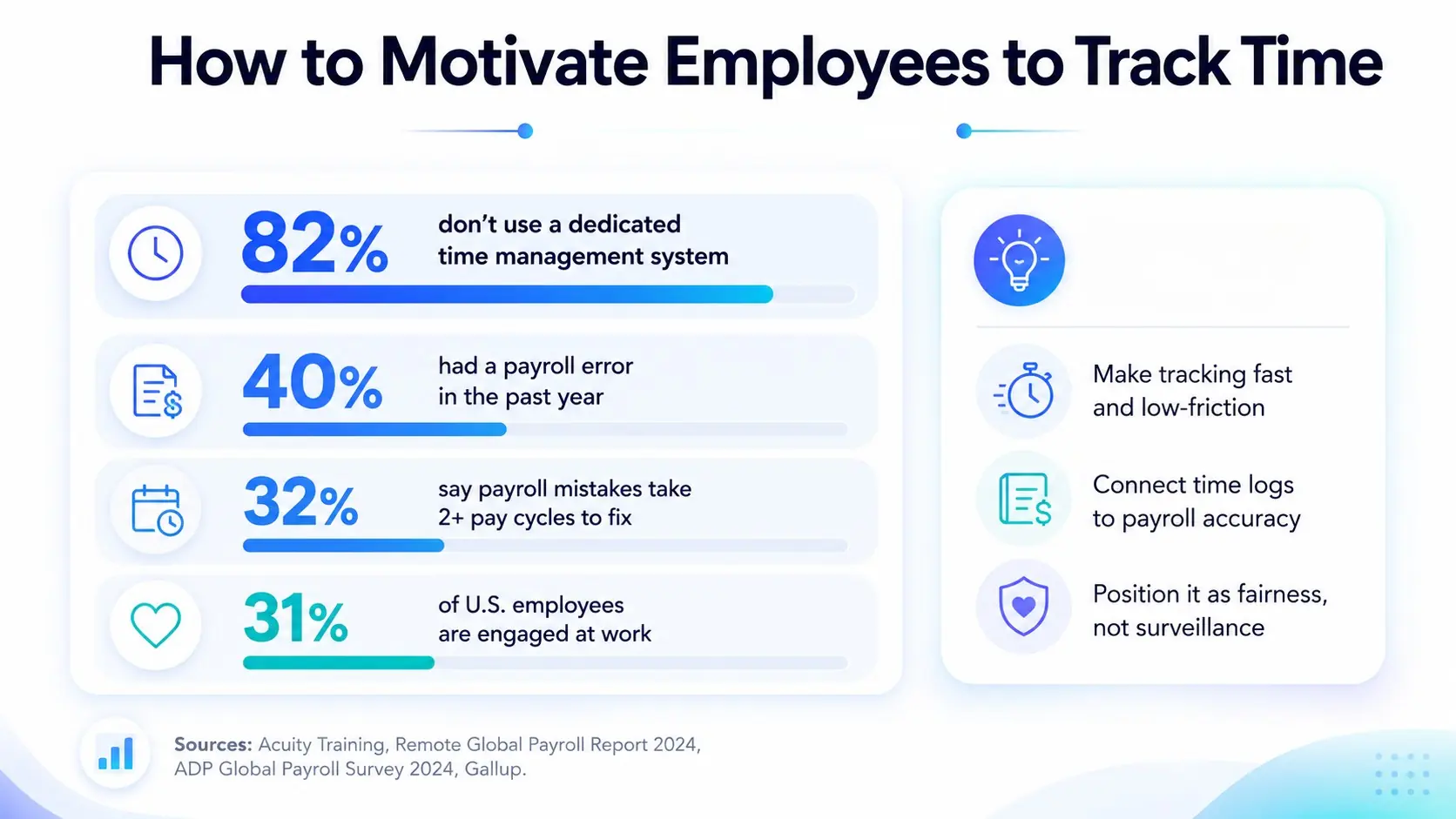
Employees track time when they see a clear personal reason to, not because they were asked. So, I’ll explain the 7 practical methods on how to motivate employees to track time.
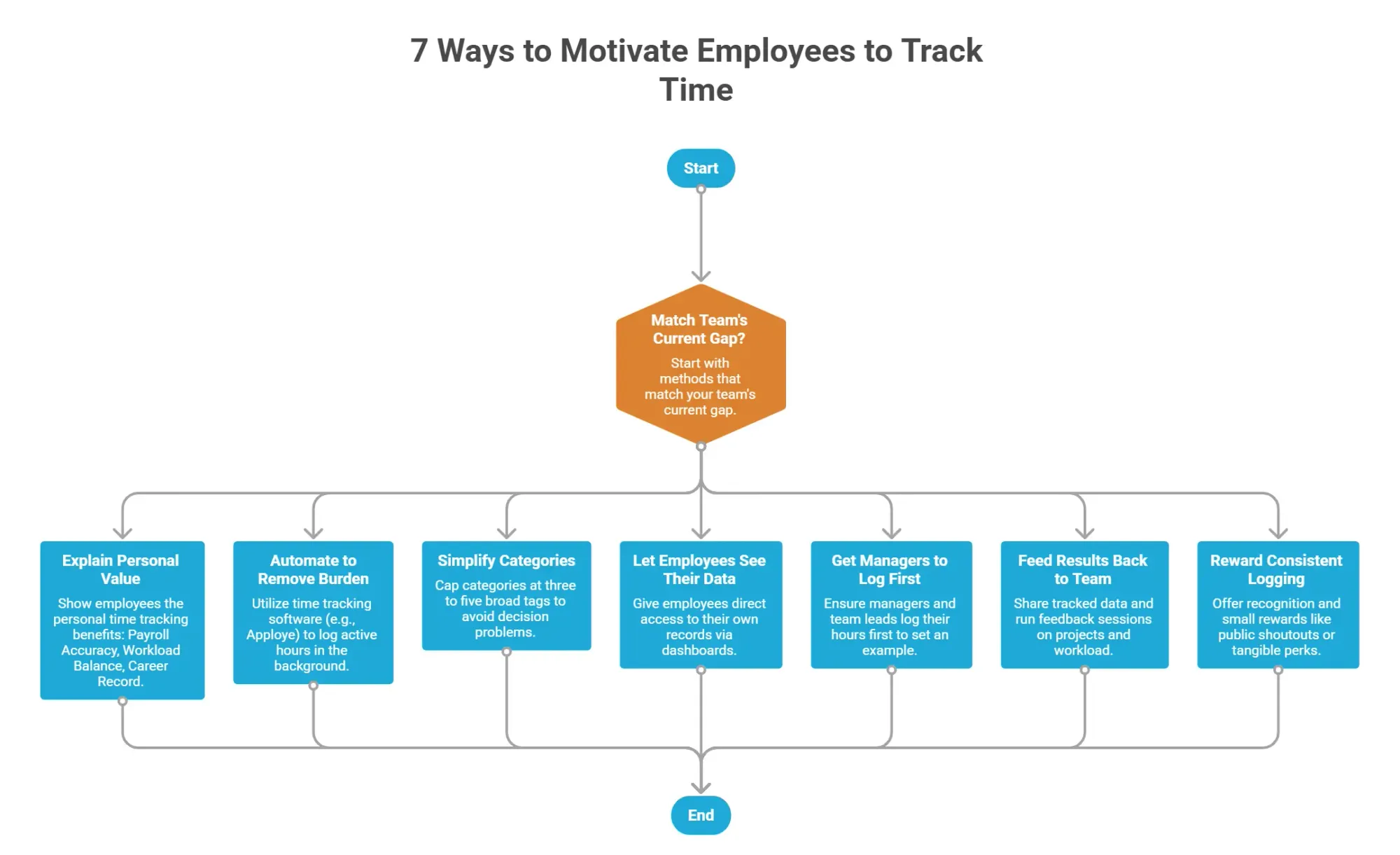
7 Ways to Motivate Employees to Track Time
The methods below target different time tracking barriers. Some employees need a clearer personal stake. Others need fewer complications. So, start with the ones that match your team's current gap.
1. Explain the Personal Value
Most employees see time tracking as something that works for the company, not for them. That mindset hurts motivation before it starts.
In fact, around 1 in 2 U.S. workers who track time admit to inaccurate logging in some form. That's not a dishonesty problem. It's a motivation problem.
So, show them the personal time tracking benefits. For example —
- Payroll Accuracy: Logged billable hours worked protects their case in pay disputes
- Workload Balance: Managers can't redistribute tasks without data
- Career Record: Tracked productivity supports their case in performance evaluations and promotion conversations
So when employees see a personal stake, they tend to log consistently.
2. Automate to Remove the Burden
Manual entry is the biggest friction point in any time tracking system. When employees log hours themselves, they estimate, forget, or skip it altogether. The longer they wait to log, the less accurate the entries become.
So, the manual process is the problem. Well, you can utilize several approaches to track employee work hours. However, automation consistently produces the most reliable data with the least resistance.
Start free on Apploye and automate your team's time logs
3. Simplify Categories for Better Logs
A time tracking system with too many categories creates a decision problem at every log entry. Guess what happens when employees have to pick from 15 project codes? Likewise, they guess or skip logging entirely.
In fact, nearly 4 in 10 employees say timesheets pull them away from higher-value work. So, cap your categories at three to five broad tags. Avoid adding sub-activities unless a specific project genuinely requires that detail.
A simple structure might include —
- Client work
- Internal meetings
- Admin
- Project-specific labels only
4. Let Employees See Their Own Data
Most employees assume the data they log flows straight to their manager and stops there. That one-way perception builds distrust and hurts compliance.
So, give your employees direct access to their own records. Besides, transparent access is also a core part of employee monitoring ethics.
Try Apploye free and give your team full data visibility
5. Get Managers to Log First
Employees watch what managers do. So, when a manager skips logging, the rest of the team reads it as permission to do the same. That behavior shapes workplace culture faster than any policy.
So, get every manager and team lead to log their hours first. When leadership treats time tracking as a normal part of the workday, employees take it seriously.
6. Feed Results Back to the Team
When the tracked data just sits idle or disappears, it demotivates employees as the data means nothing. In fact, it creates a dead end that kills long-term motivation.
So, use the tool's reporting functionality to share what the data shows with your team. In addition, run monthly feedback sessions and cover —
- Which projects ran over
- Where the workload was heavy
- What changed as a result
When employees see their logged hours translate into real decisions, tracking starts to feel worth their time.
7. Reward Consistent Logging
Consistent behavior needs a reason to stick. Recognition and small rewards improve employee satisfaction without adding pressure.
For distributed or remote employee setups, virtual employee recognition ideas can replace in-person shoutouts. The following approaches can be helpful —
- Public Shoutout: Name consistent loggers in team meetings or your Slack channel
- Streak Tracking: Run a friendly leaderboard for consecutive on-time submissions
- Tangible Perk: Offer an early Friday finish or team lunch for the highest compliance week
Start small. Even minor recognition shifts the habit fast.
Wrapping Up
Knowing how to motivate employees to track time starts with understanding why they stop. If your team treats logging as optional, start with personal value and manager modeling. If logging happens but data is uneven, add automation and simplify your categories.
Apploye supports both sides of that equation. Its time tracking removes the manual effort. Meanwhile, the daily time reports give employees visibility into their own output, and timesheet approval keeps the data clean.
Frequently Asked Questions
Should time tracking be mandatory or voluntary for employees?
Time tracking works best as mandatory, with clear rules on what counts. Voluntary adoption leads to inconsistent data. As a result, it defeats the purpose of tracking in the first place.
How long does it take for time tracking to become a consistent habit?
Time tracking becomes a consistent habit in most teams within three to four weeks. But it also depends on the intuitiveness of the tool, and when managers actively model the behavior from day one.
What's the difference between automatic and manual time tracking?
Automatic time tracking logs hours in the background without employee input. On the other hand, manual tracking requires employees to log hours themselves. It leads to estimates, delays, and higher error rates.
Can time tracking data be used in performance reviews?
Time tracking data can support performance reviews, but only as one input among several. So, use it to spot workload patterns. But don’t consider it as a standalone measure of employee output or effort.
How do you handle an employee who refuses to track time?
An employee who refuses to track time usually signals a trust or tool problem. So, you must address the concern directly. Also, clarify how managers will use the data, and simplify the logging process before escalating.
About Author